

TASUC Steps
Info Lounge Corporation Education iPhoneiPadiPod touch
TASUC Steps is a paid Education app for iPhone and iPad by Info Lounge Corporation. Requires iOS 15.5. Updated May 24, 2024.
- Price
- 8.99 USD
- on the App Store
- Size
- 36 MB
- Age 4+
- Updated
- May 24
- 2024 · v1.3.0
Screenshots

About TASUC Steps
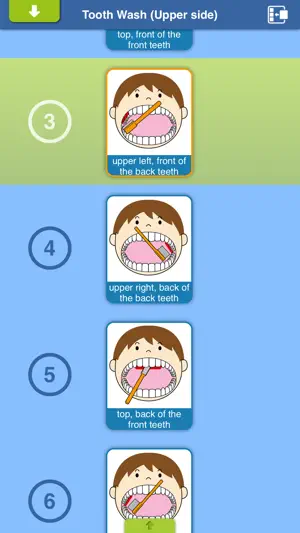
"TASUC Steps" is a procedure manual maker with picture-based cards for verbally disabled children and people with developmental disabilities such as autism. "TASUC Steps" is a procedure manual maker with picture-based cards. Simple, intuitive, stressless user interface of "TASUC Steps" supply easy understanding "What to do next?" for verbally disabled children and people with developmental disabilities such as autism, and of course for ordinary children and adults as well. Usage shown on http://apps.tasuc.com/ 'Usage'. You can watch manual movies on YouTube. The initial cards don't include voices. Please enter 'Your' voice. ------------Functions----------- - Toolbar - You can jump to 'Top', 'Talk', 'Gallery', 'Create a card', 'Settings' views. - Views - 1. Top You can jump to 'Steps', 'Gallery', 'Help(Web)' views. 2. Steps (Make, check a "STEPS") You can make manual of a procedure with picture-card. 2-1. Display Mode 2-1-1. A card is focsued by tapping. The voice is played. 2-1-2. A card is closed up by long press. If the card's visual is movie, it plays. 2-1-3. One 'step' is done by swiping a card. The next card will be focused. 2-2. Edit Mode 2-2-1. To enter Edit Mode by tapping the icon in upper right of the view. 2-2-2. Drag and drop a card from card-list to the step canvas. 2-2-3. You can re-order cards in step canvas by dragging, and delete a card by swiping to the left. 2-3. Save Mode 2-3-1. Appear Save View by tapping the bottom of the view. 2-3-2. You can select 'STEPS' (saves). 2-3-3. Swipe a 'STEPS' enter the edit mode(re-name, delete) 3. Gallery You can show card list and some edits 3-1. Play voice by tapping a card 3-2. Jump to 'Card Edit' by double tapping a card 3-3. Reorder in a page, move and copy a card to another page, delete a card from a page by draging. 3-4. You can also edit page data at this view. 4. Card Edit, Create A Card You can edit a selected card or make a new card 4-1. Edit card name, select pages, record voice and make card visual 4-2. Card visual is created by album in device, using a camera or text 4-3. Both photo and movie are available for card visual. 5. Settings You can change settings 5-1. You can change settings are 'Sound', 'Text position of card name', 'Language of cards', 'Card edit Lock', 'Cards in a row'. 5-2. Rename page name, reorder, add or delete it. 5-3. You can lock editting steps. 5-4. Rename 'step' name, reorder, add or delete it. 5-5. Database initizalization is inizialize card data to first run condition. 5-6. Lock of 'Settings'. Passcode is required for unlock.
What’s new
Version 1.3.0 · Updated May 24, 2024
Support latest iOS version.
App privacy
The developer, Info Lounge Corporation, reported these privacy practices to Apple.
Data Not Collected
The developer does not collect any data from this app.
Alternatives to TASUC Steps
Looking for apps like TASUC Steps? Here are 6 similar apps on the App Store.
-
 ADOC-S
-
 ひらがな・カタカナスクリーニング
-
 視線で動画を再生しよう!EyeMoviePlayer!!
-
 English Shadowing · Hanas
-
 視線入力!EyeCommunicationVT(縦向き)!!
-
 視線でお絵かき!EyePictureHz!!(横向き専用)
| App | Rating | Price | Last updated | Compare |
|---|---|---|---|---|
| TASUC Steps | – | 8.99 USD | May 24, 2024 | |
| ADOC-S | – | 29.99 USD | Jun 28, 2024 | Compare |
| ひらがな・カタカナスクリーニング | – | Free | Jun 13, 2026 | Compare |
| 視線で動画を再生しよう!EyeMoviePlayer!! | – | Free | May 4, 2026 | Compare |
| English Shadowing · Hanas | – | Free | Oct 21, 2026 | Compare |
| 視線入力!EyeCommunicationVT(縦向き)!! | – | Free | May 5, 2026 | Compare |
| 視線でお絵かき!EyePictureHz!!(横向き専用) | – | Free | May 5, 2026 | Compare |
Compare TASUC Steps with the top alternatives: ratings, updates, ASO score and keyword gaps →