

PumpWater: Speaker Water Eject
MyeongJin Lee Utilities iPhoneiPadiPod touch
PumpWater: Speaker Water Eject is a free Utilities app for iPhone and iPad by MyeongJin Lee. Requires iOS 17.0. Updated August 22, 2026.
- Price
- Free
- on the App Store
- Size
- 22 MB
- Age 4+
- Updated
- Aug 22
- 2026 · v2.6.2
Screenshots


About PumpWater: Speaker Water Eject
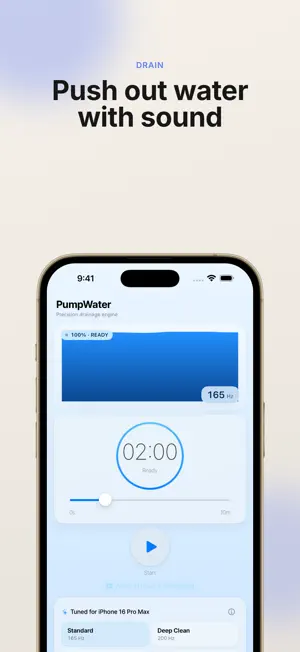
PumpWater is a dedicated tool that pushes water out of iPhone and iPad speakers using precise acoustic signals — after rain, sweat, swimming, pool parties, summer music festivals, or any water exposure. No teardown, no suction tools. The app plays a waveform tuned to the frequency band where the device speaker vibrates most efficiently, driving water droplets out of the grille. ■ How it works iPhone and iPad speakers are sealed air-chamber structures with a natural resonant frequency around 140–200 Hz, depending on the model. PumpWater plays tones in that band so the diaphragm moves at maximum amplitude, and the resulting airflow pushes water droplets clinging to the grille outward. Small droplets held by surface tension don't easily fall off with a simple shake. PumpWater uses acoustic vibration to apply repeated acceleration to the droplets, with a signal designed to deliver the momentum needed to detach them efficiently. ■ Key features - 4 presets · Standard 165 Hz — recommended for most situations · Deep Clean 200 Hz — strong action for deeper water · Fine 145 Hz — gentler with reduced vibration · Auto Sweep 130–220 Hz — sequentially targets droplets of various sizes - Precision frequency slider (20 Hz to 2,600 Hz) — fine-tune by hand - Gyro-linked visualization — tilt your device and the on-screen liquid moves with it, so you can confirm operation at a glance - Hands-free timer (up to 10 minutes) — set it down on a flat surface and walk away - Works in silent mode — unaffected by the ringer/silent switch - iOS 26 Liquid Glass design — automatic light/dark adaptation plus tinted icon support - iPad-specific layout — two-pane design that uses the larger screen - Background usage option — unlock by watching a single rewarded ad (optional) ■ When to use it - Right after your device is exposed to rain, sweat, or pool water - When call audio or speaker output sounds muffled - For routine care after workouts and outdoor activities ■ Tips 1. Place the device on a flat surface with the speaker grille facing down 2. Start with the Standard (165 Hz) preset 3. If results are limited, switch to Auto Sweep to cover the full frequency band 4. Keep each session running for at least 2–3 minutes 5. Lightly shake the device between sessions to drain dislodged droplets 6. After deep submersion, repeat several sessions ■ Safety - Recommended operating band: 100 to 2,000 Hz - For frequencies above 2,000 Hz, lower the volume and keep sessions short to protect your hearing - Avoid combining 80%+ volume with high frequencies for extended periods - Do not place the speaker directly against your ear, and avoid loud playback in public spaces - PumpWater does not repair internal circuitry damage from devices that are already water-damaged. For serious submersion, contact an authorized service center first. ■ Privacy PumpWater does not collect or store your personal data, contacts, location, photos, or microphone input. Only Google AdMob's anonymous identifiers are used to serve ads, and personalized ads can be turned off in the in-app settings. See the in-app privacy policy for details. ■ Ads PumpWater is a free, ad-supported app. - Banner ad at the bottom of the home screen - Interstitial ads before some actions - Background usage is unlocked by watching a rewarded ad (optional) There are no in-app purchases or subscriptions. ■ Compatibility - iOS 18.0 or later - iPhone and iPad supported - iOS 26 Liquid Glass design supported ■ Disclaimer PumpWater is an assistive tool that uses acoustic vibration and does not guarantee complete water removal in every scenario. Results may vary depending on device model, severity of submersion, and how quickly you respond after exposure. This app is a third-party app and is not affiliated with Apple, Inc.
What’s new
Version 2.6.2 · Updated August 22, 2026
Usability improvements.
App privacy
The developer, MyeongJin Lee, reported these privacy practices to Apple.
Data Not Linked to You
The following data, which may be collected but is not linked to your identity, may be used for the following purposes:
- Identifiers: Device ID
- Usage Data: Product Interaction
- Diagnostics: Crash Data
Used for: Third-Party Advertising, Analytics, App Functionality
Alternatives to PumpWater: Speaker Water Eject
Looking for apps like PumpWater: Speaker Water Eject? Here are 6 similar apps on the App Store. The highest rated is Clear Wave & Water Eject (4.8/5), and all 6 are free to download.
-
 Water Eject - Dust Cleaner
-
 Water Remover, Speaker Cleaner
4.7
-
 Speaker Fixer - Water Dust Out
4.6
-
 Clear Wave & Water Eject
4.8
-
 Clear Wave & Water Eject APP
4.5
-
 Water Eject ۬
4.7
| App | Rating | Price | Last updated | Compare |
|---|---|---|---|---|
| PumpWater: Speaker Water Eject | – | Free | August 22, 2026 | |
| Water Eject - Dust Cleaner | – | Free | Mar 17, 2026 | Compare |
| Water Remover, Speaker Cleaner | 4.7 / 5 (12) | Free | Oct 5, 2026 | Compare |
| Speaker Fixer - Water Dust Out | 4.6 / 5 (26) | Free | Oct 8, 2025 | Compare |
| Clear Wave & Water Eject | 4.8 / 5 (17) | Free | Oct 22, 2026 | Compare |
| Clear Wave & Water Eject APP | 4.5 / 5 (187) | Free | Oct 14, 2026 | Compare |
| Water Eject ۬ | 4.7 / 5 (3,554) | Free | Apr 9, 2025 | Compare |