

To-do Calendar
Hyunsoo Park Productivity iPhoneiPadiPod touch
To-do Calendar is a free Productivity app for iPhone and iPad by Hyunsoo Park. Requires iOS 17.0. Updated October 21, 2026.
- Price
- Free
- on the App Store
- Size
- 105 MB
- Age 4+
- Updated
- Oct 21
- 2026 · v3.1.1
Screenshots

About To-do Calendar
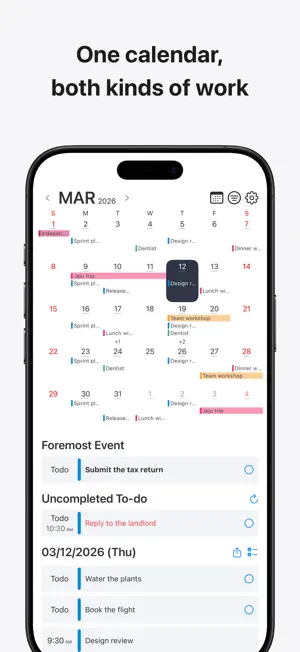
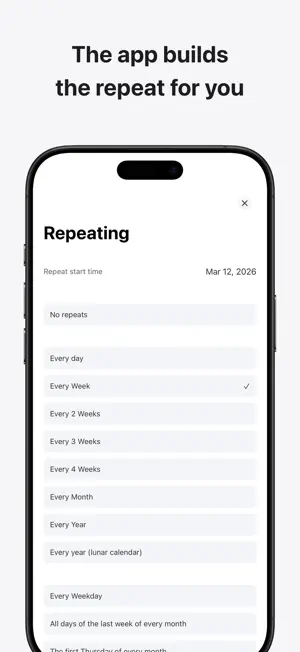
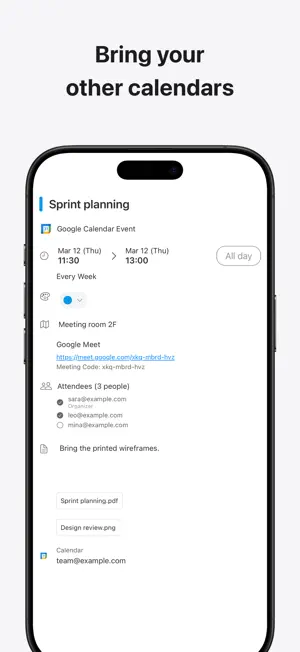
Your to-dos and your schedule, on one calendar. Your schedule lives in a calendar. Your to-dos live somewhere else. To see what this month holds and what you still haven't done, you end up checking two places. To-do Calendar keeps both on the same calendar. A schedule sits on the day it happens, and a to-do stays until you check it off. To-dos with no time attached don't disappear either. It works with no account and no connection. Sign in only when you want your data backed up and shared across your devices. ■ One calendar, both kinds of work · Schedules and to-dos sit together, color-coded by event types you create yourself · Uncompleted to-dos aren't left behind on a past date — they stay pinned to the top of the calendar · Pick a date and the app builds the matching repeat for you — every Thursday, the third Thursday of every month, even a yearly lunar date · Every event can carry a location, a link, a memo, and reminders · Pin the one you can't miss as your foremost event and it stays at the top, whatever day you're looking at · Share a day, a week, or a month as text or as an image card ■ AI quick input "lunch with Sara Friday at noon", "move the dentist to next Tuesday", "mark the laundry done". Describe it the way you'd say it. No forms to fill in, no dates to pick one field at a time. · Voice, keyboard, and reading from an image — photograph a class timetable or an event poster and the text becomes events · From Siri, the Action button, a widget, Control Center, or the share sheet, without opening the app · Not just adding — moving times, renaming, completing, deleting, several at once · Anything that removes or changes something shows you exactly what it's about to do and waits for your approval · AI quick input requires signing in ■ See your day without opening the app · Home Screen widgets — today and what's left, your event list, TODAY, your foremost event, the month and week views, and combined widgets that pair two of them · Check a to-do off straight from a widget · Lock Screen widgets for your next event and what's left of today · An event that's about to start counts down on the Lock Screen and in the Dynamic Island · Put Add with AI in Control Center and one swipe gets you to the input screen from anywhere ■ Bring your other calendars · Google Calendar — connect several accounts at once. Each calendar keeps the color you gave it in Google, and attendees, meeting links and attachments are all there, editable on the spot · Apple Calendar — the calendars already on your iPhone, with one permission grant · Choose what shows up, one calendar at a time, from the event type list · Disconnect and nothing is removed from your Google account or your device ■ Make it yours · How much detail each event shows, event text size and event colors — every change previews live · Color theme and widget theme, the first day of the week, accented days · Holidays by country, the lunar calendar, 24-hour time, and time zone · Set the event type and reminder time new events should start with Terms of Use (EULA): https://www.apple.com/legal/internet-services/itunes/dev/stdeula/
What’s new
Version 3.1.1 · Updated October 21, 2026
· Bug fixes
App privacy
The developer, Hyunsoo Park, reported these privacy practices to Apple.
Data Used to Track You
The following data may be used to track you across apps and websites owned by other companies:
- Purchases: Purchase History
- Identifiers: Device ID
- Usage Data: Product Interaction, Advertising Data
Data Linked to You
The following data, which may be collected and linked to your identity, may be used for the following purposes:
- Identifiers: Device ID
- Usage Data: Product Interaction, Advertising Data
- Purchases: Purchase History
Used for: Third-Party Advertising, Analytics, App Functionality
Data Not Linked to You
The following data, which may be collected but is not linked to your identity, may be used for the following purposes:
- Purchases: Purchase History
- Location: Coarse Location
- Contact Info: Email Address
- User Content: Customer Support
- Diagnostics: Crash Data, Other Diagnostic Data
Used for: Third-Party Advertising, Analytics, App Functionality
Alternatives to To-do Calendar
Looking for apps like To-do Calendar? Here are 6 similar apps on the App Store. The highest rated is Across: Calendar, Your Way (4.8/5), and all 6 are free to download.
-
 Lista - Task Manager
3.7
Lista - Task Manager
3.7
-
 ToDo Calendar - dolfy
4.5
ToDo Calendar - dolfy
4.5
-
 Time Calendar, Event, Task
4.6
Time Calendar, Event, Task
4.6
-
 TaskMind: To do List & Planner
4.7
TaskMind: To do List & Planner
4.7
-
 Tiny Planner - Daily Organizer
4.7
Tiny Planner - Daily Organizer
4.7
-
 Across: Calendar, Your Way
4.8
Across: Calendar, Your Way
4.8
| App | Rating | Price | Last updated | Compare |
|---|---|---|---|---|
| To-do Calendar | – | Free | October 21, 2026 | |
| Lista - Task Manager | 3.7 / 5 (3) | Free | Nov 29, 2025 | Compare |
| ToDo Calendar - dolfy | 4.5 / 5 (11) | Free | Oct 17, 2026 | Compare |
| Time Calendar, Event, Task | 4.6 / 5 (15) | Free | Oct 3, 2026 | Compare |
| TaskMind: To do List & Planner | 4.7 / 5 (53) | Free | Oct 16, 2026 | Compare |
| Tiny Planner - Daily Organizer | 4.7 / 5 (197) | Free | Dec 10, 2025 | Compare |
| Across: Calendar, Your Way | 4.8 / 5 (492) | Free | Oct 22, 2026 | Compare |
Compare To-do Calendar with the top alternatives: ratings, updates, ASO score and keyword gaps →