

TidyBee: Storage Bin Organizer
Adam Sanfacon Utilities iPhoneiPadiPod touch
TidyBee: Storage Bin Organizer is a free Utilities app for iPhone and iPad by Adam Sanfacon. Requires iOS 16.3. Updated October 19, 2026.
- Price
- Free
- on the App Store
- Size
- 41 MB
- Age 4+
- Updated
- Oct 19
- 2026 · v2.2.0
Screenshots


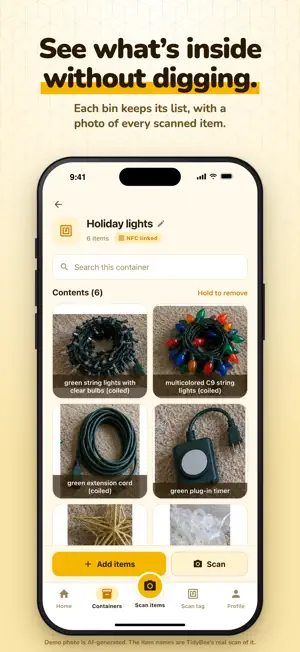
About TidyBee: Storage Bin Organizer
Lay out what's going into a bin, snap one photo, and TidyBee's AI lists every item. Next time, search "costume" or "lights" to see which bin they're in, without opening every lid. TidyBee names each item it sees and draws a box around it. Rename anything it got wrong, remove what doesn't belong, add what it missed, and save. Every item gets its own cropped photo. FIND ANYTHING Search every container and item at once. Type "extension cord" and see which bin it's in. TAP A TAG, SEE WHAT'S INSIDE Stick a standard NFC sticker on a tote and link it to the container once. Next time, scan it with TidyBee and that bin's list opens. No printer, no special labels. GREAT FOR • Holiday and seasonal decorations • Garage, attic and basement storage • Craft, hobby and camping gear • Storage units and moves FREE TO START The free plan includes 3 containers, 5 AI scans a week and up to 7 hand-added items per container. TidyBee Pro unlocks unlimited containers, items and AI scans, plus search by item name and date. Your inventory syncs to your TidyBee account, so it's there on any iPhone or iPad you sign in to. NFC features need an iPhone. NFC stickers are sold separately. Privacy Policy: https://tidybee.co/privacy Terms of Use: https://www.apple.com/legal/internet-services/itunes/dev/stdeula/
What’s new
Version 2.2.0 · Updated October 19, 2026
Try TidyBee without an account: tap Get started and scan right away. When you want your bins on every device, save them with Sign in with Apple, Google or email. New: Ask TidyBee. Type a question like “Where are my winter gloves?” on the Home screen and see which container it’s in. Scanning got better: item boxes fit more closely, the results fit on one screen, and thumbnails load faster. You can also scan a photo from your library. Renaming or removing an item now changes only that item, and the camera button in the tab bar is smaller.
App privacy
The developer, Adam Sanfacon, reported these privacy practices to Apple.
Data Linked to You
The following data, which may be collected and linked to your identity, may be used for the following purposes:
- Contact Info: Email Address
- User Content: Photos or Videos, Other User Content
Used for: App Functionality