

AcuEdit
JANOME Corporation Lifestyle iPad
AcuEdit is a free Lifestyle app for iPad by JANOME Corporation. Rated 2.7/5 from 11 ratings. Requires iOS 16.0. Updated August 26, 2025.
- Rating
- 2.7
- 11 ratings
- Price
- Free
- on the App Store
- Size
- 70 MB
- Age 4+
- Updated
- Aug 26
- 2025 · v3.30
Screenshots

About AcuEdit
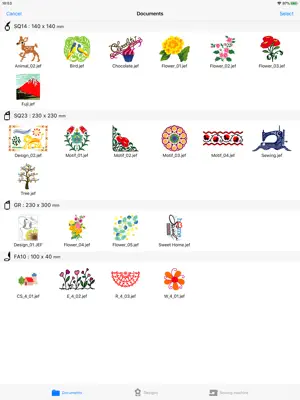
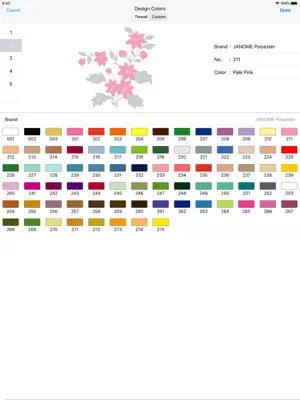
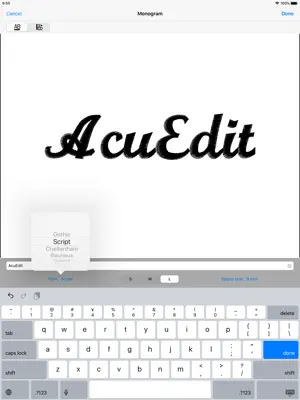
The AcuEdit app allows you to edit Janome embroidery designs on your iPad using Wireless LAN. You can edit designs anywhere, anytime! Embroidery designs can even be edited when your machine is sewing. Send the design data to your sewing machine and you are ready to go! AcuEdit is compatible with the following sewing machine models: Please refer to the following link : https://www7.janome.co.jp/global/softupdate/acuedit/ Linking with sewing machine using Wireless LAN * You can send embroidery data from your iPad to your sewing machine. The machine can start sewing your new designs upon receiving the data. * AcuEdit can also receive embroidery designs from the Ready to Sew and Editing modes of your sewing machine. AcuEdit Feature List * Move * Rotate * Enlarge/Reduce * Mirror image * Vertical flip * Centering * Cornering * Copy and paste * Arching (monogramming) * Space adjustment (monogramming) * Delete * Ability to change thread colors * Ability to change sewing order * Ability to Undo and Redo any change you make * Edit embroidery designs by using the controller on the screen. * Basic editing can also be made by moving two fingers across the screen. * iPad photos can be displayed as the background of the editing screen. Import embroidery designs * Select designs from your embroidery collection on your iPad. * You can use all built-in designs from compatible sewing machines. (to use the built-in designs from Memory Craft 15000, first connect to your sewing machine and then you can download the latest embroidery designs from the sewing machine.) (to use the built-in designs from SKYLINE S9/ atelier 9, it's necessary to download the embroidery designs from your sewing machine.) * You can add monogramming designs by inputting them using the keypad. * iTunes enables import of embroidery designs from the internet or your PC to your iPad. * Embroidery designs can now be imported from email attachment files , online storage services and other apps. Save embroidery designs * Save embroidery designs on your iPad. * View and delete thumbnails of embroidery designs. Compatible embroidery formats * jef * jef+ * jpx
Ratings & reviews
2.7
11 ratings
What’s new
Version 3.30 · Updated August 26, 2025
* Enhanced embroidery expression for a more realistic and sophisticated presentation. * Bug fixes.
App privacy
The developer, JANOME Corporation, reported these privacy practices to Apple.
Data Not Collected
The developer does not collect any data from this app.
Alternatives to AcuEdit
Looking for apps like AcuEdit? Here are 6 similar apps on the App Store. The highest rated is My Quilts (4.7/5), and 5 of the 6 are free to download.
-
 Embroidery-Link
1.8
Embroidery-Link
1.8
-
 dot Customizer
3.1
dot Customizer
3.1
-
 Embroidery Lettering
3.0
Embroidery Lettering
3.0
-
 ThreadBook
4.2
ThreadBook
4.2
-
 FlorianiT
2.6
FlorianiT
2.6
-
 My Quilts
4.7
My Quilts
4.7
| App | Rating | Price | Last updated | Compare |
|---|---|---|---|---|
| AcuEdit | 2.7 / 5 (11 ratings) | Free | August 26, 2025 | |
| Embroidery-Link | 1.8 / 5 (5) | Free | Jul 31, 2025 | Compare |
| dot Customizer | 3.1 / 5 (14) | Free | Aug 29, 2024 | Compare |
| Embroidery Lettering | 3.0 / 5 (2) | Free | May 11, 2024 | Compare |
| ThreadBook | 4.2 / 5 (52) | 14.99 USD | Jan 8, 2026 | Compare |
| FlorianiT | 2.6 / 5 (53) | Free | Feb 18, 2024 | Compare |
| My Quilts | 4.7 / 5 (421) | Free | Aug 31, 2026 | Compare |
Compare AcuEdit with the top alternatives: ratings, updates, ASO score and keyword gaps →