

My Number Card Check App
デジタル庁 Utilities iPhoneiPadiPod touchMac
My Number Card Check App is a free Utilities app for iPhone and iPad by デジタル庁. Rated 2.7/5 from 3 ratings. Requires iOS 18.0. Updated October 22, 2026.
- Rating
- 2.7
- 3 ratings
- Price
- Free
- on the App Store
- Size
- 18 MB
- Age 4+
- Updated
- Oct 22
- 2026 · v2.3.0
Screenshots


About My Number Card Check App
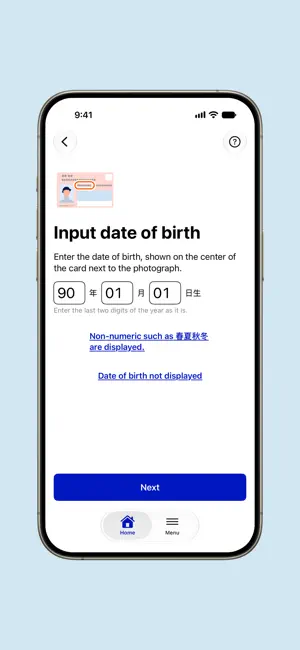
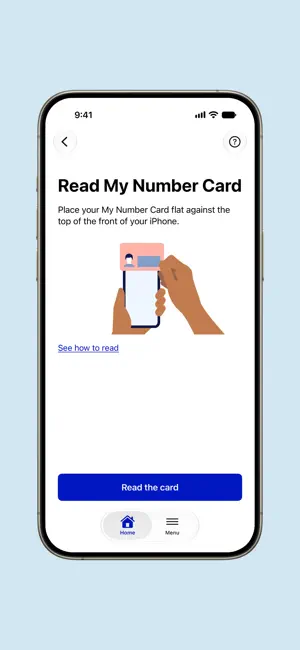
The "My Number Card Check App" provided by the Digital Agency reads the IC chip in a My Number Card and other cards, and verifies the name and other personal data recorded on it. Staff at businesses and local governments can use it to verify the identity of customers and residents at a counter or service desk. Because the app checks the data on the IC chip and its digital signature, it can detect counterfeit cards that are hard to tell apart by looking at the card face alone. ■ Documents you can verify • Physical My Number Card • My Number Card on a smartphone • Specified Residence Card and Specified Special Permanent Resident Certificate ■ Features • Physical My Number Card: Scan the card face with the camera or enter it with the keyboard, then read the IC chip to check the name, address, date of birth, sex, photo, and expiration date. • My Number Card on a smartphone: Hold the customer's smartphone near the staff device. Choose what to check for your purpose: whether the person is 20 or older, their age, or their basic information. • Specified Residence Card and Certificate: In addition to the My Number Card data, check residence information such as status of residence, period of stay, and work restrictions. • PDF export and verification: Export the verified data as a PDF record, and verify in the app that an exported PDF has not been altered. • History: Review some details, such as when a check was made. Data that identifies a person is not saved. ■ On iPhone The app reads the card's IC chip with the iPhone's NFC. ■ On iPad The app reads the card with an IC card reader connected to the iPad, which suits identity checks at a fixed place such as a shop counter or a local government service desk. ■ Requirements • iPhone: iOS 18 or later. Checking a My Number Card on a smartphone requires iOS 18.5 or later. • iPad: iPadOS 18 or later, and a PC/SC-compliant contactless (Type B) IC card reader. Checking a Specified Residence Card requires a reader that supports extended Lc/Le. Checking a My Number Card on a smartphone with an iPad requires Bluetooth. • Checking a My Number Card on a smartphone requires an internet connection. ■ Notes • This app is intended for use by businesses. For instructions and requirements, see the Digital Agency website: https://services.digital.go.jp/mynumbercard-check-app/
What’s new
Version 2.3.0 · Updated October 22, 2026
- Supports foldable iPhone. When it is open, the screen shows where to place the card, and the illustration follows how the device is turned and folded. - The layout now adapts to split screen, rotation, and window resizing. - Minor fixes.
App privacy
The developer, デジタル庁, reported these privacy practices to Apple.
Data Not Collected
The developer does not collect any data from this app.
Alternatives to My Number Card Check App
Looking for apps like My Number Card Check App? Here are 6 similar apps on the App Store. The highest rated is マイナチェッカー (3.0/5), and all 6 are free to download.


| App | Rating | Price | Last updated | Compare |
|---|---|---|---|---|
| My Number Card Check App | 2.7 / 5 (3 ratings) | Free | October 22, 2026 | |
| 在留カード等読取アプリケーション | 1.3 / 5 (22) | Free | Aug 19, 2026 | Compare |
| JPKI利用者ソフト | – | Free | Feb 4, 2026 | Compare |
| 免許証リーダー 本籍確認 | – | Free | May 20, 2026 | Compare |
| ワンタイムパスワード | 1.0 / 5 (1) | Free | Nov 2, 2026 | Compare |
| マイナPocket | – | Free | Oct 5, 2026 | Compare |
| マイナチェッカー | 3.0 / 5 (1) | Free | Apr 28, 2025 | Compare |