

Scout Mission Control
BeanLogin @ A&I Developer Tools iPhoneiPadiPod touchMacApple Watch
Scout Mission Control is a free Developer Tools app for iPhone and iPad by BeanLogin @ A&I. Rated 5.0/5 from 1 ratings. Requires iOS 27.0.
- Rating
- 5.0
- 1 ratings
- Price
- Free
- on the App Store
- Size
- 18 MB
- Age 12+
- Updated
- Oct 28
- 2026 · v1.15
Screenshots
About Scout Mission Control
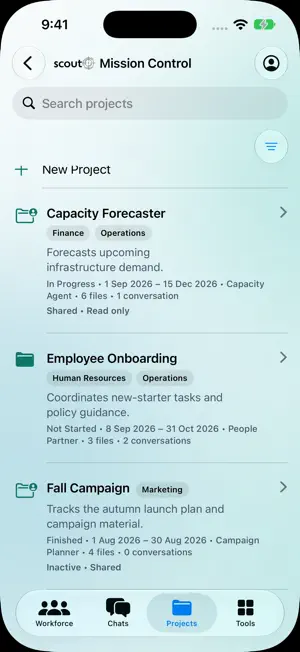
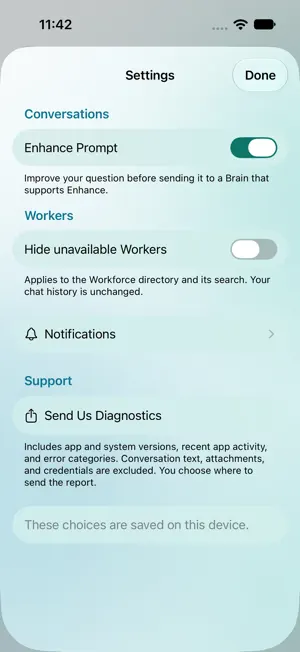
Scout brings your organization’s AI workforce to iPhone, iPad, Mac, and Apple Watch. Use the same secure Scout account to work with published workers, approved AI models, projects, and business tools. WORK WITH YOUR AI WORKFORCE See workers in an interactive Org Chart or a clear Grid. Expand or collapse teams, fit the chart to the screen, show tags, filter by multiple tags, view avatars and descriptions, then open any available worker. CHAT WITH WORKERS OR BRAINS Start a worker conversation or choose an approved AI Brain. Keep several conversations running, resume server history—including chats started on the web—rename and organize Worker and Brain conversations, attach CSV, PDF, or Markdown files, read rich Markdown and charts, and export responses as PDF. KEEP PROJECTS MOVING Create and edit projects, organize instructions and files, assign a worker, manage tasks, and plan or run work from a focused native interface. USE PUBLISHED TOOLS Open your organization’s deployed Scout Tools and work with their pages, dashboards, and records in the same app. MADE FOR APPLE DEVICES Scout adapts from compact iPhone navigation to iPad split views and Mac windows, toolbars, menus, keyboard, and pointer. Apple Watch provides quick access to Brains, recent conversations, and replies through the paired iPhone. Scout supports light and dark appearance, Dynamic Type, VoiceOver, and Reduce Motion. Scout is for organizations with an existing Scout account. Access, workers, Brains, projects, Tools, and single sign-on configuration are managed by your organization.
What’s new
Version 1.15 · Updated October 28, 2026
Scout 1.15 adds a Project Tasks Board alongside the WBS view. Switch views within a project, edit tasks on the Board, and manage task prerequisites. On iPhone, Camera can capture printed text into a conversation draft. This update also improves iPhone Duo layouts and fixes Search and conversation History navigation.
App privacy
The developer, BeanLogin @ A&I, reported these privacy practices to Apple.
Data Linked to You
The following data, which may be collected and linked to your identity, may be used for the following purposes:
- Contact Info: Email Address
- User Content: Other User Content
- Identifiers: User ID, Device ID
- Usage Data: Product Interaction
- Diagnostics: Performance Data, Other Diagnostic Data
- Other Data: Other Data Types
Used for: Analytics, Product Personalization, App Functionality
Alternatives to Scout Mission Control
Looking for apps like Scout Mission Control? Here are 6 similar apps on the App Store. The highest rated is Icon Finder for Flutter (5.0/5), and all 6 are free to download.
-
 SimpleSSM - Terminal for EC2
-
 Bugzilla++
-
 TethrX
-
 Awesome Flutter: Dev Toolkit
2.0
Awesome Flutter: Dev Toolkit
2.0
-
 Icon Finder for Flutter
5.0
Icon Finder for Flutter
5.0
-
 HTTPS Capture Traffic Decrypt
4.3
HTTPS Capture Traffic Decrypt
4.3
| App | Rating | Price | Last updated | Compare |
|---|---|---|---|---|
| Scout Mission Control | 5.0 / 5 (1 rating) | Free | October 28, 2026 | |
| SimpleSSM - Terminal for EC2 | – | Free | Oct 19, 2026 | Compare |
| Bugzilla++ | – | Free | Apr 23, 2026 | Compare |
| TethrX | – | Free | Oct 29, 2026 | Compare |
| Awesome Flutter: Dev Toolkit | 2.0 / 5 (1) | Free | Oct 9, 2026 | Compare |
| Icon Finder for Flutter | 5.0 / 5 (4) | Free | Jun 30, 2024 | Compare |
| HTTPS Capture Traffic Decrypt | 4.3 / 5 (19) | Free | Oct 9, 2026 | Compare |