

Image to PDF: Scanner & Tools
Yousef Almotiri Productivity iPhoneiPadiPod touch
Image to PDF: Scanner & Tools is a free Productivity app for iPhone and iPad by Yousef Almotiri. Requires iOS 16.0. Updated June 20, 2026.
- Price
- Free
- on the App Store
- Size
- 10 MB
- Age 4+
- Updated
- Jun 20
- 2026 · v2.0.1
Screenshots



About Image to PDF: Scanner & Tools
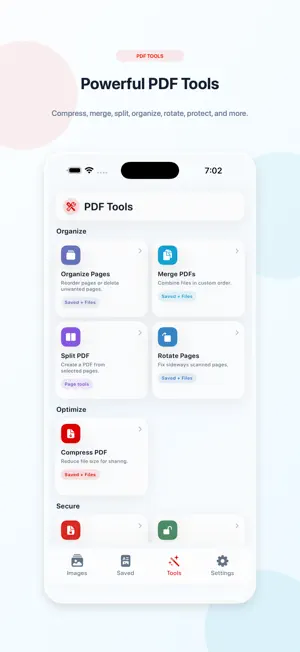
Image to PDF: Scanner & Tools helps you turn photos and scanned documents into clean, organized PDF files in seconds. Create PDFs from images, scan documents with the camera, manage saved files, and use powerful PDF tools in one simple app. Key Features: • Convert images to PDF Select photos from your library or scan with the camera, then create a polished PDF file. • Document scanner Capture documents using the camera and turn them into clear PDF pages. • PDF presets Choose the best output style for your needs, including document-friendly, small file, print quality, and email-friendly options. • Saved PDF library Keep your PDFs organized, preview them, rename them, share them, sort them, filter them, or delete files you no longer need. • Compress PDF Reduce PDF file size for easier sharing. • Merge PDFs Combine multiple PDF files into one document. • Split PDFs Extract selected pages into a new PDF. • Organize pages Reorder or delete pages from a PDF. • Rotate pages Fix scanned pages that are sideways or upside down. • Sign PDF Add your signature to PDF files. • Watermark PDF Add text or logo watermarks to your documents. • Annotate PDF Add text, stamps, arrows, highlights, shapes, blur, and other useful markups. • Protect PDF Add a password to secure your document. • Remove password Unlock protected PDFs when you know the current password. • Export pages as images Convert PDF pages into high-quality images for saving or sharing. Image to PDF: Scanner & Tools is designed for everyday document work, including receipts, notes, forms, contracts, study pages, work files, and scanned papers.
What’s new
Version 2.0.1 · Updated June 20, 2026
New in this version: - Added powerful PDF tools: Compress, Merge, Split, Organize Pages, Rotate Pages, Sign, Watermark, Annotate, Protect PDF, Remove Password, and Export Pages as Images. - Improved document scanning and image-to-PDF workflow. - Redesigned Home, Saved, Tools, and Settings screens for a cleaner experience. - Added PDF presets for documents, small files, printing, and email sharing. - Improved Saved PDFs library with better sorting, filtering, search, and file actions. - Improved result screens after creating or editing PDFs. - General performance, stability, and UI improvements.
App privacy
The developer, Yousef Almotiri, reported these privacy practices to Apple.
Data Used to Track You
The following data may be used to track you across apps and websites owned by other companies:
- Identifiers: Device ID
Data Not Linked to You
The following data, which may be collected but is not linked to your identity, may be used for the following purposes:
- Identifiers: Device ID
Used for: Third-Party Advertising
Alternatives to Image to PDF: Scanner & Tools
Looking for apps like Image to PDF: Scanner & Tools? Here are 6 similar apps on the App Store. The highest rated is PDF Scanner - Photos to PDF (5.0/5), and all 6 are free to download.
-
 QuickFill PDF
-
 PDF Scanner - Photos to PDF
5.0
PDF Scanner - Photos to PDF
5.0
-
 Simply Reminders, Tasks
-
 Craft PDF-Editor and Reader
-
 Datesnap: Flyer to Calendar
-
 Paperly: PDF Editor & Sign
4.9
Paperly: PDF Editor & Sign
4.9
| App | Rating | Price | Last updated | Compare |
|---|---|---|---|---|
| Image to PDF: Scanner & Tools | – | Free | June 20, 2026 | |
| QuickFill PDF | – | Free | Sep 13, 2026 | Compare |
| PDF Scanner - Photos to PDF | 5.0 / 5 (1) | Free | Nov 12, 2024 | Compare |
| Simply Reminders, Tasks | – | Free | Nov 8, 2024 | Compare |
| Craft PDF-Editor and Reader | – | Free | Oct 18, 2024 | Compare |
| Datesnap: Flyer to Calendar | – | Free | May 30, 2026 | Compare |
| Paperly: PDF Editor & Sign | 4.9 / 5 (16) | Free | Oct 6, 2026 | Compare |