

QR Tools: QR Code Reader
培克 罗 Utilities iPhoneiPadiPod touchMac
QR Tools: QR Code Reader is a free Utilities app for iPhone and iPad by 培克 罗. Rated 5.0/5 from 1 ratings. Requires iOS 15.0. Updated October 18, 2026.
- Rating
- 5.0
- 1 ratings
- Price
- Free
- on the App Store
- Size
- 2 MB
- Age 4+
- Updated
- Oct 18
- 2026 · v1.5.1
Screenshots

About QR Tools: QR Code Reader
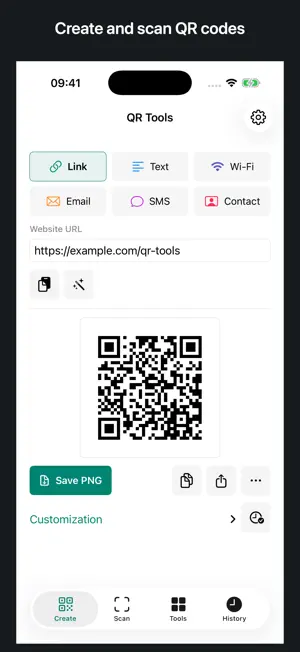
QR Tools is a QR code reader and generator for links, Wi-Fi, contacts and text. Scan images, create printable labels and share Safari pages, with QR processing on your device. CREATE AND SHARE Make codes for links, text, Wi-Fi, email, SMS and contacts. Adjust colors and error correction, then copy, share or export PNG and SVG. Save selected content to local history for reuse. SCAN AND INSPECT Read QR codes from images or an available camera. Inspect the destination, protocol and URL parameters before opening a link. See local warning signals and remove common tracking parameters. These checks do not guarantee that a website is safe. BATCH LABELS AND PRINTABLE SIGNS Import CSV to generate up to 100 QR labels. Export PNG or SVG files in a ZIP, or print label sheets as A4 or Letter PDF. Create Wi-Fi, event and menu signs with a title and caption; save an image, show it full screen or print it. CALENDAR EVENTS Enter an event and time zone to create a calendar-link QR code and export an ICS file. People scanning the calendar link need an internet connection. LOCAL BY DESIGN QR generation, image decoding, CSV processing and content inspection happen on your device. Your QR content is not uploaded to a server. No account is required. Camera access is optional; imported images and CSV files are selected by you. On iOS 17 or later, add events with the system calendar editor. Earlier versions can export ICS. Enable the Safari extension in Safari settings to create a QR code for the current tab.
What’s new
Version 1.5.1 · Updated October 18, 2026
- Clearer QR selection, export controls and tool navigation. - Improved layouts, large text and dark mode.
App privacy
The developer, 培克 罗, reported these privacy practices to Apple.
Data Not Collected
The developer does not collect any data from this app.
Alternatives to QR Tools: QR Code Reader
Looking for apps like QR Tools: QR Code Reader? Here are 6 similar apps on the App Store. The highest rated is EasyQR for iOS Safari (5.0/5), and all 6 are free to download.
-
 EasyQR for iOS Safari
5.0
EasyQR for iOS Safari
5.0
-
 QR Codes - Scan & Create
-
 Dual Camera Record Protect
-
 Tower Password Manager
-
 ManageQrCode
5.0
ManageQrCode
5.0
-
 Vybe ID
| App | Rating | Price | Last updated | Compare |
|---|---|---|---|---|
| QR Tools: QR Code Reader | 5.0 / 5 (1 rating) | Free | October 18, 2026 | |
| EasyQR for iOS Safari | 5.0 / 5 (1) | Free | Apr 3, 2024 | Compare |
| QR Codes - Scan & Create | – | Free | Jan 31, 2024 | Compare |
| Dual Camera Record Protect | – | Free | Jul 23, 2026 | Compare |
| Tower Password Manager | – | Free | Aug 11, 2026 | Compare |
| ManageQrCode | 5.0 / 5 (1) | Free | Jul 1, 2026 | Compare |
| Vybe ID | – | Free | Jun 4, 2026 | Compare |