

Lucinate
Kymatica AB Graphics & Design iPhoneiPadiPod touchMac
Lucinate is a paid Graphics & Design app for iPhone and iPad by Kymatica AB. Rated 5.0/5 from 5 ratings. Requires iOS 16.0. Updated October 19, 2026.
- Rating
- 5.0
- 5 ratings
- Price
- 19.99 USD
- on the App Store
- Size
- 39 MB
- Age 4+
- Updated
- Oct 19
- 2026 · v1.0.3
Screenshots


About Lucinate
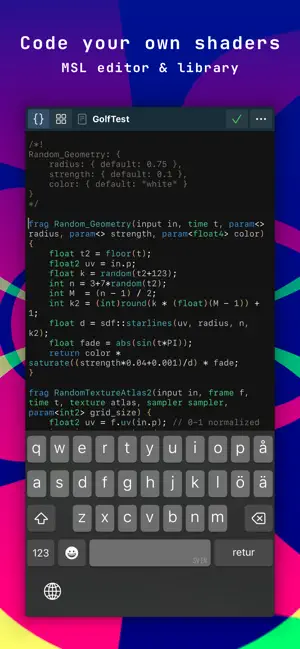
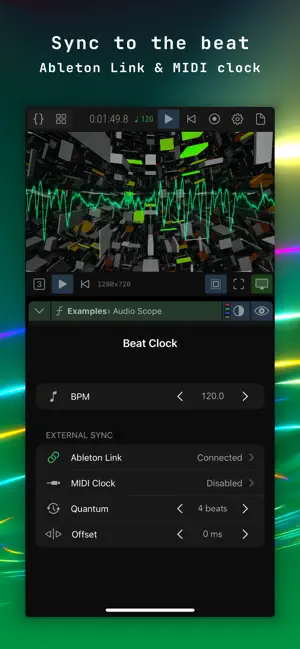
A creative environment for generative art, live visuals, and video synthesis. Blend layers, modulate any parameter with audio, MIDI, and LFOs, sync to the beat, and code your own shaders in the built-in MSL editor. Perform live or record to video. One purchase, no subscription. Use it for shader art, beat-synced visuals, audio/MIDI-reactive VJ sets, image processing, or exploring the aesthetics of algorithms. METAL SHADER ENGINE • Universal app built on Metal for Mac, iPad and iPhone • 16-bit color HDR rendering pipeline • MSL shader editor to learn, tweak, or code your own shaders using the bundled Metal Shading Language library • Includes parametric shaders for image adjustments, effects, patterns, gradients, texture utilities, coordinate space transforms, shader art examples, and more MODULAR ARCHITECTURE • Any number of Tracks, Layers, and Modulators • Advanced layer blending and masking • Deep modulation with MIDI, CV, LFOs, audio reactivity, and more • Route modulation and image signals between Tracks • Use live camera, imported video clips, and image assets as visual input CONNECTIVITY & OUTPUT • Syphon and NDI® real-time video output (Mac only) • Beat-synchronization via Ableton Link or MIDI clock • Receive audio from other apps via Ableton Link Audio • Record your results to video or export still images • Supports external displays and projectors BUY ONCE, OWN FOREVER • No subscriptions, in-app purchases, or ads • One purchase covers Mac, iPad and iPhone NOTE: On Mac, this app requires Apple Silicon or Intel with integrated GPU. NDI® is a registered trademark of Vizrt NDI AB.
Ratings & reviews
5.0
5 ratings
What’s new
Version 1.0.3 · Updated October 19, 2026
- Syphon and NDI output on Mac - Audio CV input for DC-coupled interfaces, as global modulator and audio::cv shader input - Add MIDI learn for simpler MIDI mapping - Add noise gate to audio env followers, with threshold and knee - Audio Analyzer tilt dB/oct setting, default +3 - Output Scaling setting: Linear fit, Nearest fit, Center 1:1, also affects video recording - New Example shaders: Color Tunnel, Tron Tunnel, PixelFire, BeatBoxes - New Pattern shaders: Flash RGBA, Rounded Rect - New Adjustment shader: Hue Rotate - New Utility shader: CV Monitor - New Modulators: EnvGen AD/AR/ADSR, FlipFlop - Improve cross-device project sync safety, ask to reload if project changed or deleted externally - Add midi::input last_note_ch, last_cc_ch, last_bend_ch, last_cc - Add huerot() to "color" include - Improve camera frame sync algorithm - Various UI tweaks, improvements and bug fixes - Update to LinkKit 4.1.2 - Documentation updates
App privacy
The developer, Kymatica AB, reported these privacy practices to Apple.
Data Not Collected
The developer does not collect any data from this app.
Alternatives to Lucinate
Looking for apps like Lucinate? Here are 6 similar apps on the App Store. The highest rated is Signal Loss (5.0/5), and 2 of the 6 are free to download.
-
 VOSC Visual Particle Synth
4.5
VOSC Visual Particle Synth
4.5
-
 benoît M
4.2
benoît M
4.2
-
 Bantam Tools Draw
4.8
Bantam Tools Draw
4.8
-
 Polagone - Visual Synthesizer
4.5
Polagone - Visual Synthesizer
4.5
-
 Signal Loss
5.0
Signal Loss
5.0
-
 Crystalzoa
5.0
Crystalzoa
5.0
| App | Rating | Price | Last updated | Compare |
|---|---|---|---|---|
| Lucinate | 5.0 / 5 (5 ratings) | 19.99 USD | October 19, 2026 | |
| VOSC Visual Particle Synth | 4.5 / 5 (26) | 4.99 USD | Feb 16, 2025 | Compare |
| benoît M | 4.2 / 5 (5) | Free | Jun 25, 2026 | Compare |
| Bantam Tools Draw | 4.8 / 5 (4) | 9.99 USD | Sep 8, 2026 | Compare |
| Polagone - Visual Synthesizer | 4.5 / 5 (11) | Free | Jul 1, 2026 | Compare |
| Signal Loss | 5.0 / 5 (5) | 6.99 USD | Aug 14, 2026 | Compare |
| Crystalzoa | 5.0 / 5 (5) | 0.29 USD | Mar 22, 2026 | Compare |
Compare Lucinate with the top alternatives: ratings, updates, ASO score and keyword gaps →