

Dig It: Video Keyframes
培克 罗 Photo & Video iPhoneiPadiPod touchMac
Dig It: Video Keyframes is a free Photo & Video app for iPhone and iPad by 培克 罗. Rated 5.0/5 from 1 ratings. Requires iOS 18.0. Updated October 19, 2026.
- Rating
- 5.0
- 1 ratings
- Price
- Free
- on the App Store
- Size
- 6 MB
- Age 4+
- Updated
- Oct 19
- 2026 · v1.4.4
Screenshots


About Dig It: Video Keyframes
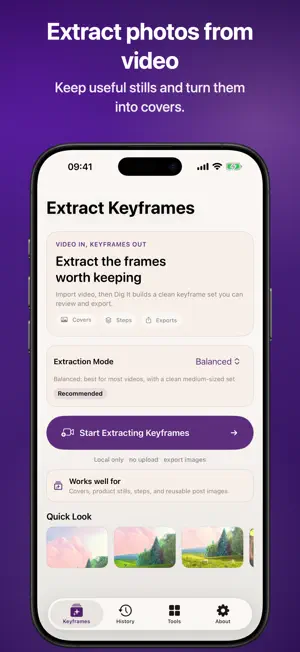
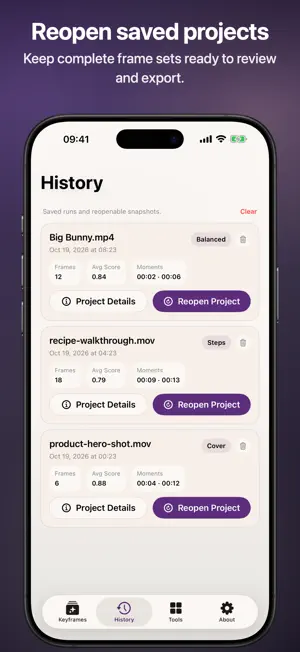
Dig It turns video into clean, usable keyframes, still images, cover frames, and step-by-step screenshots. Instead of scrubbing through a clip frame by frame, import a video once and quickly review the moments worth keeping. Use it to pull a strong product cover, capture tutorial steps, collect representative stills, or export images for posts, listings, notes, and workflows. Your video is processed locally on your device. Dig It does not upload your clips to a server during extraction. What you can do: • Extract cleaner keyframes from video • Reduce near-duplicate frames • Find stronger covers and representative stills • Capture important steps from tutorials and workflows • Review timestamps and scores at a glance • Reopen saved extraction history • Use lightweight tools to trim video, compress video, extract audio, and turn images into a video • Export only the PNG images you want to keep Built for creators, sellers, teachers, makers, and anyone who needs useful images from video fast. Crop and export cover images as PNG or JPEG, with an optional JPEG size limit. Create paginated PDF contact sheets with timestamps in A4 or Letter format.
What’s new
Version 1.4.4 · Updated October 19, 2026
- Cleaner extraction and results screens make key controls easier to find. - Improved localized interface text.
App privacy
The developer, 培克 罗, reported these privacy practices to Apple.
Data Not Collected
The developer does not collect any data from this app.