

Levee Hospitality
Levee Labs Incorporated Business iPhoneiPadiPod touch
Levee Hospitality is a free Business app for iPhone and iPad by Levee Labs Incorporated. Requires iOS 17.0. Updated October 12, 2026.
- Price
- Free
- on the App Store
- Size
- 365 MB
- Age 4+
- Updated
- Oct 12
- 2026 · v2.0
Screenshots


About Levee Hospitality
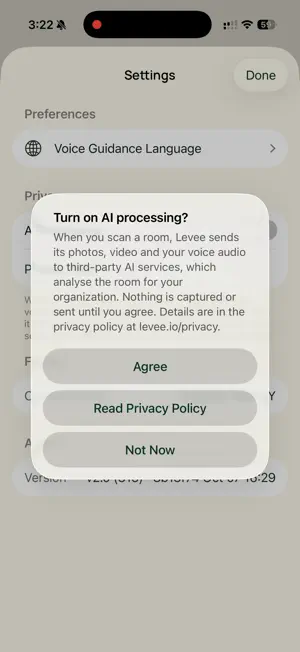
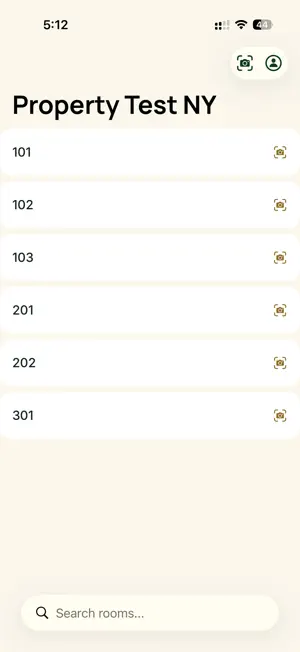
Levee Hospitality is the inspection app for hotel teams that use Levee. Sign in with your Levee account, pick a room, and work through its checklist with the camera and your voice. It is built for housekeeping inspectors, supervisors and property leaders who need every room checked the same way, every time. HOW AN INSPECTION WORKS • Choose your property, then pick a room from the list, search for it, or point the camera at the door sign to identify it. • The checklist shows one item at a time. Point the camera at an object; when Levee finds it, the list moves on. • For a task, such as a made bed, show it on camera, tap the mic and say yes. • For a count, tap the mic and say how many you see. • Finish, walk the room once more so the floor plan can be captured, and a done page confirms the room is saved and uploaded. Each item's result and photo are in your property's Levee web portal. WORKS WITHOUT SIGNAL Keep inspecting when the connection drops. The room is saved on the phone and sends itself later, including in the background. A Pending Uploads screen shows what is still on the device and lets you retry or discard it. A RECORD OF THE ROOM While you inspect, Levee captures the room's shape with the iPhone's depth sensors and uploads it with the inspection, so the property keeps a spatial record of each room alongside the checklist results. TEACH LEVEE YOUR PROPERTY Touch and hold a room in the list to add labelled reference photos of its objects. They help Levee recognise your property's own fixtures and finishes. YOUR CHOICE ON AI Before your first scan, Levee asks whether photos, video and voice audio from scans may go to third-party AI services for analysis. You can turn AI processing off at any time in Settings. ACCOUNT AND SECURITY Levee requires a Levee account provided by your property; there is no in-app sign-up. Camera frames, voice notes and room captures are sent to Levee to complete the inspection. The Privacy Policy and Delete Account are one tap away in the account menu. REQUIREMENTS An iPhone with a LiDAR scanner (iPhone 12 Pro or a later Pro model) running iOS 17 or later.
What’s new
Version 2.0 · Updated October 12, 2026
Version 2.0 is a new app, rebuilt from the ground up for iPhone. It replaces every earlier version. WHAT IS NEW • Camera-verified checklists: the list shows one item at a time; you point the camera at it, and Levee confirms it live and moves on. • Voice for tasks and counts: show a task on camera, tap the mic and say yes; for a count, say how many you see. • Finish and move on: a done page confirms the room is saved and uploaded; each item's result and photo are in your property's Levee web portal. • Works without signal: rooms are saved on the phone and upload later, including in the background. A new Pending Uploads screen shows what is still on the device. • Identify a room from its door sign with the camera. • A spatial record of each room: the iPhone's depth sensors capture the room's shape during the inspection. • Reference photos: touch and hold a room to add labelled examples of its objects, so Levee learns your property's fixtures. • Your choice on AI: a notice before your first scan, and an AI Processing switch in Settings to turn it off or back on. • Privacy Policy and Delete Account in the account menu. • New design with Levee's type and colours. WHAT HAS CHANGED • Sign in with your email and password. Sign-in by phone number and text code is no longer offered; use the email and password from your property's Levee administrator. • This version needs an iPhone with a LiDAR scanner (iPhone 12 Pro or a later Pro model) and iOS 17 or later. On other iPhones, the app installs but cannot scan rooms.
App privacy
The developer, Levee Labs Incorporated, reported these privacy practices to Apple.
Data Linked to You
The following data, which may be collected and linked to your identity, may be used for the following purposes:
- User Content: Photos or Videos, Audio Data, Other User Content
- Diagnostics: Performance Data, Other Diagnostic Data
- Contact Info: Email Address
- Identifiers: User ID
Used for: Analytics, App Functionality
Alternatives to Levee Hospitality
Looking for apps like Levee Hospitality? Here are 6 similar apps on the App Store. The highest rated is AI DREAM TEAM (5.0/5), and all 6 are free to download.


| App | Rating | Price | Last updated | Compare |
|---|---|---|---|---|
| Levee Hospitality | – | Free | October 12, 2026 | |
| devicethread™ | – | Free | Apr 3, 2024 | Compare |
| HotelFocus AI | – | Free | Jan 27, 2025 | Compare |
| MyAmadeo App | – | Free | Apr 26, 2024 | Compare |
| Kunstrux | 4.8 / 5 (19) | Free | Oct 27, 2026 | Compare |
| OrderPad: Restaurant Orders | – | Free | Oct 19, 2026 | Compare |
| AI DREAM TEAM | 5.0 / 5 (1) | Free | May 23, 2026 | Compare |
Compare Levee Hospitality with the top alternatives: ratings, updates, ASO score and keyword gaps →