

Pulses - Group Heart Rate
Insudo Factory AB Health & Fitness iPhoneiPadiPod touchMac
Pulses - Group Heart Rate is a free Health & Fitness app for iPhone and iPad by Insudo Factory AB. Rated 4.0/5 from 1 ratings. Requires iOS 15.0.
- Rating
- 4.0
- 1 ratings
- Price
- Free
- on the App Store
- Size
- 44 MB
- Age 4+
- Updated
- Sep 17
- 2026 · v2.4.8
Screenshots

About Pulses - Group Heart Rate
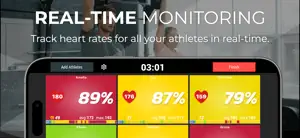
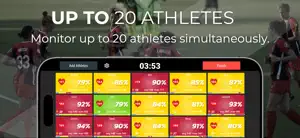
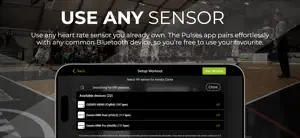
Enhance your group training sessions with Pulses by Athlete Analyzer, the app that provides coaches with real-time access to athletes' heart rates. Display heart rate data on a TV for athletes to monitor their performance live. Key Features: - Monitor Up To 20 Athletes: Track heart rates for all your athletes in real-time. - Heart Rate Zones: View the current heart rate zone for each athlete to optimize training. - Testing: Easily conduct Beep Tests and the Yo-Yo Intermittent Recovery Test (Yo-Yo IR). Measure estimated VO₂max, max heart rate, recovery heart rate, and more - Bluetooth Relay: Pair two devices to boost connectivity and enjoy a more stable connection for seamless tracking. - Bluetooth Compatibility: Works seamlessly with all standard Bluetooth heart sensors, including Coospo, Garmin and Polar. - Seamless Syncing: Sync workout data with Athlete Analyzer after each session for comprehensive analysis. - Data Access: Athletes can access their personal heart rate data anytime. Use Pulses in gyms, team training sessions, fitness classes, and more to optimize workouts and monitor progress. Coaches can adjust training intensity on the spot, ensuring each athlete stays in their optimal heart rate zone. Whether it's a high-intensity interval training (HIIT) class, a spinning session, or a team sport practice, Pulses helps elevate performance by providing actionable insights into each athlete's fitness levels. TESTING, DONE RIGHT Pulses includes full support for the Beep Test and the Yo-Yo Intermittent Recovery Test (Yo-Yo IR1 & IR2). These proven endurance tests help assess aerobic capacity, track improvements, and validate training progress. Real-time heart rate tracking during the test ensures reliable data and insight into each athlete’s fitness level. FAQ: How can I display heart rates on a TV screen? - You can use AirPlay to mirror your device to a larger screen or connect your iPad/iPhone using a compatible HDMI adapter. Which heart rate sensors are compatible with the app? - The app works with all standard Bluetooth heart rate monitors. How many athletes can I monitor at the same time? - You can monitor up to 20 athletes simultaneously. What is the connection range? - The range is up to 50 meters, but it depends on the sensor type, location, and potential interference. We recommend testing it in your specific environment. NOT INTENDED FOR MEDICAL USE: This app is intended for informational purposes only and does not constitute medical advice, diagnosis, or treatment. It is not a substitute for professional medical advice from a qualified healthcare provider. Always seek the advice of your doctor or other qualified health provider with any questions you may have regarding a medical condition. Do not disregard professional medical advice or delay in seeking it because of something you have read on this app. SUBSCRIPTION DETAILS: You need to have an active subscription to use the app. If you purchase the monthly subscription, payment will be charged to your Apple ID account. Your account will automatically be charged for renewal within 24-hours prior to the end of the current subscription period unless you disable auto-renew. You can manage and cancel your subscriptions by going to your account settings on the App Store after purchase. Revolutionize your training sessions with Pulses by Athlete Analyzer. Download now and make every beat count! Privacy Policy: https://www.athleteanalyzer.com/privacy-policy Terms of Service: https://www.apple.com/legal/internet-services/itunes/dev/stdeula/
What’s new
Version 2.4.8 · Updated September 17, 2026
Fixes issues with calories count.
App privacy
The developer, Insudo Factory AB, reported these privacy practices to Apple.
Data Used to Track You
The following data may be used to track you across apps and websites owned by other companies:
- Usage Data: Product Interaction
- Diagnostics: Performance Data
Data Linked to You
The following data, which may be collected and linked to your identity, may be used for the following purposes:
- Usage Data: Product Interaction, Other Usage Data
- Diagnostics: Performance Data, Crash Data, Other Diagnostic Data
- Identifiers: Device ID, User ID
- Health & Fitness: Fitness
- User Content: Other User Content
Used for: Developer’s Advertising or Marketing, Analytics, Product Personalization, App Functionality, Other Purposes
Alternatives to Pulses - Group Heart Rate
Looking for apps like Pulses - Group Heart Rate? Here are 6 similar apps on the App Store. The highest rated is Heart Rate Ninja (4.8/5), and all 6 are free to download.
-
 OnBeat - group heart rate app
4.6
OnBeat - group heart rate app
4.6
-
 Heart Rate Ninja
4.8
Heart Rate Ninja
4.8
-
 Polar Club - Group fitness app
4.8
Polar Club - Group fitness app
4.8
-
 Polar Team
4.6
Polar Team
4.6
-
 Polar Team Pro
4.0
Polar Team Pro
4.0
-
 SelfLoops Group Fitness Plus
| App | Rating | Price | Last updated | Compare |
|---|---|---|---|---|
| Pulses - Group Heart Rate | 4.0 / 5 (1 rating) | Free | September 17, 2026 | |
| OnBeat - group heart rate app | 4.6 / 5 (17) | Free | Sep 30, 2024 | Compare |
| Heart Rate Ninja | 4.8 / 5 (57) | Free | Sep 25, 2026 | Compare |
| Polar Club - Group fitness app | 4.8 / 5 (147) | Free | Mar 17, 2026 | Compare |
| Polar Team | 4.6 / 5 (313) | Free | Feb 17, 2026 | Compare |
| Polar Team Pro | 4.0 / 5 (4) | Free | Dec 11, 2025 | Compare |
| SelfLoops Group Fitness Plus | – | Free | Oct 12, 2026 | Compare |