

Track3D PHX
Constructn Corp. Productivity iPhoneiPadiPod touch
Track3D PHX is a free Productivity app for iPhone and iPad by Constructn Corp. Requires iOS 15.0. Updated October 12, 2024.
- Price
- Free
- on the App Store
- Size
- 88 MB
- Age 4+
- Updated
- Oct 12
- 2024 · v1.0.4
Screenshots

About Track3D PHX
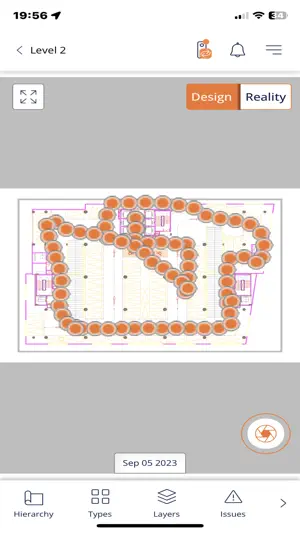
New name, same commitment to excellence: Track3D (formerly ConstructN) Why the Change? We have rebranded to Track3D to better represent our vision and the comprehensive range of features we offer for construction monitoring and management. While our name has changed, our mission to provide the best tools for your projects remains steadfast. This version of Track3D is for a special use case. Do not use this app unless suggested by any of Track3D representatives. Our default capture app is accessible via the following link https://apps.apple.com/in/app/track3d/id6449701613 Welcome to Track3D, the Ultimate 360 capture & Progress Monitoring App for Construction Projects. Track3D app is the comprehensive solution for all your progress monitoring challenges. With our app, you can easily capture and access visual data from various sources, track progress, identify issues, and collaborate with your project teams. Whether you're using a photo, a 360-degree camera, your iPhone camera (with or without LiDAR), or other methods, Track3D has got you covered. Key Features: 1. Multiple Capture Options: Take photos using your iPhone camera, a 360-degree camera* (our app connects seamlessly to the 360 camera), or even import existing photos from your iPhone. With our app, you have the flexibility to choose the convenient method for capturing your project site. This is very easy as it can be done by just your iPhone. 2. Progress Dashboards: Stay on top of your project's progress with intuitive dashboards that provide you with essential metrics and visual representations of your data. 3. Comprehensive Site Exploration: Explore your building as a whole or analyze individual floors. Not only can you view the current status, but you can also compare it with Building Information Models (BIM) or past views, allowing for detailed analysis and decision-making. 4. Issue Tracking and Task Assignment: Easily track progress, identify issues, and assign tasks to the respective personnel. You can even mark issue locations directly on the actual photos, ensuring clear communication and streamlined issue resolution. 5. Multiple Data Views: Access a variety of data views, including BIMs, 2D floor plans, and point clouds. This versatility enables a comprehensive understanding of your project's construction progress. Use Track3D to: 1. Turn your data to insights 2. Gain 100% control over your project 3. Review project site from anywhere, anytime – reduce site visits 4. All your teams can now collaborate using comprehensive photo documentation tools 5. Early detection of defects, snags to reduce rework costs 6. Execute better with Machine Generated Insights Review project progress drilled down to the individual element level With Track3D, you can gain complete control over your project, simplify progress monitoring, reduce site visits, and collaborate seamlessly with your teams. Transform your visual data into valuable insights and take your construction project monitoring to the next level. *Please search for the support article titled 'Supported Cameras' in the 'Knowledge Center' on our website
What’s new
Version 1.0.4 · Updated October 12, 2024
- Bug Fixes and Enhancements
App privacy
The developer, Constructn Corp., reported these privacy practices to Apple.
Data Linked to You
The following data, which may be collected and linked to your identity, may be used for the following purposes:
- Identifiers: Device ID
- Diagnostics: Crash Data, Performance Data, Other Diagnostic Data
- Contact Info: Email Address, Name
Used for: Analytics, App Functionality
Data Not Linked to You
The following data, which may be collected but is not linked to your identity, may be used for the following purposes:
- Location: Coarse Location
- User Content: Photos or Videos, Other User Content
Used for: App Functionality
Alternatives to Track3D PHX
Looking for apps like Track3D PHX? Here are 6 similar apps on the App Store. The highest rated is NEBT- binni concrete (5.0/5), and all 6 are free to download.
-
 NEBT- binni concrete
5.0
-
 BLDX AI
-
 Onohome Scan
-
 DropControl Setup
-
 binni concrete
5.0
-
 Reconstruct Capture
4.7
| App | Rating | Price | Last updated | Compare |
|---|---|---|---|---|
| Track3D PHX | – | Free | October 12, 2024 | |
| NEBT- binni concrete | 5.0 / 5 (1) | Free | Aug 26, 2025 | Compare |
| BLDX AI | – | Free | Oct 15, 2026 | Compare |
| Onohome Scan | – | Free | Jan 7, 2026 | Compare |
| DropControl Setup | – | Free | Oct 21, 2026 | Compare |
| binni concrete | 5.0 / 5 (1) | Free | Oct 5, 2026 | Compare |
| Reconstruct Capture | 4.7 / 5 (23) | Free | Oct 7, 2026 | Compare |
Compare Track3D PHX with the top alternatives: ratings, updates, ASO score and keyword gaps →