

AI Note Taker: Voice Recording
Frontguard LTD Utilities iPhoneiPadiPod touch
AI Note Taker: Voice Recording is a free Utilities app for iPhone and iPad by Frontguard LTD. Rated 5.0/5 from 7 ratings. Requires iOS 15.1.
- Rating
- 5.0
- 7 ratings
- Price
- Free
- on the App Store
- Size
- 79 MB
- Age 4+
- Updated
- Jul 28
- 2026 · v1.1.4
Screenshots


About AI Note Taker: Voice Recording
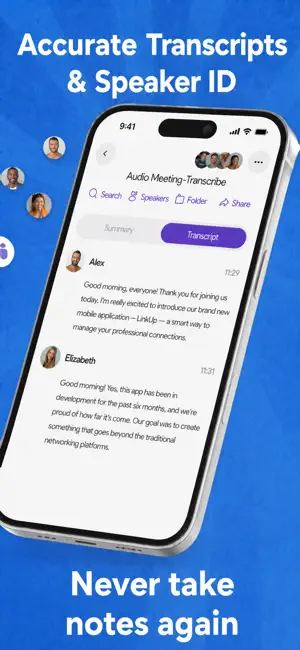
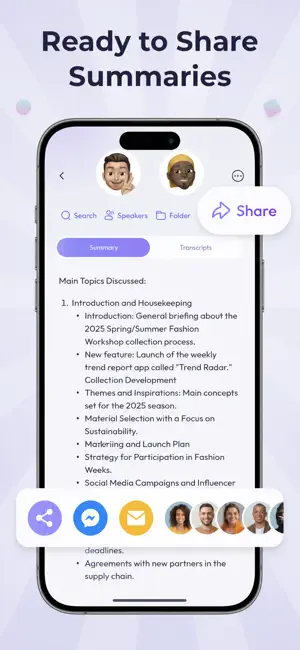
AI Note Taker captures every idea and meeting in crystal-clear audio with instant AI – record, transcribe, and summarize in one easy step. Whether you're in a business meeting, class lecture, interview, or podcast, transcribe dramatically faster than manual note-taking, instantly and accurately, with no typing required, so you never miss a single word. Loved by students, journalists, and professionals worldwide, it captures every detail in real time and creates clean, shareable text the moment you stop recording. Never miss a word again – start recording, transcribing, and summarizing with AI Note Taker today! Key Features Effortless Recording Quickly and easily record and transcribe important content. Ensure no detail is missed in your conversations and experiences. Automatically manage and name your recordings for easy organization. Transcription Excellence Easily turn spoken content into written text from live speech or uploaded videos. Powered by advanced AI models including Whisper for on-device mobile offline privacy and offline use, ASR for real-time transcription, and Nova-3 for fast, multi-language transcription, ensuring high accuracy and versatility. Support multi-language note-taking and efficiently share speech-to-text content. AI Note Taker Instantly summarize long recordings into clear, actionable AI-powered notes and summaries to save time, powered by cutting-edge AI models and designed to handle diverse tasks and complex scenarios. * Google Gemini 3.1 Flash for long-text processing. * OpenAI GPT-5 for general tasks. * DeepSeek V4.0 for Chinese-specific scenarios. Turn voice notes into organized to-do lists and highlights that are easy to review, share, and collaborate on. Folder Management Organize your transcribed audio recordings into custom folders for easy access and efficient management. Create, rename, and move files to structure your voice notes intuitively. Move recordings between folders seamlessly to ensure all your audio files are categorized according to your needs. Mastering Audio Editing Easily trim and cut your audio recordings to remove unwanted parts or create seamless transitions. Preserve original sound quality with advanced editing options, including optional reverse audio for creative needs. Listen and Share Customize playback speed for efficient review of AI note summaries and transcriptions. Effortlessly collaborate by sending transcribed text and audio files in various formats, including shareable links, to colleagues and friends. Subscription Details: Subscriptions auto-renew unless auto-renew is turned off at least 24 hours before the end of the current period. Manage subscriptions in Account Settings post-purchase. Payment is charged to iTunes Account upon confirmation. Detailed information on our Terms of Use and Privacy Policy is available here: Privacy Policy: https://static.callrecorderapp.net/page/ios/privacy Terms of Service: https://static.callrecorderapp.net/page/ios/terms
Ratings & reviews
5.0
7 ratings
What’s new
Version 1.1.4 · Updated July 28, 2026
• Faster, smoother experience across the app • Performance and reliability improvements • Bug fixes and general enhancements
App privacy
The developer, Frontguard LTD, reported these privacy practices to Apple.
Data Used to Track You
The following data may be used to track you across apps and websites owned by other companies:
- Usage Data: Advertising Data
Data Linked to You
The following data, which may be collected and linked to your identity, may be used for the following purposes:
- Contact Info: Name, Phone Number
Used for: App Functionality
Data Not Linked to You
The following data, which may be collected but is not linked to your identity, may be used for the following purposes:
- Usage Data: Advertising Data, Product Interaction
- Purchases: Purchase History
- User Content: Customer Support, Audio Data
- Identifiers: User ID, Device ID
- Diagnostics: Crash Data, Performance Data
Used for: Third-Party Advertising, Developer’s Advertising or Marketing, Analytics, Product Personalization, App Functionality
Alternatives to AI Note Taker: Voice Recording
Looking for apps like AI Note Taker: Voice Recording? Here are 6 similar apps on the App Store. The highest rated is ScreenSpy: See PC/Mac Screen (5.0/5), and all 6 are free to download.
-
 ScreenSpy: See PC/Mac Screen
5.0
ScreenSpy: See PC/Mac Screen
5.0
-
 Remote Control for FireStick
4.9
Remote Control for FireStick
4.9
-
 Speech to Text: AI Transcriber
5.0
Speech to Text: AI Transcriber
5.0
-
 Hidden Camera Detector with AI
4.6
Hidden Camera Detector with AI
4.6
-
 Photo Vault Boyfriend Camera
5.0
Photo Vault Boyfriend Camera
5.0
-
 SMS Verification
4.5
SMS Verification
4.5
| App | Rating | Price | Last updated | Compare |
|---|---|---|---|---|
| AI Note Taker: Voice Recording | 5.0 / 5 (7 ratings) | Free | July 28, 2026 | |
| ScreenSpy: See PC/Mac Screen | 5.0 / 5 (4) | Free | Sep 30, 2026 | Compare |
| Remote Control for FireStick | 4.9 / 5 (119) | Free | Oct 19, 2025 | Compare |
| Speech to Text: AI Transcriber | 5.0 / 5 (9) | Free | Feb 20, 2025 | Compare |
| Hidden Camera Detector with AI | 4.6 / 5 (5) | Free | Apr 25, 2025 | Compare |
| Photo Vault Boyfriend Camera | 5.0 / 5 (8) | Free | Sep 1, 2026 | Compare |
| SMS Verification | 4.5 / 5 (50) | Free | May 21, 2025 | Compare |