

MultiCalc
SyCIS Ltd Utilities iPhoneiPadiPod touch
MultiCalc is a free Utilities app for iPhone and iPad by SyCIS Ltd. Requires iOS 13.0. Updated September 17, 2026.
- Price
- Free
- on the App Store
- Size
- 33 MB
- Age 4+
- Updated
- Sep 17
- 2026 · v4.1.0
Screenshots


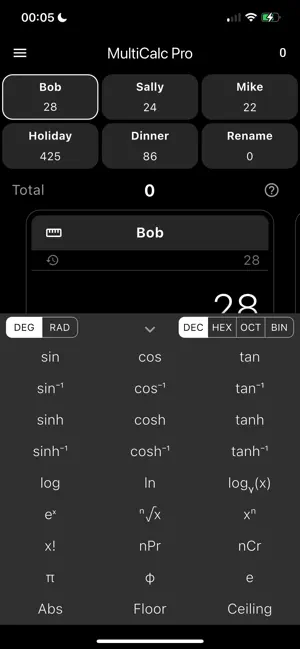
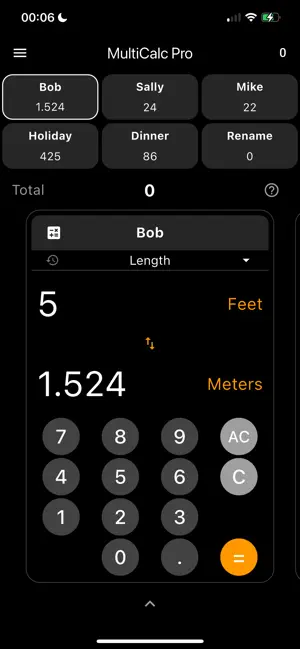
About MultiCalc
Tired of juggling apps or losing your place on a single calculator? MultiCalc redefines multitasking with six independent calculators on one screen. Effortlessly swipe between six calculators, give each one a custom name (like "Shopping" or "Homework"), and see all your results at a glance. Instantly add values from any calculator to a running total, making it perfect for comparing figures, budgeting, and complex multi-step problems. --- Upgrade to MultiCalc Pro --- Take your calculations to the next level. Unlock the ultimate toolkit with a single in-app purchase: • Powerful Unit Converter: Instantly convert length, weight, volume, temperature, speed, and more. Perfect for the kitchen, workshop, or travel. • Full Scientific Calculator: Unlock trigonometry (sin, cos, tan), logarithms, factorials, and more for complex engineering and academic problems. • Advanced Calculation History: Save, pin, and reuse previous calculations. Your pinned history acts as a powerful set of custom memory values, complete with their original context. • Ad-Free Experience: Enjoy a clean, focused interface with no interruptions. Key Features: Manage six independent calculators simultaneously. Assign custom names for easy organization. Combine results into a single, running total. Modern, intuitive, dark-themed interface. [Pro] Powerful multi-category Unit Converter. [Pro] Full suite of scientific functions. [Pro] Interactive history with pinning for memory. [Pro] Completely Ad-Free. Whether you're a student, a professional, or just need to keep track of daily expenses, MultiCalc is the only calculator you'll need. Download now and transform the way you calculate!
What’s new
Version 4.1.0 · Updated September 17, 2026
New: f(x) Calculator Functions: Link your calculators together like never before. Set any of your 6 calculators to automatically compute from the others — add, subtract, multiply, or divide one calculator's value against another calculator or a fixed number. Change a source value and every linked calculator updates instantly. Perfect for running totals, markups, splits, and conversions that depend on each other. Korean Language Support: MultiCalc is now fully localized in Korean (한국어), including the unit converter, history, tutorials, and all Pro features. Also in this update: General performance and stability improvements Minor bug fixes across the scientific and converter panels As always, thanks for using MultiCalc — if you enjoy it, a quick review really helps!
App privacy
The developer, SyCIS Ltd, reported these privacy practices to Apple.
Data Used to Track You
The following data may be used to track you across apps and websites owned by other companies:
- Identifiers: Device ID
Data Not Linked to You
The following data, which may be collected but is not linked to your identity, may be used for the following purposes:
- Identifiers: Device ID
Used for: Third-Party Advertising
Alternatives to MultiCalc
Looking for apps like MultiCalc? Here are 6 similar apps on the App Store. The highest rated is Money Manager • Budget Planner (4.8/5), and 5 of the 6 are free to download.
-
 kpad timers
3.0
kpad timers
3.0
-
 Calctan
4.5
Calctan
4.5
-
 Watch Calculator: Tip & Units
-
 Countdown Widget: Day Count
4.6
Countdown Widget: Day Count
4.6
-
 Spin - Lucky Wheel Random Draw
4.7
Spin - Lucky Wheel Random Draw
4.7
-
 Money Manager • Budget Planner
4.8
Money Manager • Budget Planner
4.8
| App | Rating | Price | Last updated | Compare |
|---|---|---|---|---|
| MultiCalc | – | Free | September 17, 2026 | |
| kpad timers | 3.0 / 5 (2) | Free | Jan 7, 2025 | Compare |
| Calctan | 4.5 / 5 (61) | Free | Oct 29, 2026 | Compare |
| Watch Calculator: Tip & Units | – | 0.99 USD | Oct 14, 2026 | Compare |
| Countdown Widget: Day Count | 4.6 / 5 (67) | Free | Oct 24, 2026 | Compare |
| Spin - Lucky Wheel Random Draw | 4.7 / 5 (94) | Free | Oct 22, 2026 | Compare |
| Money Manager • Budget Planner | 4.8 / 5 (20) | Free | Oct 1, 2026 | Compare |
Compare MultiCalc with the top alternatives: ratings, updates, ASO score and keyword gaps →