

Carillon Repetition Minute
SWANDEX Productivity iPhoneiPadiPod touch
Carillon Repetition Minute is a free Productivity app for iPhone and iPad by SWANDEX. Requires iOS 17.4. Updated October 26, 2026.
- Price
- Free
- on the App Store
- Size
- 3 MB
- Age 4+
- Updated
- Oct 26
- 2026 · v1.54
Screenshots


About Carillon Repetition Minute
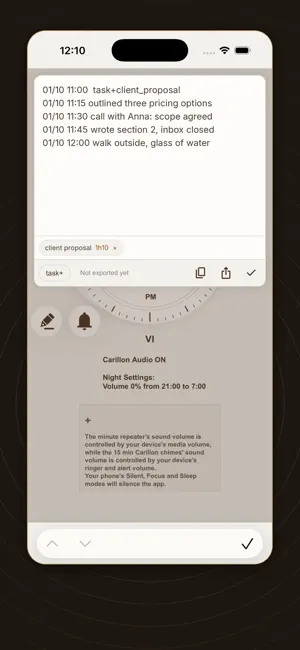
Carillon marks the quarter hours, the way a carillon watch complication does. At :15, :30 and :45 a short chime. On the hour, the hour is struck. It runs by itself through the hours you choose - no alarms to set, no notification to dismiss, no screen to unlock. You don't use it. You live inside it, and after a few days you find you always know roughly what time it is without having reached for anything. DISCREET BY DESIGN The chimes are quiet and sound like an ordinary notification. Nobody around you looks up, and you never have to explain why your phone rings like a bell tower. It plays at your ringer volume, like any notification, and respects silent mode and Focus automatically. HOURS YOU CAN ACTUALLY COUNT Eleven identical strikes are impossible to count. Carillon groups them in fives, with a pause between groups - so eleven arrives as five, five, one. You hear the shape rather than counting the blows. The same grouping applies to the minutes, where counting fourteen chimes would otherwise be hopeless. THE FULL REPETITION, ON DEMAND Press the dial and the exact time is struck: the hour, then the quarters, then the minutes past the quarter - the acoustic time-telling of a minute repeater watch. Useful in the dark, in a meeting, while driving, or whenever looking at a screen would be rude or impossible. WHO IT IS FOR - Anyone who loses hours without noticing, and wants time to pass audibly - People who find a gentle bell less jarring than an alarm - Blind and low-vision users who want the time discreetly, without a screen reader announcing it to the room - Anyone who likes bells SET IT AND FORGET IT Choose the hours it chimes and leave it. It keeps chiming after a restart without ever being opened. FREE VERSION AND FULL VERSION The app is free to install and chimes through the day, with fixed quiet hours overnight. The one-time Full Version Unlock adds flexible night settings and a quarter-hour journal: tap the notification when a quarter chimes and note what you did in the last fifteen minutes. Your journal stays on your phone and is never sent to us, yet you can copy or share it anywhere, for example to the AI assistant of your choice, for analysis and feedback. Quarter after quarter, you build the habit of recalling what you actually accomplished, the very heart of time management. One payment, no subscription. Recordings are made from a real bell. No account, no subscription, no tracking, no advertising.
What’s new
Version 1.54 · Updated October 26, 2026
Logbook: task words in brown, auto ':', dates in your region's order. Notifications always show the quarter, the logbook's power reserve and your open tasks. Power reserve (full version): like a watch's reserve indicator, a small dial (● ◕ ◑ ◔ ○) winds down while the logbook is left alone and back up with each entry. Task language: 'task+' label starts a task, 'task-' label closes it, label ':' gives its status, 'next' marks the next step. New help, with a table of the task operators. Logbook: taller, a task summary (statuses, next steps, subtasks), and tapping a task shades its earlier entries. Logbook habit: the gold movement on the dial and gauges in the summary. Summary: drag and drop subtasks, rename tasks by long press, closed tasks hidden. Color themes (full version): tap ≡, then the palette, and choose one of ten. The logbook's buttons now stay above the keyboard. Summary: turn the page with the folded corner; double-tap a task to write about it in the logbook. Logbook text follows your text size setting, larger on iPad. Summary: Focus rewards few open tasks; ⏳ marks tasks with no news for 4 days. Logbook: by voice, say "new task" or "end task" with the label, and "next step"; keywords now in capitals; a lock shows the log stays on this device. Task bar: main tasks first, then subtasks. Summary: long-press a line and drop it on another task to move it there; the time since a task was opened now follows its date. Logbook: a learning mode guides your first lines with handwritten tips; the cap button after NEXT turns it on or off. Bolder TASK+ and NEXT buttons. Color themes now give the logbook code-editor colors. Smoother page turns, faster typing in long logs. The dial page stays put (no pinch zoom); help scrolls and closes with a tap beside it. Movement panel open by default.
App privacy
The developer, SWANDEX, reported these privacy practices to Apple.
Data Not Collected
The developer does not collect any data from this app.
Alternatives to Carillon Repetition Minute
Looking for apps like Carillon Repetition Minute? Here are 6 similar apps on the App Store. The highest rated is ChimeSet: Alarm Clock & Timer (5.0/5), and all 6 are free to download.
-
 BeepCycle
-
 Belltron HM
-
 HourVoice
-
 Time to Dot - a braille clock
-
 ChimeSet: Alarm Clock & Timer
5.0
ChimeSet: Alarm Clock & Timer
5.0
-
 Beeper: Repeat Timer & Chimes
| App | Rating | Price | Last updated | Compare |
|---|---|---|---|---|
| Carillon Repetition Minute | – | Free | October 26, 2026 | |
| BeepCycle | – | Free | Jul 9, 2026 | Compare |
| Belltron HM | – | Free | Aug 28, 2026 | Compare |
| HourVoice | – | Free | Jun 26, 2026 | Compare |
| Time to Dot - a braille clock | – | Free | Oct 21, 2024 | Compare |
| ChimeSet: Alarm Clock & Timer | 5.0 / 5 (2) | Free | Oct 26, 2026 | Compare |
| Beeper: Repeat Timer & Chimes | – | Free | Oct 20, 2026 | Compare |