

WaveCutter
凡 杨 Music iPhoneiPadiPod touch
WaveCutter is a free Music app for iPhone and iPad by 凡 杨. Rated 1.0/5 from 1 ratings. Requires iOS 16.0. Updated August 25, 2025.
- Rating
- 1.0
- 1 ratings
- Price
- Free
- on the App Store
- Size
- 43 MB
- Age 4+
- Updated
- Aug 25
- 2025 · v1.0.1
Screenshots


About WaveCutter
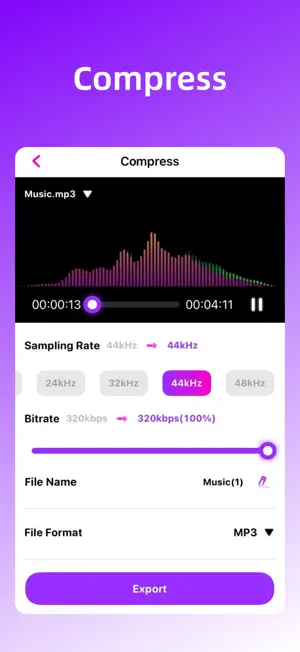
Have you struggled to find the right tools to add perfect soundtracks to your videos? "WaveCutter", your portable audio studio, is here to help you easily handle all your audio editing needs! Powerful features, simple operation: Basic Editing: Supports audio cutting, splicing, copying, and deleting, allowing you to easily trim the parts you want. Audio Compression: Compress audio file sizes with one click, making sharing and storage convenient while maintaining clear sound quality. Effect Processing: Built-in effects like fade-in, fade-out, speed change, pitch shift, reverb, and equalizer to make your audio more professional. Multi-Track Editing: Supports multi-track mixing, making it easy to add background music, sound effects to create complex audio projects. Audio Reverb: Add reverb effects to your audio. Format Conversion: Supports conversion between various audio formats to meet the needs of different platforms and devices. "WaveCutter" is perfect for everyone: For music enthusiasts, create a personalized music experience. your ultimate audio editing tool, available anytime, anywhere—edit whenever you want! Subscription instructions: Payment: Automatic renewal products include "monthly membership/quarterly membership/annual membership". After you confirm the purchase, the fee will be deducted from your iTunes account; Automatic renewal: Apple will automatically deduct the fee from your iTunes account, and the validity period will be automatically extended upon success. Cancel renewal: If you need to cancel automatic renewal, please turn it off in "iOS-Account Settings" before the next deduction. After closing, no fees will be deducted. Privacy Policy http://www.itool.love/privacy_policy.html User Agreement https://www.apple.com/legal/internet-services/itunes/dev/stdeula/
What’s new
Version 1.0.1 · Updated August 25, 2025
1. Fixed bugs 2. Added WiFi file transfer
App privacy
The developer, 凡 杨, reported these privacy practices to Apple.
Data Used to Track You
The following data may be used to track you across apps and websites owned by other companies:
- Usage Data: Advertising Data
Data Not Linked to You
The following data, which may be collected but is not linked to your identity, may be used for the following purposes:
- Location: Coarse Location
- Identifiers: Device ID
- Usage Data: Advertising Data, Product Interaction
- Diagnostics: Crash Data, Performance Data, Other Diagnostic Data
Used for: Third-Party Advertising, Analytics, App Functionality
Alternatives to WaveCutter
Looking for apps like WaveCutter? Here are 6 similar apps on the App Store. The highest rated is Audio Editor - Music Enhancer (5.0/5), and 4 of the 6 are free to download.
-
 Audio Editor - Music Enhancer
5.0
Audio Editor - Music Enhancer
5.0
-
 ZGZ Audio Editor
-
 Audio Editor & Music Editor
5.0
Audio Editor & Music Editor
5.0
-
 variStretch
5.0
variStretch
5.0
-
 Audio Extractor: ReelsVOX
-
 Music Cutter - Speed Changer
1.0
Music Cutter - Speed Changer
1.0
| App | Rating | Price | Last updated | Compare |
|---|---|---|---|---|
| WaveCutter | 1.0 / 5 (1 rating) | Free | August 25, 2025 | |
| Audio Editor - Music Enhancer | 5.0 / 5 (4) | Free | Oct 24, 2025 | Compare |
| ZGZ Audio Editor | – | Free | May 27, 2024 | Compare |
| Audio Editor & Music Editor | 5.0 / 5 (1) | Free | Dec 13, 2024 | Compare |
| variStretch | 5.0 / 5 (1) | 5.99 USD | Jul 10, 2026 | Compare |
| Audio Extractor: ReelsVOX | – | Free | Aug 10, 2026 | Compare |
| Music Cutter - Speed Changer | 1.0 / 5 (3) | 1.99 USD | May 12, 2026 | Compare |
Compare WaveCutter with the top alternatives: ratings, updates, ASO score and keyword gaps →