

Kaption: Video Subtitles
Mario Garcia Productivity iPhoneiPadiPod touch
Kaption: Video Subtitles is a free Productivity app for iPhone and iPad by Mario Garcia. Rated 4.6/5 from 5 ratings. Requires iOS 17.5.
- Rating
- 4.6
- 5 ratings
- Price
- Free
- on the App Store
- Size
- 13 MB
- Age 4+
- Updated
- Sep 16
- 2026 · v1.18
Screenshots


About Kaption: Video Subtitles
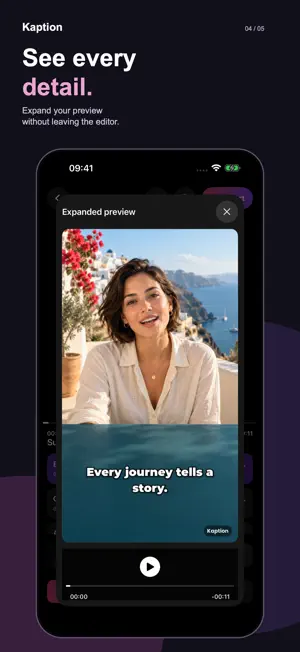
Make your videos easier to follow, even with the sound off. Kaption turns speech into subtitles you can edit, style and preview before sharing. Your first video project is free. Creating another video requires Kaption PRO. You can keep editing and exporting your first project in 720p with a watermark. SUBTITLES THAT FIT YOUR STORY • Generate captions automatically from your video. • Edit the wording and adjust when each subtitle starts and ends. • Add, split or remove lines in a clear subtitle list. • Personalize fonts, colors and sizes to match your style. • Tap the video for a larger preview while keeping the editor close. • Translate subtitles into other languages. FROM VIDEO TO FINISHED CAPTIONS 1. Choose a video from your library. 2. Generate subtitles, review the text and make it yours. 3. Export your captioned video, ready to share. START FREE, EXPORT MORE WITH PRO Create and edit subtitles, then export in 720p with a watermark. Kaption PRO unlocks watermark-free exports in 1080p and 4K. Available resolution depends on your source video. Choose a monthly or annual auto-renewing subscription. The price is shown before purchase. Payment is charged to your Apple Account. Subscriptions renew automatically unless canceled at least 24 hours before the current period ends. Manage or cancel your subscription in your Apple Account settings. Privacy: https://kaption.ai/privacy Terms of Use: https://www.apple.com/legal/internet-services/itunes/dev/stdeula/ PRO also unlocks exclusive typewriter, bounce, blur and shake text animations.
Ratings & reviews
4.6
5 ratings
What’s new
Version 1.18 · Updated September 16, 2026
• A clearer subtitle editor with precise start and end times. • More space between the subtitle list and editing actions. • Tap your video to open a larger floating preview. • Improved startup, video loading and responsiveness.
App privacy
The developer, Mario Garcia, reported these privacy practices to Apple.
Data Not Collected
The developer does not collect any data from this app.
Alternatives to Kaption: Video Subtitles
Looking for apps like Kaption: Video Subtitles? Here are 6 similar apps on the App Store. The highest rated is Locally AI by LM Studio (4.7/5), and all 6 are free to download.
-
 Video Captions - Text on video
4.4
Video Captions - Text on video
4.4
-
 RecAI: AI Translator for Video
4.4
RecAI: AI Translator for Video
4.4
-
 Video Translate & Subtitles
4.6
Video Translate & Subtitles
4.6
-
 Teleprompter App Record Videos
4.6
Teleprompter App Record Videos
4.6
-
 Locally AI by LM Studio
4.7
Locally AI by LM Studio
4.7
-
 Files - File Manager & Browser
4.7
Files - File Manager & Browser
4.7
| App | Rating | Price | Last updated | Compare |
|---|---|---|---|---|
| Kaption: Video Subtitles | 4.6 / 5 (5 ratings) | Free | September 16, 2026 | |
| Video Captions - Text on video | 4.4 / 5 (34) | Free | Oct 12, 2026 | Compare |
| RecAI: AI Translator for Video | 4.4 / 5 (20) | Free | Sep 16, 2026 | Compare |
| Video Translate & Subtitles | 4.6 / 5 (7) | Free | Oct 21, 2026 | Compare |
| Teleprompter App Record Videos | 4.6 / 5 (1,599) | Free | Oct 18, 2026 | Compare |
| Locally AI by LM Studio | 4.7 / 5 (1,841) | Free | Oct 15, 2026 | Compare |
| Files - File Manager & Browser | 4.7 / 5 (12,581) | Free | May 6, 2026 | Compare |