

Alpacca: Shifts & Time Clock
Happy Cactus Solutions LLC Productivity iPhoneiPadiPod touch
Alpacca: Shifts & Time Clock is a free Productivity app for iPhone and iPad by Happy Cactus Solutions LLC. Rated 5.0/5 from 5 ratings. Requires iOS 18.0.
- Rating
- 5.0
- 5 ratings
- Price
- Free
- on the App Store
- Size
- 113 MB
- Age 4+
- Updated
- Oct 15
- 2026 · v1.5.1
Screenshots


About Alpacca: Shifts & Time Clock
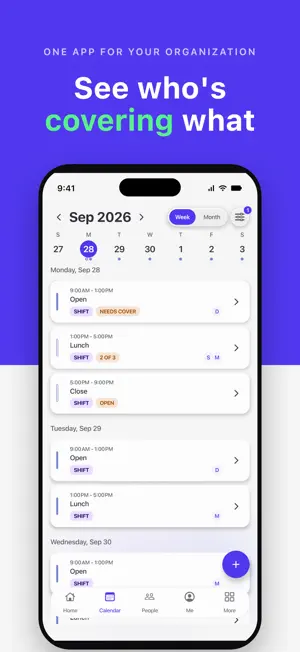
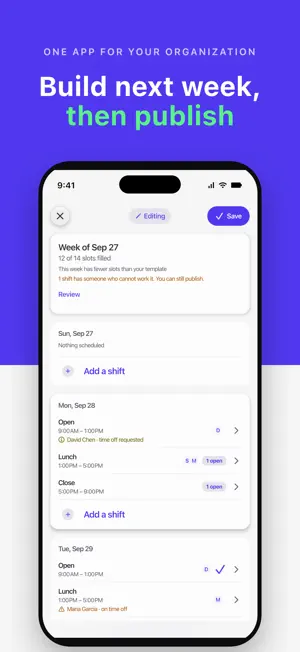
Who's working Saturday, who has clocked in, whether the closing checklist got done, and who has the van keys — one app, one flat price for the whole organization. Alpacca runs the organization: the schedule, the shifts, the time clock, the bookings, the clients, the tasks and the equipment. It's built for barbershops, salons, cafés, clinics, cleaning and trades crews — small businesses that have outgrown a group chat and a shared spreadsheet. Nonprofits that run the same way use it too. Try it first Tap Try the demo on the first screen and run a café with a team and six weeks of history, as its owner. No account needed. Shift scheduling Build next week's schedule from your usual one and publish it in a few minutes. A shift that's short of staff is flagged. Someone can't make their shift? They can hand it off, and anyone qualified can pick it up, with your approval if you want it. Shift checklists Give a shift its routine: opening, closing, cleaning. Members mark each item done during the shift, with who and when, and clock-out reminds them what's left. Time clock Turn an iPad or tablet you already have into Alpacca Terminal. Open alpacca.app/terminal and pair it from the app. Your team taps their name and a 4-digit PIN to clock in, take a break or clock out — no account or app for them. It keeps working when the wifi drops. Or let members clock in from their own phone: everyone, or only the people you choose. Each punch records the street it came from. Nobody is tracked in between, and clocking out always goes through. Time cards Every member's week in one place. Hours so far plus the shifts still ahead show overtime before it happens, and late, early and missed shifts are marked. Members ask for a fix on a missed punch, which counts only once a manager approves it. When a pay period ends, approve each person's hours, then export them to Excel, or to PDF with one page per person. Labor costs and reports Turn on labor costs and add each person's pay, by the hour or by the day. See what the week costs while you build it, and what each person cost in any pay period. Only owners and admins see pay. Reports cover attendance, labor cost and who came to your bookings, and export to Excel. Equipment handoffs Take the van keys, the till or a tool, or assign it to a person or a team, due back when the shift ends, when you close or on a date, with a note for whoever is next. Bookings, classes and tours Share a booking page where clients pick a time that works, with the person they want or whoever is available. Or run a class or tour at set times: guests take a spot on one date or sign up for the whole course. For one person, use Suggest times. Every booking lands on your calendar, and you mark who came. Clients, vendors and tasks Contacts, notes and one History for each client and vendor. Assign tasks with a due date. One shared calendar, polls and time off. What Alpacca doesn't do We don't process donations, dues or payments, and we are not a payroll or accounting system. Labor costs are an estimate; whoever runs payroll still does. Plans One flat price per organization, not per person, billed monthly, quarterly or yearly. Every feature is in every plan; plans differ only by how many members they hold. Essential — up to 8 members. $12.99 per month, or $99.99 per year. Standard — up to 25 members. $24.99 per month, or $199.99 per year. Pro — up to 75 members. $49.99 per month, or $399.99 per year. Essential, billed monthly, includes a 14-day free trial that becomes a paid subscription when it ends unless you cancel first. Every other plan and billing period is charged from the first day. Subscriptions renew automatically at the price and interval shown at checkout until you cancel. Cancel any time in your Apple account settings; cancelling stops the next renewal, and access continues to the end of the term you have paid for. Terms of Use (EULA): https://www.apple.com/legal/internet-services/itunes/dev/stdeula/
Ratings & reviews
5.0
5 ratings
What’s new
Version 1.5.1 · Updated October 15, 2026
New in this version: • Pay by quincena: close each pay period and send your accountant the hours file. • Three new reports: Shift coverage, Checklists and Time off. • Overtime rules can change from a date, without repricing past weeks. • Ask Siri when you work next, who's working today, or what bookings you have. • Late tolerance: decide how late still counts as on time. • Choosing a plan when you create your organization is clearer: one flat price for your whole team. • On iPad, Announcements, Skills and Terminals use the full screen. • Plus fixes and improvements.
App privacy
The developer, Happy Cactus Solutions LLC, reported these privacy practices to Apple.
Data Linked to You
The following data, which may be collected and linked to your identity, may be used for the following purposes:
- Identifiers: User ID
- Diagnostics: Crash Data
- Financial Info: Other Financial Info
- Contact Info: Email Address, Name, Phone Number
- User Content: Photos or Videos
Used for: Analytics, Product Personalization, App Functionality
Data Not Linked to You
The following data, which may be collected but is not linked to your identity, may be used for the following purposes:
- Usage Data: Product Interaction
- Diagnostics: Performance Data, Other Diagnostic Data
- Location: Precise Location
- Contacts: Contacts
Used for: Analytics, App Functionality
Alternatives to Alpacca: Shifts & Time Clock
Looking for apps like Alpacca: Shifts & Time Clock? Here are 6 similar apps on the App Store. The highest rated is Nevvi (5.0/5), and all 6 are free to download.


| App | Rating | Price | Last updated | Compare |
|---|---|---|---|---|
| Alpacca: Shifts & Time Clock | 5.0 / 5 (5 ratings) | Free | October 15, 2026 | |
| ControlHorarioApp | – | Free | Oct 14, 2026 | Compare |
| Nevvi | 5.0 / 5 (8) | Free | Jan 20, 2026 | Compare |
| It's Time: Calendar Alarms | – | Free | Oct 2, 2026 | Compare |
| YourPond | 5.0 / 5 (30) | Free | Oct 10, 2026 | Compare |
| Calendo | 3.0 / 5 (2) | Free | Oct 11, 2026 | Compare |
| Claude Intune | 5.0 / 5 (1) | Free | Oct 16, 2026 | Compare |