

CineMon
CineSpices LLC Photo & Video iPadMac
CineMon is a free Photo & Video app for iPad and Mac by CineSpices LLC. Rated 4.3/5 from 6 ratings. Requires iOS 26.0. Updated October 20, 2026.
- Rating
- 4.3
- 6 ratings
- Price
- Free
- on the App Store
- Size
- 21 MB
- Age 4+
- Updated
- Oct 20
- 2026 · v2.0.0
Screenshots


About CineMon
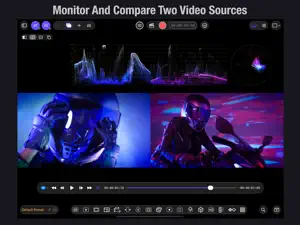
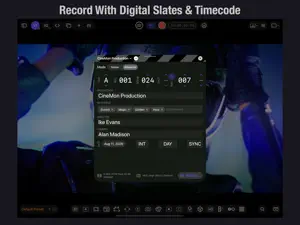
Monitor two live video sources, mix audio, and record with slates and timecode, all on your iPad or Mac. CineMon combines professional picture monitoring, audio analysis, and capture in one flexible production workspace. Built for cinematographers, camera assistants, DITs, directors, and sound professionals. From solo shoots to full crews, make confident decisions about picture and sound. MASTER THE SHOT • Monitor two live video feeds simultaneously, or pair a live camera with a reference file. Switch between sources or compare them in Reference Mode with wipe, side-by-side, and overlay views for camera matching and continuity. • Evaluate exposure and color with waveform, vectorscope, and histogram. Make informed lighting decisions with spot metering, contrast ratios, zebras, and exposure test strips. • Read exposure at a glance with customizable False Color, including Stops, Skin Tone, White Balance, and your own IRE gradients. • Verify fine detail with Focus Peaking and control its threshold to suppress grain and noise. Frame precisely with composition guides, safe areas, and anamorphic de-squeeze. • Preview looks with display LUTs and save log, gamut, color transforms, and calibration settings in reusable Input Profiles. Arrange picture, scopes, and analysis views across six monitor layouts. MIX AND MEASURE • Combine camera audio, microphones, USB interfaces, and reference tracks in one live mix, with or without video. Work with sources that have different sample rates, bit depths, and channel layouts. • Balance each source with faders, mute, solo, and pan, with input monitoring and audio-follows-video controls. • Inspect levels, stereo image, phase, transients, and frequency content with six audio scopes: Levels, Loudness, Goniometer, Oscilloscope, Band Spectrum, and FFT Spectrum. • Follow momentary, short-term, and integrated loudness, loudness range, and true peak with ITU-R BS.1770 metering. Use EBU R128, ATSC A/85, or custom targets, and review session history. RECORD AND HAND OFF • Record the active video source in 10-bit HEVC or ProRes, choosing the input image or your processed look. Capture reference stills for continuity and shot comparison. • Keep takes identified with reusable digital slates. Use Record Run, Free Run, or external LTC timecode, including Jam Sync and freewheel, to fit your production workflow. • Review media, flag good takes, and organize recordings with ratings, notes, keywords, and Smart Collections. • Carry scene, take, reel, camera, and notes into DaVinci Resolve and Final Cut Pro through embedded QuickTime and XMP metadata, with color tags attached. Spend less time logging and more time editing. YOUR HARDWARE. YOUR WORKFLOW. Build a portable setup with compatible USB capture hardware or Accsoon SeeMo on iPad, or scale up to Blackmagic Design DeckLink and UltraStudio on Mac. Change your hardware. Keep your familiar tools and saved configurations. CineMon’s highly optimized video and audio engines deliver responsive monitoring, precise 16-bit image processing, and flexible live mixing while keeping CPU and GPU workloads lean. That efficiency leaves more processing headroom for demanding setups and helps preserve battery life on location. Customize your workspace with toolbars and presets, and keep your configuration available across devices with iCloud sync. START FREE. EXPAND WITH PRO. Composition Guides, framing tools, Histogram, and basic Levels metering are free. Unlock advanced capabilities with one-time PRO Video Monitoring, Audio Monitoring, and Recording Packs, or choose a bundle. The CineMon PRO Pass subscription includes all PRO features and future PRO additions while your subscription is active. No ads. No tracking. No personal information collected. Questions or feedback: [email protected] Privacy Policy: https://www.cinemon.app/app/privacy.html Terms of Service: https://www.apple.com/legal/internet-services/itunes/dev/stdeula/
Ratings & reviews
4.3
6 ratings
What’s new
Version 2.0.0 · Updated October 20, 2026
CineMon 2.0 expands your monitoring workspace with two live video sources, a complete audio mixer, and professional recording with slates and timecode. New picture tools, a redesigned interface, and highly optimized video and audio engines bring more of your production together on iPad and Mac. TWO LIVE VIDEO SOURCES • Run two live video sources simultaneously on iPad or Mac. Switch between V1 and V2, or view both in Reference Mode with wipe, side-by-side, top-and-bottom, and overlay comparisons. • Match cameras, check continuity, or compare a live picture with a reference file. Supported iPads can also use two built-in cameras. • Connect Blackmagic Design DeckLink and UltraStudio hardware on Mac. A COMPLETE AUDIO WORKSPACE • Mix camera audio, microphones, USB interfaces, and files, with or without video. Combine sources with different sample rates, bit depths, and channel layouts in one live mix. • Control each source with faders, mute, solo, pan, input monitoring, and audio-follows-video, feeding a master bus. • Analyze sound with six scopes: Levels, Loudness, Goniometer, Oscilloscope, Band Spectrum, and FFT Spectrum. • Measure momentary, short-term, and integrated loudness, loudness range, and true peak to ITU-R BS.1770, with EBU R128, ATSC A/85, custom targets, and session history. RECORDING, SLATES, AND TIMECODE • Record the active video source in H.264, 10-bit HEVC, or ProRes, choosing Raw Input or Processed Image. New snapshot options capture the Monitor View or all three still versions at once. • Create reusable digital slates with production metadata, recording settings, and library destinations. Share slates as .cmslate files. • Use Record Run, Free Run, or external LTC timecode with Jam Sync, freewheel, drop-frame support, and Advanced LTC Alignment. • Monitor long takes with optional audio drift correction, dropped-frame indication, and post-recording review notices. FROM SLATE TO EDIT • Browse the new Media Library with previews, Good Take flags, ratings, notes, keywords, and Smart Collections. • Carry Scene, Take, Reel, Camera, and Notes into DaVinci Resolve and Final Cut Pro through QuickTime and XMP metadata, with color tags attached. EXPANDED PICTURE TOOLS • Rebuilt Focus Peaking reveals fine detail, with a Threshold control to suppress grain and noise. • False Color adds Stops, Skin Tone, White Balance, custom IRE gradients, and dedicated panel views. • New Exposure tool combines exposure adjustment and Test Strip. Color Palette analyzes dominant colors, and 3D Preview supports stereoscopic material. • Save source calibration in Input Profiles, including log, gamut, color transforms, and calibration LUTs. New log profiles include Apple Log 2, Z CAM Z-Log2, and Kinefinity KineLOG3. • New 1 Over 2 and 2 Over 4 layouts expand your workspace to six monitor layouts. REDESIGNED FOR SPEED AND FLEXIBILITY • A rebuilt 16-bit Metal video engine reduces banding, latency, and power use, with faster scopes. The optimized audio engine handles flexible live mixing while keeping processing workloads lean. • A new Home workspace organizes video and audio sources. Rearrange the video toolbar. And a new multi-source transport coltrol bar. • Sync presets, slates, LUTs, gradients, and settings across devices with iCloud. MORE WAYS TO GO PRO New Audio Monitoring and Recording Packs join the Video Monitoring Pack, with an all-in-one bundle and an Audio + Recording Upgrade for existing Video Pack owners. The PRO Pass includes all PRO features while active. Existing Video Monitoring Pack owners keep their purchased features. Core monitoring remains free, now including basic audio Levels metering.
App privacy
The developer, CineSpices LLC, reported these privacy practices to Apple.
Data Not Collected
The developer does not collect any data from this app.
Alternatives to CineMon
Looking for apps like CineMon? Here are 6 similar apps on the App Store. The highest rated is Parallax Monitor (5.0/5), and 4 of the 6 are free to download.
-
 Mavis Monitor: Pro Display
1.0
-
 VideoViewer Pro
4.3
-
 ZineControl
4.5
-
 Parallax Monitor
5.0
-
 Capturino
4.5
-
 Teradek TV
3.7
| App | Rating | Price | Last updated | Compare |
|---|---|---|---|---|
| CineMon | 4.3 / 5 (6 ratings) | Free | October 20, 2026 | |
| Mavis Monitor: Pro Display | 1.0 / 5 (3) | Free | Oct 13, 2026 | Compare |
| VideoViewer Pro | 4.3 / 5 (3) | Free | Jun 22, 2026 | Compare |
| ZineControl | 4.5 / 5 (11) | 14.99 USD | Oct 21, 2026 | Compare |
| Parallax Monitor | 5.0 / 5 (24) | 19.99 USD | Sep 29, 2026 | Compare |
| Capturino | 4.5 / 5 (25) | Free | Oct 15, 2026 | Compare |
| Teradek TV | 3.7 / 5 (6) | Free | May 13, 2026 | Compare |
Compare CineMon with the top alternatives: ratings, updates, ASO score and keyword gaps →