

Sound Level & Spectrogram
TOON,LLC Utilities iPhoneiPadiPod touch
Sound Level & Spectrogram is a free Utilities app for iPhone and iPad by TOON,LLC. Requires iOS 18.7. Updated October 10, 2025.
- Price
- Free
- on the App Store
- Size
- 4 MB
- Age 4+
- Updated
- Oct 10
- 2025 · v3.0
Screenshots
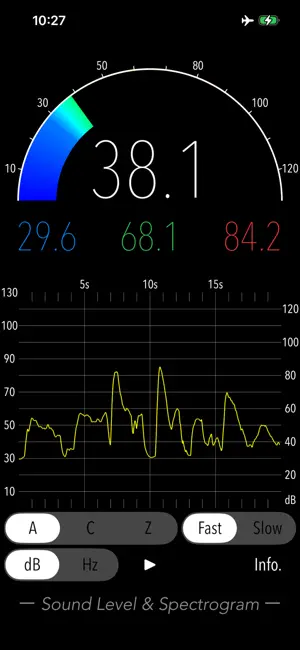
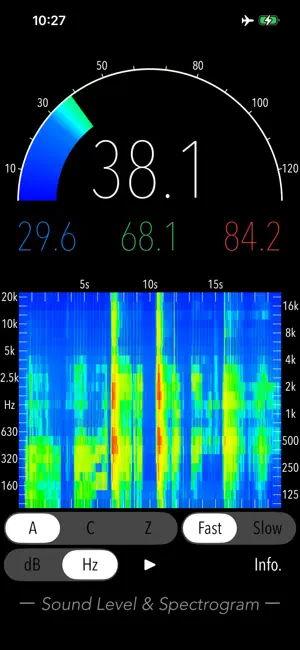

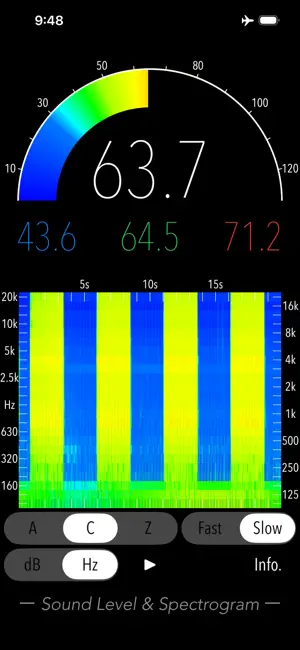
About Sound Level & Spectrogram
"Sound Level & Spectrogram" is a sound level meter app for iPhone to easily measure the sound level of noise and music in your living environment. Simply tap the start button to measure sound levels in decibels (dB) and view the real-time variation of the sound level. You can also use the spectrogram feature to visually check the frequency characteristics of the sound source. Furthermore, you can select between frequency weighting correction characteristics and time weighting characteristics, which are essential for standard sound level meters, enabling appropriate sound measurement. Exposure to noise can impact health, potentially causing tinnitus, sleep disorders, stress, cognitive decline and heart disease. These risks have also been highlighted by the World Health Organization (WHO). Understanding noise levels is the first step towards improving your quality of life. Use this app to protect your health and create a comfortable living environment. Features: - Sound level measurement (dB): Leq (equivalent sound level), Min (minimum value), Max (maximum value), Avg (time-averaged equivalent sound level) - Frequency weighting correction characteristics: A (general sound level measurement with auditory correction), C (sound level measurement with almost flatter correction than A correction, e.g. peak evaluation at high volume), Z (flat characteristics without auditory correction, physical sound level measurement) - Time weighting characteristics: Fast=0.125sec, Slow=1.0sec - Time course graph - Spectrogram: 1/3 octave band analysis - Measurement time: 20 sec Applications: - Environmental noise measurement - Architectural acoustics - Live sound check - Installation of audio equipment - Tuning of sound equipment - Device management Example of the noise level situation: - 130 dB: Engine sound of Airplane - 110 dB: Horn of Car - 100 dB: Noise of passing train - 90 dB: In loud factory - 80 dB: In the train, Vacuum cleaner - 70 dB: Noisy office, Noisy Street - 60 dB: Quiet Car, Normal conversation - 50 dB: Quiet office - 40 dB: In the library, Quiet residential area - 30 dB: Outskirts of midnight, Whisper - 20 dB: Sounds of rubbing leaves Note: - Spectrogram is a tool to analyze the frequency spectrum of sound, with time on the horizontal axis, frequency on the vertical axis, and the strength of the signal represented by colors, and is used for acoustic analysis, voiceprint identification, etc. - This app is adjusted the reference value for iPhone. However, the built-in microphone of your iPhone is likely to have a non-uniform gain. Therefore, exact measurements are not guaranteed. - The standard noise measurement range is 30-130 dBA, and the measured value (Leq) is about 30 dBA in a quiet room of the household. Due to the presence of background noise, noise levels are never measured at 0dBA even in very quiet environments. In a typical anechoic room, the noise level is around 5-15 dBA. - At the initial startup after installing the app, the iOS system asks for permission to access the built-in microphone. In this case, you need to enable access to the microphone. If you have not enabled this setting, this app cannot work by privacy restrictions of the iOS system. Please enable the access permission on the iOS setting, "Settings > Privacy & Security > Microphone". Please visit our iOS app support page for more information on this app.
What’s new
Version 3.0 · Updated October 10, 2025
- Minor improvements. - Requires iOS 18.7 or later.
App privacy
The developer, TOON,LLC, reported these privacy practices to Apple.
Data Used to Track You
The following data may be used to track you across apps and websites owned by other companies:
- Location: Coarse Location
- Identifiers: Device ID
- Usage Data: Product Interaction, Advertising Data
- Diagnostics: Crash Data, Performance Data
Data Linked to You
The following data, which may be collected and linked to your identity, may be used for the following purposes:
- Location: Coarse Location
- Identifiers: Device ID
- Usage Data: Product Interaction, Advertising Data
- Diagnostics: Performance Data
Used for: Third-Party Advertising
Data Not Linked to You
The following data, which may be collected but is not linked to your identity, may be used for the following purposes:
- Diagnostics: Crash Data
Used for: Third-Party Advertising
Alternatives to Sound Level & Spectrogram
Looking for apps like Sound Level & Spectrogram? Here are 6 similar apps on the App Store. The highest rated is Spectrum Analyzer+ Audio FFT (2.3/5), and all 6 are free to download.
-
 FNam FFT Spectrogram Analyzer
-
 Audio SA
-
 EyeSound Vocal
-
 Enviro Noise Partner
-
 Sorama App
-
 Spectrum Analyzer+ Audio FFT
2.3
Spectrum Analyzer+ Audio FFT
2.3
| App | Rating | Price | Last updated | Compare |
|---|---|---|---|---|
| Sound Level & Spectrogram | – | Free | October 10, 2025 | |
| FNam FFT Spectrogram Analyzer | – | Free | Oct 10, 2026 | Compare |
| Audio SA | – | Free | Aug 24, 2026 | Compare |
| EyeSound Vocal | – | Free | Mar 7, 2024 | Compare |
| Enviro Noise Partner | – | Free | May 4, 2026 | Compare |
| Sorama App | – | Free | Jun 5, 2026 | Compare |
| Spectrum Analyzer+ Audio FFT | 2.3 / 5 (3) | Free | Sep 25, 2026 | Compare |