

Cancel Subscriptions Refund +
PERIZADE ERBAS Productivity iPhoneiPadiPod touch
Cancel Subscriptions Refund + is a free Productivity app for iPhone and iPad by PERIZADE ERBAS. Rated 3.9/5 from 35 ratings. Requires iOS 17.0.
- Rating
- 3.9
- 35 ratings
- Price
- Free
- on the App Store
- Size
- 26 MB
- Age 4+
- Updated
- Sep 29
- 2026 · v1.0.4
Screenshots


About Cancel Subscriptions Refund +
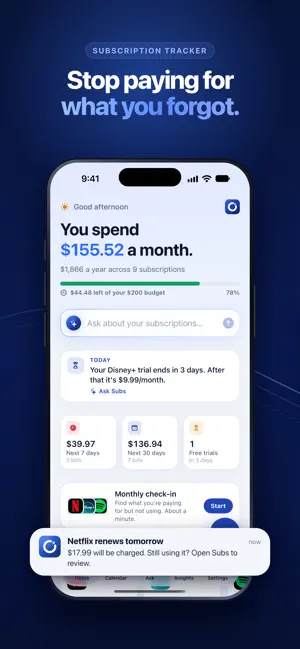
Stop paying for subscriptions you forgot about. Subs shows every subscription in one place, reminds you before you're charged, and helps you cancel what you don't use and ask for your money back. FIND EVERY SUBSCRIPTION • Snap a screenshot or card statement: Subs finds your subscriptions, installments and bills in seconds • Or pick from hundreds of popular services with their logos and typical prices • See what you spend a month and a year, at a glance NEVER GET SURPRISE-CHARGED • Reminders before every renewal and before free trials turn into charges • A calendar of every upcoming payment • A heads-up a week before big yearly charges CANCEL AND GET MONEY BACK • Step-by-step cancel guides with a direct link to each service's account page • For subscriptions billed by Apple, go straight to your App Store subscriptions • Write a cancellation or refund email in seconds • Mark it as cancelled and watch your savings grow ASK SUBS • A private AI assistant that answers questions about your subscriptions: "What's due this week?", "Which ones should I cancel?", "Can I afford another one?" • Runs on your iPhone with Apple Intelligence; your data never leaves it • Instant answers on every iPhone, even without Apple Intelligence FIND THE MONEY YOU'RE WASTING • A monthly check-in to rate how much you use each subscription • Price increase tracking shows what every increase costs you a year • A monthly budget, spending by category and home screen widgets PRIVATE BY DESIGN No bank login, no ads, no selling your data. Screenshots and statements are read on your iPhone. SUBS PREMIUM Some features need a Subs Premium subscription. Payment is charged to your Apple Account. The subscription renews automatically unless cancelled at least 24 hours before the end of the current period. Manage or cancel it anytime in your App Store account settings. Terms of Use: https://substrack.co/terms/ Privacy Policy: https://substrack.co/privacy/
Ratings & reviews
3.9
35 ratings
What’s new
Version 1.0.4 · Updated September 29, 2026
Subs has been completely redesigned. • iOS 27 improvements • Ask Subs: a private AI assistant for your subscriptions that runs on your iPhone • Import from a screenshot or card statement – Subs finds subscriptions, installments and bills • Reminders before every charge and before free trials end • Monthly check-in to find what you're paying for but not using • Price increase tracking, budget, calendar, insights and widgets • Step-by-step cancel guides and a refund email writer • New look with light and dark mode
App privacy
The developer, PERIZADE ERBAS, reported these privacy practices to Apple.
Data Not Collected
The developer does not collect any data from this app.
Alternatives to Cancel Subscriptions Refund +
Looking for apps like Cancel Subscriptions Refund +? Here are 6 similar apps on the App Store. The highest rated is Safe Cleanup: Phone Cleaner (4.4/5), and all 6 are free to download.
-
 SubsPad - Subscription Manager
-
 Phone Cleaner: Junk & Cache
4.0
-
 Safe Cleanup: Phone Cleaner
4.4
-
 RapidClear: Storage Cleaner
4.4
-
 Deep Cleaner: Storage Cleanup
4.4
-
 Total Password for Mobile
3.2
| App | Rating | Price | Last updated | Compare |
|---|---|---|---|---|
| Cancel Subscriptions Refund + | 3.9 / 5 (35 ratings) | Free | September 29, 2026 | |
| SubsPad - Subscription Manager | – | Free | Dec 8, 2025 | Compare |
| Phone Cleaner: Junk & Cache | 4.0 / 5 (231) | Free | Aug 31, 2026 | Compare |
| Safe Cleanup: Phone Cleaner | 4.4 / 5 (283) | Free | Jun 26, 2026 | Compare |
| RapidClear: Storage Cleaner | 4.4 / 5 (1,351) | Free | Sep 25, 2026 | Compare |
| Deep Cleaner: Storage Cleanup | 4.4 / 5 (399) | Free | May 30, 2026 | Compare |
| Total Password for Mobile | 3.2 / 5 (121) | Free | Nov 20, 2023 | Compare |