

Meow Player-Transfer Play Read
yao shi Utilities iPhoneiPadiPod touch
Meow Player-Transfer Play Read is a free Utilities app for iPhone and iPad by yao shi. Requires iOS 16.0. Updated July 10, 2026.
- Price
- Free
- on the App Store
- Size
- 54 MB
- Age 4+
- Updated
- Jul 10
- 2026 · v2.1.3
Screenshots



About Meow Player-Transfer Play Read
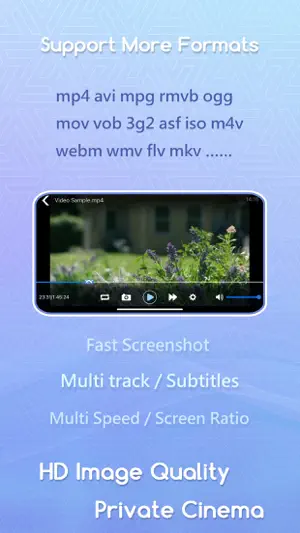
This is a local file server application** that includes features such as video playback, audio playback, image viewing, document viewing and editing, PDF viewing, 3D model viewing, streaming media playback, and file transfers between the app and the photo album. -File Server Use your mobile device as a file server. Simply enable the file transfer feature and enter the URL provided by the app in your browser to manage or upload files from the web. The app offers a built-in file management system, supporting actions such as creating folders, creating text files, batch deletion, copying, cutting, compression, and decompression. Currently, zip is supported for compression and decompression, with support for more formats coming in future updates. -Video Playback An integrated video player allows you to watch videos uploaded to your device. Supports a wide variety of video formats, including: `.3g2`, `.3gp`, `.3gp2`, `.3gpp`, `.amv`, `.asf`, `.avi`, `.bik`, `.bin`, `.divx`, `.drc`, `.dv`, `.f4v`, `.flv`, `.gvi`, `.gxf`, `.iso`, `.m1v`, `.m2v`, `.m2t`, `.m2ts`, `.m4v`, `.mkv`, `.mov`, `.mp2`, `.mp4`, `.mp4v`, `.mpe`, `.mpeg`, `.mpeg1`, `.mpeg2`, `.mpeg4`, `.mpg`, `.mpv2`, `.mts`, `.mxf`, `.mxg`, `.nsv`, `.nuv`, `.ogg`, `.ogm`, `.ogv`, `.ps`, `.rec`, `.rm`, `.rmvb`, `.rpl`, `.thp`, `.tod`, `.ts`, `.tts`, `.txd`, `.vob`, `.vro`, `.webm`, `.wm`, `.wmv`, `.wtv`, `.xesc` Local Save: Keep track of and manage your personal playback history. Playlist Feature: Automatically generates a playlist of all videos in the current folder for easy switching. Screenshot: Capture your favorite scenes at any time. Recording: Easily record and save video clips. -Playback Use the same built-in media player to play local audio files. Supported audio formats include: `.3ga`, `.669`, `.a52`, `.acc`, `.ac3`, `.adt`, `.adts`, `.aif`, `.aiff`, `.amr`, `.aob`, `.ape`, `.awb`, `.caf`, `.dts`, `.flac`, `.it`, `.kar`, `.m4a`, `.m4b`, `.m4p`, `.m5p`, `.mid`, `.mka`, `.mlp`, `.mod`, `.mpa`, `.mp1`, `.mp2`, `.mp3`, `.mpc`, `.mpga`, `.mus`, `.oga`, `.ogg`, `.oma`, `.opus`, `.qcp`, `.ra`, `.rmi`, `.s3m`, `.sid`, `.spx`, `.thd`, `.tta`, `.voc`, `.vqf`, `.w64`, `.wav`, `.wma`, `.wv`, `.xa`, `.xm` Playlist Feature: Automatically generates a playlist of all audio files in the current folder for easy switching. -Image Viewing View uploaded images directly within the app. You can share images with friends or save them to your photo album. Supports zoom and pan gestures for easy inspection of image details. -Document Viewing and Editing** Supports viewing of Word, Excel, and PowerPoint documents. You can also edit various text file formats directly within the app or create new text files. Supports multiple character encodings for cross-platform compatibility. Adjustable font sizes for visual comfort. Light and dark mode available to reduce eye strain. -PDF Viewing Supports viewing and saving of PDF files. Includes features like page display and reading progress saving. -3D Model Viewing Supports viewing of 3D model formats including: `.dae`, `.scn`, `.usd`, `.usda`, `.usdc`, `.abc`, `.gltf`, `.glb`, `.ply`, `.stl`, `.3ds`, `.usdz`, `.obj`, `.fbx` -Streaming Media Playback Supports a variety of streaming formats. During playback, you can take screenshots or record clips, allowing you to easily save your favorite content. -Photo Album and App File Transfer You can copy images or videos from the app to your photo album and vice versa. This makes it easy to download photos from your photo album to a computer via the app. More File Format Support Coming Soon Support for additional file formats will be included in future updates.
What’s new
Version 2.1.3 · Updated July 10, 2026
- Add long-press fast playback - Fix the bug in the history playback feature
App privacy
The developer, yao shi, reported these privacy practices to Apple.
Data Not Collected
The developer does not collect any data from this app.
Alternatives to Meow Player-Transfer Play Read
Looking for apps like Meow Player-Transfer Play Read? Here are 6 similar apps on the App Store. The highest rated is Via Browser (4.4/5), and all 6 are free to download.
-
 Via Browser
4.4
Via Browser
4.4
-
 PikPak - Cloud Storage & Saver
3.0
PikPak - Cloud Storage & Saver
3.0
-
 微信输入法
4.0
微信输入法
4.0
-
 QQ浏览器-腾讯AI浏览器
4.2
QQ浏览器-腾讯AI浏览器
4.2
-
 中国联通
2.5
中国联通
2.5
-
 中国电信-全国统一官方服务平台
4.3
中国电信-全国统一官方服务平台
4.3
| App | Rating | Price | Last updated | Compare |
|---|---|---|---|---|
| Meow Player-Transfer Play Read | – | Free | July 10, 2026 | |
| Via Browser | 4.4 / 5 (162) | Free | Sep 12, 2025 | Compare |
| PikPak - Cloud Storage & Saver | 3.0 / 5 (229) | Free | Sep 10, 2026 | Compare |
| 微信输入法 | 4.0 / 5 (782) | Free | Oct 21, 2026 | Compare |
| QQ浏览器-腾讯AI浏览器 | 4.2 / 5 (1,145) | Free | Oct 14, 2026 | Compare |
| 中国联通 | 2.5 / 5 (1,282) | Free | Sep 23, 2026 | Compare |
| 中国电信-全国统一官方服务平台 | 4.3 / 5 (7,145) | Free | Oct 12, 2026 | Compare |