

Little Card
晓雨 陈 Productivity iPhoneiPadiPod touch
Little Card is a free Productivity app for iPhone and iPad by 晓雨 陈. Requires iOS 17.0. Updated September 23, 2024.
- Price
- Free
- on the App Store
- Size
- 8 MB
- Age 4+
- Updated
- Sep 23
- 2024 · v1.1.2
Screenshots


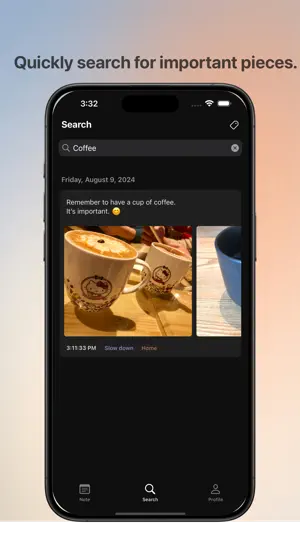
About Little Card
Simplify your note-taking by focusing on what matters most. Little card helps you highlight key pieces, cutting out the noise so you can stay clear and focused on what truly counts. No complex setup or login required. Just open the app and start capturing. Notes are saved only on your device and sync through iCloud. Main features: - Colorful Tags: Easily categorize and highlight your notes with vibrant, customizable tags that make organization a breeze. - Dark Mode: Enjoy a sleek, eye-friendly dark mode that’s perfect for late-night note-taking and planning sessions. - Attachment Support: Attach images, URLs to your notes, making it a versatile tool for all your needs. - Daily Organization: Keep your day on track by organizing notes by date, ensuring you never miss an important detail. - Quick Search: Quickly find the information you need with keyword and tag-based searches, saving you time and effort. - Regular Updates: Stay ahead with constant feature releases and improvements, ensuring your note-taking experience only gets better. Contact us for any suggestions or questions. [email protected] Little Card subscription All Access Little Card plans: Monthly: $1.99 Yearly: $17.99 Payments and Renewal: Payment will be charged to iTunes Account at confirmation of purchase. Subscription automatically renews unless auto-renew is turned off at least 24-hours before the end of the current period. Account will be charged for renewal within 24-hours prior to the end of the current period. You can manage or turn off auto-renew in your Account settings at any time after purchase You can cancel current subscription at any time after purchase. Privacy policy: https://littlecard.laconiks.com/privacy/ Terms of use: https://littlecard.laconiks.com/term/
What’s new
Version 1.1.2 · Updated September 23, 2024
Little Card V1.1.2 - Minor updates for iOS 18. Little Card V1.1.1 - Tap image to preview in full-size. - Fixes some bugs when adding image and URL. Little Card V1.1 - New UI for iPad. - Create new note card on any day. - Swipe to add tags or delete card on iPhone. - Delete empty card when end editing. - Fix some bugs. Have a nice day.
App privacy
The developer, 晓雨 陈, reported these privacy practices to Apple.
Data Not Collected
The developer does not collect any data from this app.
Alternatives to Little Card
Looking for apps like Little Card? Here are 6 similar apps on the App Store. The highest rated is LegibleNote Lite (4.5/5), and all 6 are free to download.
-
 DoNow — What to do now
-
 TabPad
4.0
TabPad
4.0
-
 Noteara: Notes, AI, Whiteboard
4.3
Noteara: Notes, AI, Whiteboard
4.3
-
 LegibleNote Lite
4.5
LegibleNote Lite
4.5
-
 CopyMate: AI Clipboard Manager
4.0
CopyMate: AI Clipboard Manager
4.0
-
 Note.s Taking App - NotesU
4.5
Note.s Taking App - NotesU
4.5
| App | Rating | Price | Last updated | Compare |
|---|---|---|---|---|
| Little Card | – | Free | September 23, 2024 | |
| DoNow — What to do now | – | Free | Aug 25, 2026 | Compare |
| TabPad | 4.0 / 5 (4) | Free | Mar 20, 2026 | Compare |
| Noteara: Notes, AI, Whiteboard | 4.3 / 5 (3) | Free | Sep 11, 2026 | Compare |
| LegibleNote Lite | 4.5 / 5 (4) | Free | Jul 11, 2024 | Compare |
| CopyMate: AI Clipboard Manager | 4.0 / 5 (4) | Free | Sep 30, 2026 | Compare |
| Note.s Taking App - NotesU | 4.5 / 5 (30) | Free | Sep 23, 2026 | Compare |
Compare Little Card with the top alternatives: ratings, updates, ASO score and keyword gaps →