

Text Editor: PWEditor Next
Masatsugu Futamata Utilities iPhoneiPadiPod touch
Text Editor: PWEditor Next is a free Utilities app for iPhone and iPad by Masatsugu Futamata. Requires iOS 16.4. Updated October 4, 2026.
- Price
- Free
- on the App Store
- Size
- 162 MB
- Age 4+
- Updated
- Oct 4
- 2026 · v3.15.0
Screenshots


About Text Editor: PWEditor Next
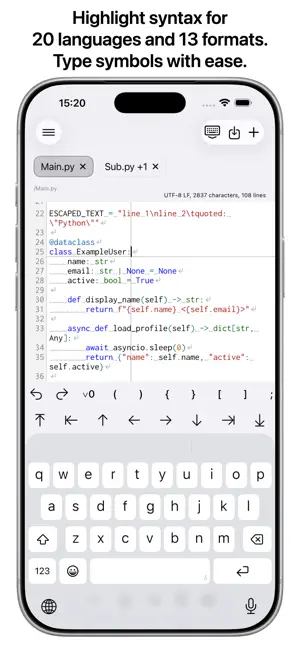
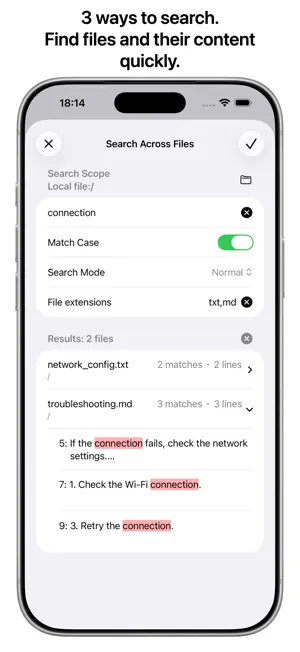
PWEditor Next is a powerful text editor that lets you edit text files directly across a wide range of storage services. You can edit in real time while viewing a preview tailored to each file format. Based on the original PWEditor app, PWEditor Next has been redesigned for the latest iOS and iPadOS environments. ・Supports 10 storage types Supports local files, five cloud storage services (iCloud Drive, Google Drive, Dropbox, OneDrive, and Box), and four server types (FTP, SFTP, SMB, and WebDAV). - SFTP supports username and password authentication. - WebDAV supports username and password authentication and connects over HTTP or HTTPS. ・Previews 16 file formats - Dedicated previews: PDF and images - Document formats: HTML, Markdown, and AsciiDoc - Diagram and chart formats: Mermaid, PlantUML, Graphviz, D2, and Pikchr - Tree formats: JSON, YAML, XML, and PropertyList - Table formats: CSV and TSV The 14 formats other than PDF and images also support real-time previews. For CSV and TSV, you can configure whether the file has a header row and choose the delimiter. ・Advanced editor features - Syntax highlighting - 20 languages: Arduino、Bash/Shell、C、C++、C#、Dart、GO、Java、JavaScript、Kotlin、Lua、Objective-C、PHP、Python、R、Ruby、Rust、SQL、Swift、TypeScript - 13 formats: AsciiDoc, CSS, D2, Graphviz, HTML, JSON, Markdown, Mermaid, Pikchr, PropertyList, PlantUML, XML, and YAML - Display of invisible characters (half-width spaces, full-width spaces, tabs, and line breaks) - Status information (character encoding, line endings, character count, and line count) - File path display - Line numbers - Horizontal and vertical guide lines - Auto-indentation - Symbol input, including Undo and Redo - Cursor movement - Character encoding and line ending conversion ・Multiple tabs and split-screen view Open and edit multiple files at the same time in tabs. The free plan supports up to two tabs; the Pro plan removes the tab limit. In split-screen view, you can display two files or a file and its preview side by side within a single tab. Split-screen view is available on the free plan for local files and iCloud Drive. The Pro plan is required for all other storage services. ・Three types of search - Find and replace within a file - Search for file and directory names - Search across multiple files ・File manager features - File list - Rename, copy, move, and delete files and directories - Export files - Recently opened files - Favorites ・Backup history Files are backed up before saving, before converting character encoding or line endings, and before restoring from backup history. You can use the history to restore an earlier version of a file. ・AI features Use Apple Intelligence to summarize, rephrase, and translate text. ・Other features - Switch the display language (Japanese, English, Spanish, or Chinese) - Switch between light and dark themes - Support for cloud storage sharing links - Support for files shared from other apps ・Free plan and Pro plan Basic features are available for free. The following features require the Pro plan: - More than two tabs across all storage services - Split-screen view, AI features, copy, move, and export for storage services other than local files and iCloud Drive - Search within subdirectories and search filters for some storage services ・Terms of Use (Apple’s Standard EULA): https://www.apple.com/legal/internet-services/itunes/dev/stdeula/
What’s new
Version 3.15.0 · Updated October 4, 2026
- Recent files, favorites, and backup history for cloud storage now support multiple accounts. - Fixed an issue that prevented the file list from appearing when opening a directory from Google Drive favorites. - Improved the preview, file and directory name search, in-file search and replace, and cross-file search sheets to fit the screen on iPad.
App privacy
The developer, Masatsugu Futamata, reported these privacy practices to Apple.
Data Used to Track You
The following data may be used to track you across apps and websites owned by other companies:
- Usage Data: Advertising Data
Data Not Linked to You
The following data, which may be collected but is not linked to your identity, may be used for the following purposes:
- Usage Data: Advertising Data
- Diagnostics: Crash Data
Used for: Third-Party Advertising, Analytics, App Functionality
Alternatives to Text Editor: PWEditor Next
Looking for apps like Text Editor: PWEditor Next? Here are 6 similar apps on the App Store. The highest rated is MD Preview (5.0/5), and all 6 are free to download.
-
 Jedit Lite
-
 VaultXT - Text File Editor
-
 TextEditor - QuickEdit
4.9
TextEditor - QuickEdit
4.9
-
 Edhita: Text Editor
3.5
Edhita: Text Editor
3.5
-
 MD Preview
5.0
MD Preview
5.0
-
 Negi - フルアクセス断固拒否の日本語キーボードアプリ
5.0
Negi - フルアクセス断固拒否の日本語キーボードアプリ
5.0
| App | Rating | Price | Last updated | Compare |
|---|---|---|---|---|
| Text Editor: PWEditor Next | – | Free | October 4, 2026 | |
| Jedit Lite | – | Free | Apr 14, 2026 | Compare |
| VaultXT - Text File Editor | – | Free | Sep 28, 2026 | Compare |
| TextEditor - QuickEdit | 4.9 / 5 (15) | Free | Sep 15, 2026 | Compare |
| Edhita: Text Editor | 3.5 / 5 (24) | Free | Jan 15, 2026 | Compare |
| MD Preview | 5.0 / 5 (25) | Free | Sep 26, 2026 | Compare |
| Negi - フルアクセス断固拒否の日本語キーボードアプリ | 5.0 / 5 (1) | Free | Oct 5, 2026 | Compare |