

Lens AI: Image Search & Value
ATN Marketing SRL Utilities iPhoneiPadiPod touch
Lens AI: Image Search & Value is a free Utilities app for iPhone and iPad by ATN Marketing SRL. Rated 4.5/5 from 1,631 ratings. Requires iOS 17.0.
- Rating
- 4.5
- 1.6K ratings
- Price
- Free
- on the App Store
- Size
- 87 MB
- Age 9+
- Updated
- Nov 6
- 2026 · v1.8.9
Screenshots



About Lens AI: Image Search & Value
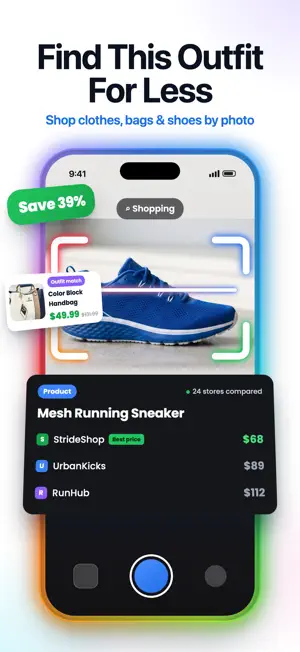
What is this? How much is it worth? Where can I buy it cheaper? Snap a photo, and Lens AI answers in seconds. Lens AI is an AI-powered visual search and image recognition app for iPhone that helps you search for anything with your camera. Take a photo, upload an image, or scan a screenshot to identify objects, plants, animals, and insects, estimate value, find products, compare prices, translate text, and run a reverse image search. Just point, scan, and discover. 500K+ downloads and 5M+ items scanned. ► SNAP IT, KNOW IT Use your camera as a search engine. Ask "what is this?" and get instant answers about everyday objects, artworks and landmarks, with a confidence score on every result. ► IDENTIFY PLANTS, ANIMALS & INSECTS - What is this plant? Identify plants, flowers, trees and mushrooms, with care tips. - What breed is this dog? Recognize dog and cat breeds, birds, fish, and wild animals. - Is this bug harmful? The bug identifier shows if insects and spiders are harmless or dangerous. ► KNOW WHAT IT'S WORTH Is this coin rare? What era is this antique from? How much is it worth? Lens App estimates the value of coins, banknotes, antiques, watches, and collectibles based on comparable listings online. Perfect for flea markets. ► SHOP BY IMAGE & OUTFIT FINDER See something you like? Find this dress, those sneakers, or that chair from a photo. Shop by screenshot from social media, find similar clothes, bags, jewelry and home decor, and compare prices in your local currency. ► REVERSE IMAGE SEARCH Search by image instead of words. Find similar images, the source of a photo, and related information online, then ask AI what’s in it. ► PHOTO TRANSLATOR Translate signs, menus, documents and labels with your camera in real time, in about 40 languages. Perfect when traveling abroad. ► FOOD SCANNER & ASK AI Snap a meal to see calories, macros and recipes. Every result includes an AI chat for follow-up questions. HOW TO USE LENS AI 1. Point your camera at anything, or upload a photo or screenshot. 2. Object recognition analyzes shape, color and texture. 3. Get the name, facts, value or best price, usually in seconds. 4. Ask AI to learn more or save it to History. WHY LENS AI - All-in-one AI Lens app: a photo identifier, bug identifier, coin identifier, rock identifier, calorie counter, photo translator and product finder in one image search app. - More than just names: answers with context, value, care tips and where to buy, not just links. - Made for gardeners, pet owners, collectors, shoppers, travelers, and parents. QUESTIONS PEOPLE ASK How do I identify something from a photo? Take or upload a picture in Lens AI. AI image recognition identifies it and explains what it is. How do I search by image on iPhone? Use a photo, your camera or a screenshot in Lens AI for visual search and reverse image search. Can I find a product from a screenshot? Yes. Lens AI finds the same or similar products and compares prices across stores. How much is my coin or antique worth? Lens AI identifies coins, antiques, and collectibles and estimates their value from comparable listings. ACCURACY & PRIVACY Best with clear, well-lit photos. For safety decisions, such as eating wild mushrooms, consult an expert. Photos are processed only for your scan and deleted right after analysis, never sold. Your History stays on your device and can be deleted anytime. --- AI Lens App is available on iOS for iPhone and iPad. Lens App uses computer vision and multimodal AI to understand what appears inside a photo. Privacy: https://allscanai.com/privacy/ Terms: https://allscanai.com/terms/ Site: LensApp.io
Ratings & reviews
4.5
1.6K ratings
What’s new
Version 1.8.9 · Updated November 6, 2026
More accurate identification, with better results for collectibles, antiques and products. Faster, smoother scanning and a fresh new look. Bug fixes and small improvements.
App privacy
The developer, ATN Marketing SRL, reported these privacy practices to Apple.
Data Not Linked to You
The following data, which may be collected but is not linked to your identity, may be used for the following purposes:
- Purchases: Purchase History
- Identifiers: Device ID
- Usage Data: Product Interaction
- User Content: Photos or Videos, Other User Content
Used for: Analytics, App Functionality
Alternatives to Lens AI: Image Search & Value
Looking for apps like Lens AI: Image Search & Value? Here are 6 similar apps on the App Store. The highest rated is The private browser арр (4.7/5), and all 6 are free to download.
-
 Identify Anything & Lens Scan
4.0
-
 The private browser арр
4.7
-
 Identify Anything AI Scanner
4.4
-
 Lens: Reverse Image Search AI
4.4
-
 AI Snap Identifier
4.0
-
 Lens Scan: Identify Anything
4.6
| App | Rating | Price | Last updated | Compare |
|---|---|---|---|---|
| Lens AI: Image Search & Value | 4.5 / 5 (1,631 ratings) | Free | November 6, 2026 | |
| Identify Anything & Lens Scan | 4.0 / 5 (2,567) | Free | Nov 4, 2026 | Compare |
| The private browser арр | 4.7 / 5 (53) | Free | Aug 21, 2026 | Compare |
| Identify Anything AI Scanner | 4.4 / 5 (281) | Free | Aug 12, 2025 | Compare |
| Lens: Reverse Image Search AI | 4.4 / 5 (1,279) | Free | Sep 30, 2026 | Compare |
| AI Snap Identifier | 4.0 / 5 (193) | Free | Aug 18, 2026 | Compare |
| Lens Scan: Identify Anything | 4.6 / 5 (20,091) | Free | Oct 23, 2026 | Compare |