

No Spam-AI Spam Message Filter
geeyong yoon Utilities iPhoneiPadiPod touch
No Spam-AI Spam Message Filter is a free Utilities app for iPhone and iPad by geeyong yoon. Requires iOS 16.0. Updated January 27, 2026.
- Price
- Free
- on the App Store
- Size
- 75 MB
- Age 4+
- Updated
- Jan 27
- 2026 · v1.2
Screenshots



About No Spam-AI Spam Message Filter
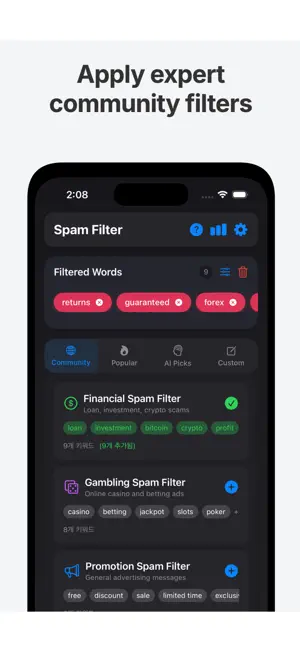
Block annoying spam messages with No Spam! Automatically filter unwanted texts about loans, investments, gambling, and more using keyword-based filtering. KEY FEATURES [AI Recommended Keywords] Analyzes your current filters and suggests related keywords. Strengthen your filter with just one tap. [Community Filter Sets] Expert-curated filter collections for financial spam, gambling ads, adult content, and more. Add dozens of keywords with a single tap. [Top 20 Popular Keywords] Discover the most-used filter keywords by other users and add them instantly. [Whitelist] Keep important messages from banks, delivery services, and trusted senders by adding them to your whitelist. Regex patterns supported. [Regex Filters] Power users can create advanced regex patterns for precise spam detection. [Backup & Restore] Export your filter settings as JSON and import them on a new device. Never lose your customizations. [Statistics] Track daily, weekly, and monthly blocking stats and see which keywords are triggered most often. HOW TO USE 1. Install the app and go to Settings > Messages > Unknown & Spam 2. Enable "No Spam" as your SMS filter 3. Add keywords or apply recommended filters 4. Spam messages will be automatically moved to Junk PRIVACY - Messages are processed locally on your device only - Only anonymous statistics are collected - No personal information is stored or transmitted
What’s new
Version 1.2 · Updated January 27, 2026
[New Features] - Community Filters: Add expert-curated spam filter sets with one tap - Top 20 Keywords: See the most popular filter keywords used by others - Whitelist: Exclude specific senders from filtering - Regex Support: Advanced pattern matching for precise filtering - Backup/Restore: Export and import your filter settings as JSON [Improvements] - Enhanced AI keyword recommendations - Improved UI/UX design - Better stability and performance
App privacy
The developer, geeyong yoon, reported these privacy practices to Apple.
Data Used to Track You
The following data may be used to track you across apps and websites owned by other companies:
- Usage Data: Advertising Data
Data Not Linked to You
The following data, which may be collected but is not linked to your identity, may be used for the following purposes:
- Usage Data: Advertising Data
Used for: Third-Party Advertising, Product Personalization
Alternatives to No Spam-AI Spam Message Filter
Looking for apps like No Spam-AI Spam Message Filter? Here are 6 similar apps on the App Store. The highest rated is K-Spam: 한국 특화 스팸 필터 앱 (5.0/5), and all 6 are free to download.
-
 Spam Message Filter
1.0
-
 K-Spam: 한국 특화 스팸 필터 앱
5.0
-
 제로스팸 - AI 스팸문자차단 앱
5.0
-
 TextInPeace Spam Text Blocker
2.2
-
 타이머야
-
 QuietCall: Block & Notes
| App | Rating | Price | Last updated | Compare |
|---|---|---|---|---|
| No Spam-AI Spam Message Filter | – | Free | January 27, 2026 | |
| Spam Message Filter | 1.0 / 5 (1) | Free | Apr 4, 2026 | Compare |
| K-Spam: 한국 특화 스팸 필터 앱 | 5.0 / 5 (1) | Free | Aug 24, 2026 | Compare |
| 제로스팸 - AI 스팸문자차단 앱 | 5.0 / 5 (1) | Free | May 5, 2026 | Compare |
| TextInPeace Spam Text Blocker | 2.2 / 5 (5) | Free | May 14, 2025 | Compare |
| 타이머야 | – | Free | Jul 24, 2026 | Compare |
| QuietCall: Block & Notes | – | Free | Oct 28, 2026 | Compare |