

Best IPTV Player: Xtream M3U
usman mansur Entertainment iPhoneiPadiPod touch
Best IPTV Player: Xtream M3U is a free Entertainment app for iPhone and iPad by usman mansur. Rated 3.7/5 from 7 ratings. Requires iOS 15.1.
- Rating
- 3.7
- 7 ratings
- Price
- Free
- on the App Store
- Size
- 96 MB
- Age 4+
- Updated
- Oct 24
- 2026 · v1.8
Screenshots

About Best IPTV Player: Xtream M3U
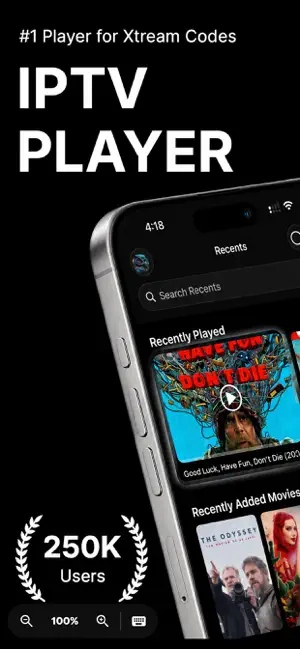
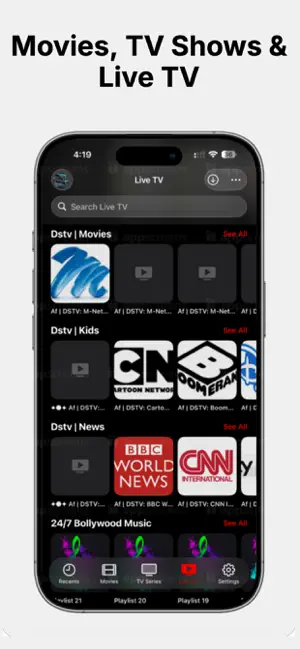
Watch your IPTV subscription on iPhone and iPad — Live TV, Movies and TV Series in one fast, beautiful player. Bring your Xtream Codes login or an M3U/M3U8 playlist URL and start watching in seconds. Trusted by over 250,000 users worldwide. WHY BEST IPTV PLAYER • Watch offline — download movies and episodes to your device and watch anywhere, no connection needed • TV Guide — see what's on now and what's coming up, channel by channel • Favourites — star any channel, movie or series and jump straight back to it • Cast to your TV — Chromecast, DLNA and AirPlay, including your downloaded videos • Built for speed — fast search, category browsing and instant switching across huge playlists • Full playback control — gesture seek, volume and brightness, audio and subtitle tracks, aspect ratio • Multiple playlists — switch between providers and accounts without logging out • Your language — English, French, Arabic, Spanish, Italian, Portuguese, German and Turkish, with full right-to-left layout GETTING STARTED 1. Add your playlist — enter your Xtream Codes login (server, username, password) or paste an M3U/M3U8 link 2. Give it a moment — your channels, movies and series sort themselves into categories 3. Start watching — play it, download it for offline, or cast it to your TV WORKS WITH • Xtream Codes API • M3U and M3U8 playlist files • M3U playlist URLs IMPORTANT Best IPTV Player does not provide, host, or endorse any channels, movies, or media content. It is a player only — you must supply your own valid IPTV subscription (Xtream Codes) or playlist (M3U/M3U8) from a service you are entitled to use. We are not affiliated with any content provider. SUPPORT Have a question or found an issue? Reach out from the in-app Feedback section — we read every message. TERMS AND PRIVACY Terms of Use (EULA): https://www.apple.com/legal/internet-services/itunes/dev/stdeula/ Privacy Policy: https://best-iptv-5dd45.web.app/privacy-policy
Ratings & reviews
3.7
7 ratings
What’s new
Version 1.8 · Updated October 24, 2026
• New: follow a program from the TV Guide. It appears on your Lock Screen with a countdown to the start, then its progress, and a tap opens the channel (iOS 16.2 or later) • New Continue Watching widget for your Home Screen: tap it to pick up where you left off (iOS 16.2 or later) • New Control Center controls for Continue Watching, TV Guide and Downloads (iOS 18 or later) • Touch and hold the app icon for shortcuts to Continue Watching, TV Guide, Search and Downloads • Ask Siri to continue watching, play a channel or open the TV Guide. It works from Shortcuts and Spotlight too (iOS 17 or later) • Downloads and library updates can keep going after you leave the app, with progress on the Lock Screen (iOS 26 or later) • The Lock Screen and Control Center show what's playing, with play, pause and skip, for downloads and MKV videos too • Playback pauses for a phone call and carries on when it ends • Adding your provider is easier: paste the full link they sent you and the server, username and password are filled in for you. Naming the playlist is now optional, and a failed login tells you what to check • When a video can't play, the app now tells you why instead of closing or loading forever, and more channels and video files play on the first try • Search works better with accented and Arabic titles • Recents: search on the See All screens now works as you type, and you can remove something you watched by touching and holding its poster • The cast screen and the Recents tab are now translated into all of the app's languages, and the cast screen reads right to left in Arabic • Ready for iOS 27, with a refreshed app icon and navigation bars that move out of the way as you scroll • Easier on your battery: when your device is hot or in Low Power Mode, the app holds downloads and tones down visual effects, then picks up again on its own • iPad: the app stays inside its window when you resize it • Fixed: searching the TV Guide could show each program twice • Fixed: a slow provider could freeze the app while a video was loading • Fixed several crashes, including one that could happen during a download
App privacy
The developer, usman mansur, reported these privacy practices to Apple.
Data Used to Track You
The following data may be used to track you across apps and websites owned by other companies:
- Identifiers: Device ID
Data Not Linked to You
The following data, which may be collected but is not linked to your identity, may be used for the following purposes:
- Identifiers: Device ID, User ID
- Usage Data: Product Interaction
- Diagnostics: Crash Data
Used for: Third-Party Advertising, Analytics
Alternatives to Best IPTV Player: Xtream M3U
Looking for apps like Best IPTV Player: Xtream M3U? Here are 6 similar apps on the App Store. The highest rated is IPTV Player Capybara: Live TV (4.9/5), and all 6 are free to download.
-
 Vivimate Pro : IPTV Player
4.5
Vivimate Pro : IPTV Player
4.5
-
 VixioTV - IPTV & M3U Player
4.7
VixioTV - IPTV & M3U Player
4.7
-
 IPTV Player Capybara: Live TV
4.9
IPTV Player Capybara: Live TV
4.9
-
 Pro IPTV Player
4.4
Pro IPTV Player
4.4
-
 AREZTV IPTV Media Player
4.6
AREZTV IPTV Media Player
4.6
-
 NiPa Player: IPTV M3U Xtream
4.0
NiPa Player: IPTV M3U Xtream
4.0
| App | Rating | Price | Last updated | Compare |
|---|---|---|---|---|
| Best IPTV Player: Xtream M3U | 3.7 / 5 (7 ratings) | Free | October 24, 2026 | |
| Vivimate Pro : IPTV Player | 4.5 / 5 (2) | Free | Jul 5, 2026 | Compare |
| VixioTV - IPTV & M3U Player | 4.7 / 5 (3) | Free | Oct 15, 2026 | Compare |
| IPTV Player Capybara: Live TV | 4.9 / 5 (15) | Free | Oct 26, 2026 | Compare |
| Pro IPTV Player | 4.4 / 5 (5) | Free | May 11, 2026 | Compare |
| AREZTV IPTV Media Player | 4.6 / 5 (5) | Free | Oct 24, 2026 | Compare |
| NiPa Player: IPTV M3U Xtream | 4.0 / 5 (1) | Free | Oct 21, 2026 | Compare |