

Pop - Paste, Organize, Perform
Guru Sidharth Govindaraju Productivity iPhoneiPadiPod touchMac
Pop - Paste, Organize, Perform is a free Productivity app for iPhone and iPad by Guru Sidharth Govindaraju. Rated 5.0/5 from 6 ratings. Requires iOS 17.4.
- Rating
- 5.0
- 6 ratings
- Price
- Free
- on the App Store
- Size
- 30 MB
- Age 4+
- Updated
- May 24
- 2026 · v2.5.0
Screenshots
About Pop - Paste, Organize, Perform
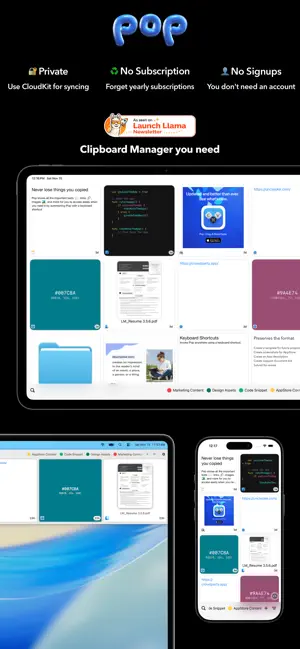
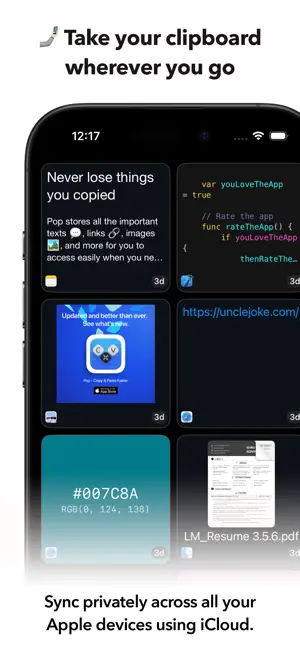
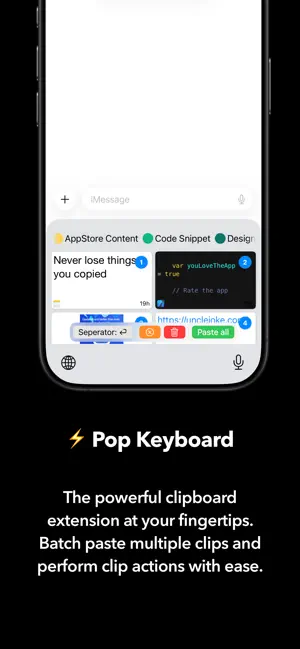
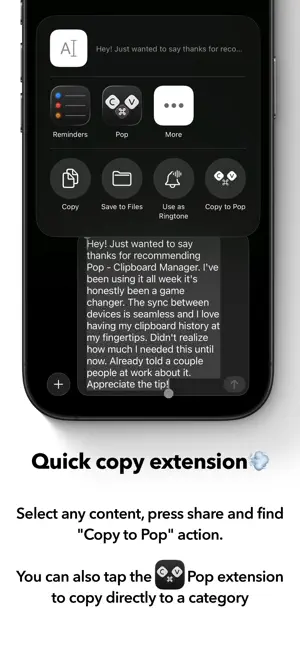
Are you constantly switching between apps to find the right text, image, or link that you copied, only to lose track of what you need to paste? Meet Pop - Paste, Organize, Perform, your essential clipboard manager that revolutionizes your copy and paste experience. Designed for students, professionals, and creatives alike, Pop is the ultimate solution for handling text snippets across multiple Apple devices, ensuring every piece of information is just a keypress away. Pop is seamlessly integrated into your Apple ecosystem, enhancing your copy paste workflow without the need for tedious setup or accounts. With Pop, all your clipboard history is efficiently stored and synchronized across your MacOS, iOS, iPadOS, and visionOS devices using iCloud, allowing for swift access to all your important content across platforms. Basic Version Features: - 3-Day Clipboard History: Keep track of items you copied over the past three days, reducing the hassle of re-copying content. This clipboard manager ensures that no snippet is left behind in your clipboard history. - Multi-Platform Access: Benefit from seamless functionality on your MacOS and iOS devices. With the "Copy to Pop" share sheet, copy and paste becomes easier than ever. - Share Extension & Actions: Select text snippets, links, images, and more, then easily choose “Pop” or “Copy to Pop” in the share sheet for quick pasting. - Click-to-Copy: Streamline your workflow by clicking to copy text and swiftly paste it anywhere, optimizing how you use clipboards daily. Pro Version Features: - Universal Keyboard Extension: Instantly find and insert your saved clips directly from the Universal Keyboard Extension, no matter where you're typing. Copy and paste efficiently with this intuitive feature. - Contextual Actions: Perform secondary actions directly from the clipboard, including formatting removal, Markdown pasting, image resizing, QR code generation, and color value pasting. - Batch Pasting: Choose multiple clips for sequential pasting using customizable separator keys such as commas or new lines with the Pro keyboard extension, perfect for frequent snippet management. - Multi-tasking Support: Utilize Pop in split view or slide over mode on iPadOS for seamless multitasking. Drag and drop clips to fit your workflow, enhancing how you manage your clipboard. - Advanced Search: Find any clipboard item instantly using our quick search algorithm and type filtering, making it easier than ever to locate text snippets. With Pop, every copied item is just a tap away, transforming how you manage clipboard tasks. Whether you're building presentations, organizing research, or crafting creative content, Pop ensures you never lose track of your clipboard content. Elevate your productivity today by downloading Pop and experience the powerful features of this highly efficient clipboard manager. Don't wait—streamline your copy and paste operations with Pop today!
Ratings & reviews
5.0
6 ratings
What’s new
Version 2.5.0 · Updated May 24, 2026
What’s new in Pop - Paste, Organize, Perform 2.5.0 Enhancements - You can now edit Text clips and URL clips. Bug fixes - Fixed an issue where pressing and holding a clip in the Keyboard Extension to Paste as Markdown didn’t work. - Fixed an issue where removing a tag could delete the tag entirely. - Fixed a crash that could occur when tagging. - Reverted a change that made some Text clip background colours too similar to the foreground.
App privacy
The developer, Guru Sidharth Govindaraju, reported these privacy practices to Apple.
Data Not Collected
The developer does not collect any data from this app.
Alternatives to Pop - Paste, Organize, Perform
Looking for apps like Pop - Paste, Organize, Perform? Here are 6 similar apps on the App Store. The highest rated is Clipster Clipboard Manager (5.0/5), and all 6 are free to download.
-
 Clipster Clipboard Manager
5.0
Clipster Clipboard Manager
5.0
-
 Clipster - Clipboard Manager
1.0
Clipster - Clipboard Manager
1.0
-
 PasteQ - Search Copy Paste
-
 CopyMate: AI Clipboard Manager
4.2
CopyMate: AI Clipboard Manager
4.2
-
 PasteDock: Clipboard Saver
4.3
PasteDock: Clipboard Saver
4.3
-
 Clipboard Manager - QuickPaste
4.7
Clipboard Manager - QuickPaste
4.7
| App | Rating | Price | Last updated | Compare |
|---|---|---|---|---|
| Pop - Paste, Organize, Perform | 5.0 / 5 (6 ratings) | Free | May 24, 2026 | |
| Clipster Clipboard Manager | 5.0 / 5 (1) | Free | Jul 16, 2026 | Compare |
| Clipster - Clipboard Manager | 1.0 / 5 (1) | Free | May 14, 2025 | Compare |
| PasteQ - Search Copy Paste | – | Free | Sep 19, 2026 | Compare |
| CopyMate: AI Clipboard Manager | 4.2 / 5 (5) | Free | Sep 30, 2026 | Compare |
| PasteDock: Clipboard Saver | 4.3 / 5 (20) | Free | Apr 27, 2026 | Compare |
| Clipboard Manager - QuickPaste | 4.7 / 5 (3) | Free | Sep 1, 2026 | Compare |