

Missions: Daily Task Planner
Hoai Hung Tran Productivity iPhoneiPadiPod touch
Missions: Daily Task Planner is a free Productivity app for iPhone and iPad by Hoai Hung Tran. Rated 5.0/5 from 1 ratings. Requires iOS 16.0.
- Rating
- 5.0
- 1 ratings
- Price
- Free
- on the App Store
- Size
- 82 MB
- Age 9+
- Updated
- Jun 6
- 2026 · v3.0.3
Screenshots
About Missions: Daily Task Planner
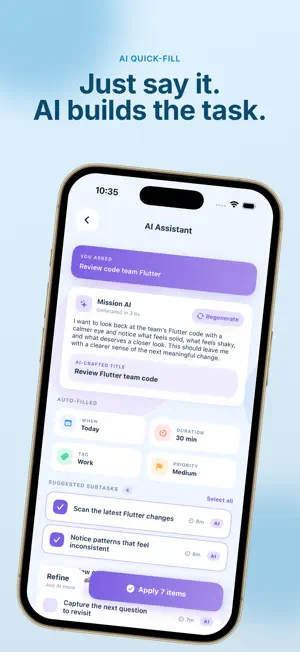
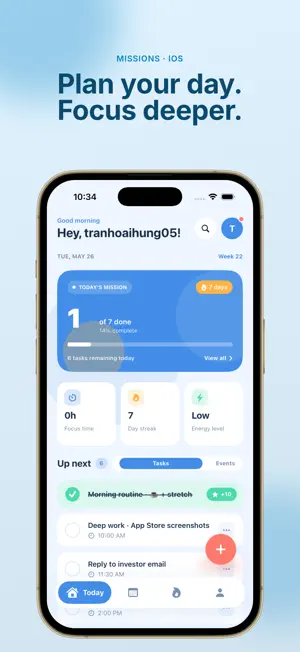
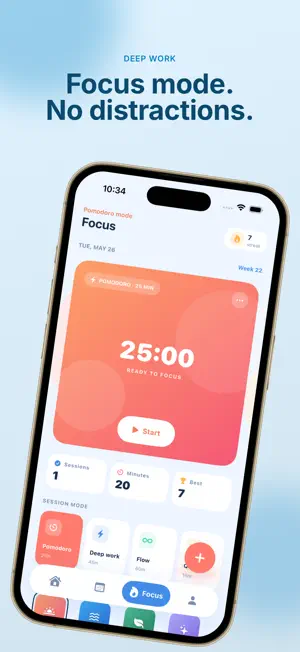
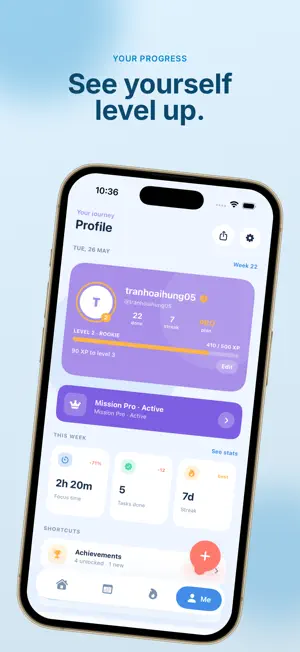
Missions is a calm, AI-assisted task planner for people who want to get things done without turning every day into a long checklist. Capture tasks by voice. Plan the week in a few seconds. Lock in with Pomodoro when it matters. THE EVERYDAY FLOW • Speak a task. Missions detects the title, date, time, and tag for you. • See Today on the Home Screen, the Lock Screen, StandBy, and Apple Watch. • Switch to Focus mode for Pomodoro sessions with ambient sound. • Drag tasks across the week when plans change. Nothing falls through. • Build streaks and earn badges as steady progress, not pressure. DESIGNED TO STAY OUT OF THE WAY A hand-drawn interface that feels closer to a notebook than a productivity dashboard. Big type, soft colors, gentle reminders that respect Do Not Disturb and Focus filters. BUILT FOR YOUR DEVICES • iPhone, iPad and Apple Watch, with Siri Shortcuts and App Intents. • Home Screen, Lock Screen and StandBy widgets on iOS 17 and later. • Optional iCloud sync — your tasks live on your devices, not on our servers. WHAT'S INSIDE • Day, Week and Month views • Subtasks, tags, voice notes and attachments • Pomodoro timer with six ambient themes • Smart reminders and recurring tasks • Dark mode and tinted icons • 24 languages MISSION PRO A single Premium upgrade unlocks unlimited tasks, no ads, iCloud sync, advanced AI Quick-Fill and the full theme library. Available as monthly, yearly or one-time Lifetime — start with a 3-day free trial on Monthly and Yearly. Subscriptions renew automatically unless cancelled at least 24 hours before the period ends. Manage your subscription anytime in Settings. Privacy Policy: https://kihutech.com/policy Terms of Use: https://kihutech.com/terms
What’s new
Version 3.0.3 · Updated June 6, 2026
Thank you for using Missions! This update focuses on making the app smoother and more polished: • Improved overall performance and faster, more responsive screens • Fixed several UI issues for a cleaner, more consistent look • Small bug fixes and stability improvements We read every review — your feedback shapes what comes next. Enjoy a calmer, faster Missions!
App privacy
The developer, Hoai Hung Tran, reported these privacy practices to Apple.
Data Used to Track You
The following data may be used to track you across apps and websites owned by other companies:
- Usage Data: Product Interaction
Data Not Linked to You
The following data, which may be collected but is not linked to your identity, may be used for the following purposes:
- Usage Data: Product Interaction, Advertising Data
Used for: Third-Party Advertising, Analytics
Alternatives to Missions: Daily Task Planner
Looking for apps like Missions: Daily Task Planner? Here are 6 similar apps on the App Store. The highest rated is Nearing (5.0/5), and all 6 are free to download.


| App | Rating | Price | Last updated | Compare |
|---|---|---|---|---|
| Missions: Daily Task Planner | 5.0 / 5 (1 rating) | Free | June 6, 2026 | |
| DragonX: Focus Timer | – | Free | Aug 21, 2026 | Compare |
| Momentum: AI Daily Planner | – | Free | Sep 29, 2026 | Compare |
| Nearing | 5.0 / 5 (2) | Free | Jun 30, 2026 | Compare |
| ListTaskTick | – | Free | Jan 27, 2025 | Compare |
| ContentPlanner Pro | – | Free | May 3, 2026 | Compare |
| WSWork | – | Free | Apr 6, 2026 | Compare |