

SnapCut: AI Video Editor
MWM Photo & Video iPhoneiPadiPod touch
SnapCut: AI Video Editor is a free Photo & Video app for iPhone and iPad by MWM. Rated 4.4/5 from 381 ratings. Requires iOS 17.4. Updated September 12, 2026.
- Rating
- 4.4
- 381 ratings
- Price
- Free
- on the App Store
- Size
- 357 MB
- Age 4+
- Updated
- Sep 12
- 2026 · v1.1.1
Screenshots
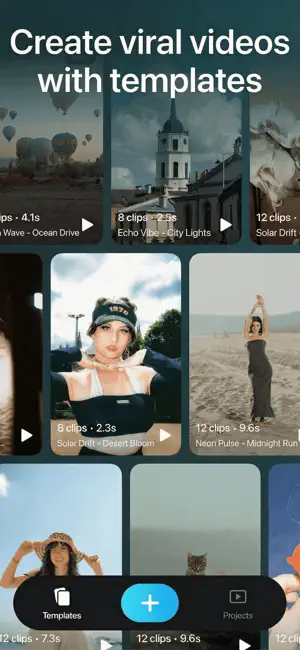
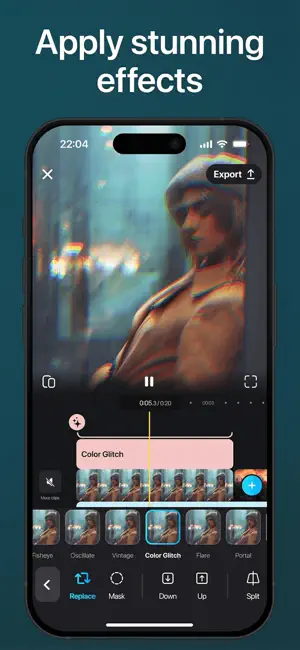


About SnapCut: AI Video Editor
Turn your memories into stunning videos in a single tap! SnapCut is the video editor that makes you look like a pro, even if you're just starting out. Create incredible content for social media, or relive precious moments with friends and family. SnapCut balances simplicity and power, giving you an intuitive interface with advanced features. Unleash your creativity today! Why You'll Love It: • Create amazing videos for socials, friends, and family, all in one tap. • Edit like a pro, even if you're a beginner. • Enjoy a simple, yet powerful, video editing experience. Top Features: • Cut, merge, and adjust clips with a multi-track timeline. • Control video speed with smooth slow-motion or dynamic acceleration. • Add cinematic transitions and keyframe animations. • Remove backgrounds with one click (coming soon). • Real-time preview and auto-save. AI Magic Movie: • Create unique movies in seconds with AI. • Select a duration (15, 30, 45, or 60 seconds) and mood (Chill, Business, Relax, Workout, etc.). • Let AI sync and adjust clips automatically. • Edit or save for later refinement. Unlimited Creativity: • Add visual effects like glitch, prism, and vintage. • Create double exposures and experiment with overlays. • Apply cinematic filters for a Hollywood look. Text & Stickers: • Create titles with a complete text editor. • Animate your videos with dynamic text effects. • Add stickers or images for personalization. Audio & Music: • Access over 1,000 free music tracks. • Sync videos perfectly with the integrated Beat List. • Adjust volume and mixing options with precision. Simplified Sharing: • Export in up to 4K, 60fps with HDR support. • Format videos for TikTok, Instagram, YouTube, and more. Download SnapCut now and unlock limitless creativity! SnapCut PRO Subscription option: Your SnapCut PRO subscription will automatically renew 24-hours prior to the end of each term (month or year correspondingly) and your card will be charged through your iTunes account. You can turn off auto-renewal at any time in your iTunes account settings, but refunds will not be provided for any unused period of the term. Terms of Use: https://musicworldmedia.com/products/snapcut/tou Privacy Policy: https://musicworldmedia.com/products/snapcut/policies Support: [email protected]
Ratings & reviews
4.4
381 ratings
What’s new
Version 1.1.1 · Updated September 12, 2026
App optimization and bug fixes Enjoy!!!
App privacy
The developer, MWM, reported these privacy practices to Apple.
Data Used to Track You
The following data may be used to track you across apps and websites owned by other companies:
- Usage Data: Product Interaction
Data Not Linked to You
The following data, which may be collected but is not linked to your identity, may be used for the following purposes:
- Usage Data: Product Interaction
- Diagnostics: Crash Data
Used for: Analytics, App Functionality
Alternatives to SnapCut: AI Video Editor
Looking for apps like SnapCut: AI Video Editor? Here are 6 similar apps on the App Store. The highest rated is Vmake Labs: create viral video (4.8/5), and all 6 are free to download.
-
 Funimate Video & Motion Editor
4.7
Funimate Video & Motion Editor
4.7
-
 Eklipse.gg
3.9
Eklipse.gg
3.9
-
 Vmake Labs: create viral video
4.8
Vmake Labs: create viral video
4.8
-
 Ivy Professional Video Editor
4.1
Ivy Professional Video Editor
4.1
-
 Blurrr-Music video editor
4.6
Blurrr-Music video editor
4.6
-
 Edith: AI Photo Editor, Camera
4.8
Edith: AI Photo Editor, Camera
4.8
| App | Rating | Price | Last updated | Compare |
|---|---|---|---|---|
| SnapCut: AI Video Editor | 4.4 / 5 (381 ratings) | Free | September 12, 2026 | |
| Funimate Video & Motion Editor | 4.7 / 5 (672,725) | Free | Jul 23, 2026 | Compare |
| Eklipse.gg | 3.9 / 5 (1,147) | Free | Oct 3, 2026 | Compare |
| Vmake Labs: create viral video | 4.8 / 5 (5,174) | Free | Sep 28, 2026 | Compare |
| Ivy Professional Video Editor | 4.1 / 5 (170) | Free | Nov 23, 2023 | Compare |
| Blurrr-Music video editor | 4.6 / 5 (9,534) | Free | Nov 11, 2025 | Compare |
| Edith: AI Photo Editor, Camera | 4.8 / 5 (9,485) | Free | Aug 11, 2026 | Compare |