

Ninja Cord
Takumi Muraishi Social Networking iPhoneiPadiPod touch
Ninja Cord is a free Social Networking app for iPhone and iPad by Takumi Muraishi. Requires iOS 16.0. Updated October 20, 2026.
- Price
- Free
- on the App Store
- Size
- 8 MB
- Age 9+
- Updated
- Oct 20
- 2026 · v2.1.0
Screenshots


About Ninja Cord
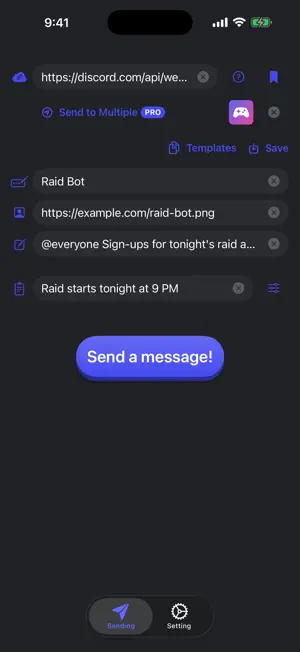
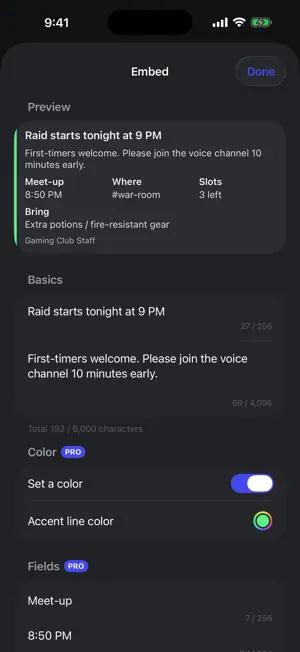
Ninja Cord sends messages to Discord through webhooks. No bot to build and no server to run — just paste a webhook URL and post to a channel with any name and avatar you like. ■ Send in seconds • Pick the sender name, avatar and message • Add an embed with a title and description, and see how it will look in Discord with a live preview • Attach one image (up to 10 MB) ■ Built for repeat use • Save webhook URLs with a name and switch between them in one tap • Save messages you send often as templates, then pin and reorder them • Check what went through in the send history (stored only on this device, and you can turn it off) • Dark and light themes ■ Ninja Cord Pro (monthly auto-renewing subscription) • No ads • Unlimited templates (the free plan keeps up to 3) • Embed color, fields, image, thumbnail, footer and timestamp • Broadcast the same message to several saved destinations at once Watch an ad to try full embeds and broadcasting for one send (ad removal and unlimited templates are not included). ■ Getting started 1. In Discord, open Edit Channel → Integrations → Webhooks for the channel you want to post to 2. Create a new webhook and tap Copy Webhook URL 3. Paste it into the URL field in Ninja Cord and send You need the Manage Webhooks permission on that server to create a webhook. ■ Please note • Anyone who knows a webhook URL can post to that channel. Keep your URLs private. • Ninja Cord is not an official Discord app and is not affiliated with or endorsed by Discord Inc. Terms of Use: https://www.apple.com/legal/internet-services/itunes/dev/stdeula/ Privacy Policy: https://shilokuma-inc.github.io/iOS-Release-Sample/PrivacyPolicy/discord-bot-helper/PrivacyPolicy.html
What’s new
Version 2.1.0 · Updated October 20, 2026
■ A more satisfying send • The Send button now has a tactile, press-down design • Feel a haptic tap when you press Send, and when a message succeeds or fails ■ Get your webhook URL faster • Open the Discord app right from "How to get a webhook URL" • No Discord app? Open it from the App Store or in the browser instead • Paste the webhook URL you copied in Discord straight into the URL field when you come back ■ Other improvements • On iPad, the input fields on the Send screen no longer stretch too wide • Buttons in dialogs are easier to read • Improved sending reliability • Bug fixes
App privacy
The developer, Takumi Muraishi, reported these privacy practices to Apple.
Data Used to Track You
The following data may be used to track you across apps and websites owned by other companies:
- Identifiers: Device ID
- Usage Data: Advertising Data
Data Not Linked to You
The following data, which may be collected but is not linked to your identity, may be used for the following purposes:
- Identifiers: Device ID
- Usage Data: Advertising Data
- Purchases: Purchase History
Used for: Third-Party Advertising, Analytics
Alternatives to Ninja Cord
Looking for apps like Ninja Cord? Here are 6 similar apps on the App Store. The highest rated is SuperExpat (5.0/5), and all 6 are free to download.
-
 はげましあい
-
 good! - 褒め合うSNS
-
 DihDah
3.7
DihDah
3.7
-
 Throw – Connect in Silence
-
 SuperExpat
5.0
SuperExpat
5.0
-
 famigo - Family & Friends Chat
5.0
famigo - Family & Friends Chat
5.0
| App | Rating | Price | Last updated | Compare |
|---|---|---|---|---|
| Ninja Cord | – | Free | October 20, 2026 | |
| はげましあい | – | Free | Apr 18, 2026 | Compare |
| good! - 褒め合うSNS | – | Free | Nov 23, 2025 | Compare |
| DihDah | 3.7 / 5 (6) | Free | May 8, 2024 | Compare |
| Throw – Connect in Silence | – | Free | Mar 11, 2026 | Compare |
| SuperExpat | 5.0 / 5 (7) | Free | Sep 17, 2026 | Compare |
| famigo - Family & Friends Chat | 5.0 / 5 (2) | Free | Oct 17, 2026 | Compare |
Compare Ninja Cord with the top alternatives: ratings, updates, ASO score and keyword gaps →