

Authenticator App: 2FA & Cloud
Beijing Haohai Xincheng Technology Co., Ltd Productivity iPhoneiPadiPod touchApple Watch
Authenticator App: 2FA & Cloud is a free Productivity app for iPhone and iPad by Beijing Haohai Xincheng Technology Co., Ltd. Rated 4.5/5 from 15 ratings.
- Rating
- 4.5
- 15 ratings
- Price
- Free
- on the App Store
- Size
- 48 MB
- Age 4+
- Updated
- Aug 27
- 2026 · v1.3.8
Screenshots



About Authenticator App: 2FA & Cloud
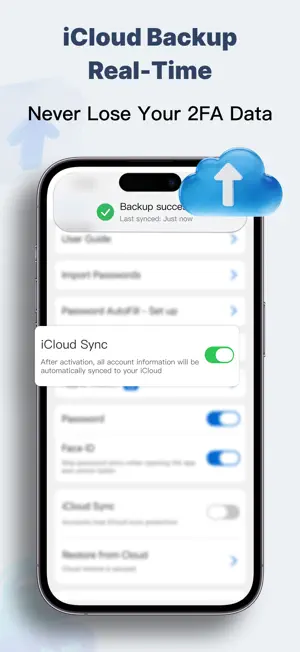
The ultimate upgrade for Google Authenticator! Worried about losing your phone? Secure iCloud Cloud Backup ensures you never get locked out. Optimized for US users: Seamless 2FA support for Discord, Fortnite, Microsoft, AWS, and all your digital accounts. 【Core Features】 - Never Lose Access: iCloud Backup Lost or broke your phone? Don't risk losing your accounts. Enable Cloud Backup to securely store your 2FA tokens in your personal iCloud. Restore everything instantly on a new iPhone with zero hassle. - For Gamers: Secure Your Loot The essential security tool for gamers. Perfect support for Discord, Roblox, Fortnite (Epic Games), PlayStation (PSN), Xbox, Twitch, and Battle.net. Generate codes instantly without lag, even while offline. - Apple Watch Support Unlock from your wrist! No need to pull out your phone. View your 2FA codes directly on your Apple Watch. Log in faster to your games or work VPNs. - Business & Work: Microsoft Compatible Enterprise-grade security. A powerful alternative to Microsoft Authenticator. Works seamlessly with Office 365, Outlook, Okta, Salesforce, Cisco Duo, AWS, and GitHub. Streamline your workflow with professional reliability. - Password & 2FA Manager: All-in-One More than just an authenticator. Built-in Password Manager allows you to store your passwords alongside your 2FA codes. Copy and paste with ease—manage your entire digital identity in one secure app. 【Why Choose Us?】 - Universal Compatibility: Supports standard 2FA for 1000+ services. Including Google, Amazon, Microsoft, Facebook, Instagram, Discord, Snapchat, Roblox, Coinbase, PayPal, LinkedIn, and more. - Easy Migration: Support batch import & export via iCloud or Text File. Easily transfer data from Google Authenticator to your new iPhone. - Privacy Lock: Set an app launch password to prevent others from viewing your verification codes and account information when using your phone, and protect your privacy and security. - Bank-Level Encryption: Your data is yours. We use advanced encryption and store data locally or in your iCloud. We never upload your keys to 3rd-party servers. - Scan from Photos: Can't scan a QR code on your screen? Use our Import from Photos feature. Just take a screenshot and load it—no need for a second device. - Offline Access: No internet? No problem. Generate valid TOTP codes even in Airplane Mode. 【Q&A】 Q: What is an Authenticator? A: It is a tool that generates Time-based One-Time Passwords (TOTP) to protect your accounts from hacking. It serves as a digital key for Two-Factor Authentication (2FA). Q: Can it replace Google Authenticator? A: Yes! It is fully compatible with Google's protocols but adds premium features like iCloud Backup, Password Management, and Photo Import. It's safer and easier to use. 【Subscription Info】 Unlock Premium for unlimited accounts and secure cloud backup. - Payment will be charged to your iTunes Account at confirmation of purchase. - Subscription automatically renews unless auto-renew is turned off at least 24 hours before the end of the current period. - Account will be charged for renewal within 24 hours prior to the end of the current period. - You can manage your subscriptions and turn off auto-renewal by going to your Account Settings after purchase. - Any unused portion of a free trial period, if offered, will be forfeited when you purchase a subscription. Contact Us: [email protected] Refunds for paid subscriptions follow Apple’s official rules. All payment transactions, refund reviews and processing are under the exclusive authority of Apple Inc. As the app developer, we cannot process refunds directly. Please submit your refund request at Apple’s official page: https://reportaproblem.apple.com. Log in with your Apple ID, find your order and apply. Apple will inform you of the review result within 48 hours. Terms of Service: https://authfile.pages.dev/terms_en-US.html Privacy Policy: https://authfile.pages.dev/privacy_en-US.html
Ratings & reviews
4.5
15 ratings
What’s new
Version 1.3.8 · Updated August 27, 2026
Optimize user experience.
App privacy
The developer, Beijing Haohai Xincheng Technology Co., Ltd, reported these privacy practices to Apple.
Data Not Linked to You
The following data, which may be collected but is not linked to your identity, may be used for the following purposes:
- Identifiers: Device ID
- Usage Data: Advertising Data
- Diagnostics: Crash Data, Performance Data
Used for: Third-Party Advertising, App Functionality
Alternatives to Authenticator App: 2FA & Cloud
Looking for apps like Authenticator App: 2FA & Cloud? Here are 6 similar apps on the App Store. The highest rated is PrivScanner: PPT Slides to PDF (5.0/5), and all 6 are free to download.
-
 PomoLite - Focus Timer Keeper
4.9
PomoLite - Focus Timer Keeper
4.9
-
 Fun Clock - Nice Ticking Sound
4.3
Fun Clock - Nice Ticking Sound
4.3
-
 Noteit -AI Journal Notes Diary
4.7
Noteit -AI Journal Notes Diary
4.7
-
 PrivScanner: PPT Slides to PDF
5.0
PrivScanner: PPT Slides to PDF
5.0
-
 Remote Print: Wireless Printer
4.6
Remote Print: Wireless Printer
4.6
-
 DeadLineTodo - DDL Management
4.5
DeadLineTodo - DDL Management
4.5
| App | Rating | Price | Last updated | Compare |
|---|---|---|---|---|
| Authenticator App: 2FA & Cloud | 4.5 / 5 (15 ratings) | Free | August 27, 2026 | |
| PomoLite - Focus Timer Keeper | 4.9 / 5 (7) | Free | Aug 19, 2024 | Compare |
| Fun Clock - Nice Ticking Sound | 4.3 / 5 (84) | Free | Oct 2, 2026 | Compare |
| Noteit -AI Journal Notes Diary | 4.7 / 5 (36) | Free | May 26, 2026 | Compare |
| PrivScanner: PPT Slides to PDF | 5.0 / 5 (1) | Free | Aug 21, 2026 | Compare |
| Remote Print: Wireless Printer | 4.6 / 5 (63) | Free | Sep 21, 2025 | Compare |
| DeadLineTodo - DDL Management | 4.5 / 5 (2) | Free | Jul 18, 2025 | Compare |