

ERS Time Logbook
ERS Biometrics (Pty) Ltd Business iPhoneiPadiPod touch
ERS Time Logbook is a free Business app for iPhone and iPad by ERS Biometrics (Pty) Ltd. Requires iOS 15.6. Updated May 5, 2026.
- Price
- Free
- on the App Store
- Size
- 96 MB
- Age 4+
- Updated
- May 5
- 2026 · v1.2.13
Screenshots


About ERS Time Logbook
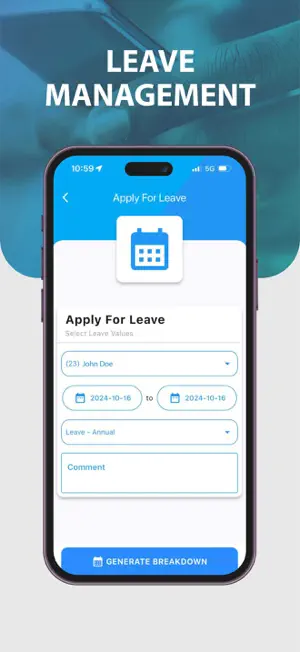
Welcome to the ERS Time Logbook! We appreciate your interest in our app, designed to streamline time and attendance management for businesses. Important: Before downloading, ensure you have the latest version of the ERSBio Web-based software. This will provide optimal compatibility and performance. Key Features: - Remote Clocking: Easily clock in and out from anywhere, with options for IN/OUT and undefined entries, ensuring accurate time tracking for all employees. - Job Costing Clocking: Track time spent on specific job codes, allowing for precise job costing and project management. - Mobile Tracking: Monitor employee locations in near real-time to enhance accountability and efficiency. - Geofencing: Set up virtual boundaries to automatically clock for employees when they enter or leave designated areas. - Leave Management: Simplify the process of managing employee leave through digital application and approval processes. - Job Code Creation: Customize and create specific job codes to match your organization's needs. - Push Notifications: Stay updated with real-time notifications related to clock-ins, clock-outs, and job-related alerts. - Hours Worked Overview: Access daily/ weekly/ monthly summaries of hours worked, helping you monitor productivity effortlessly. - Clocking Report: Generate detailed reports on clocking activities for better payroll management and auditing. - Support Query Logging: Instantly log support requests within the app, ensuring your issues are addressed promptly by our team of dedicated support staff. - Customizable Usage: Control mobile clocking access, allowing you to disable it for specific employees as necessary. Permissions: To ensure proper functionality, certain permissions are required: Camera, Location, and USB Permissions: By default, these permissions are disabled. To enable, navigate to Settings > Application Manager > Select the Application > Open Permissions and activate the necessary permissions. Requirements: - Latest ERSBio Web-Based Software Version: Make sure you’re running the most current version of ERSBio for seamless integration. - Compatible Handset: The app is optimized for various devices—check compatibility to avoid issues. - Data Connection: An internet connection is necessary for full app functionality. - Location Permission: Enable location tracking for accurate mobile monitoring. Feedback: We value your input! Please rate the ERS Time Logbook app to help us improve and serve you better.
What’s new
Version 1.2.13 · Updated May 5, 2026
Performance, usability, and security improvements across the app. Updated navigation, home, employee, reports, overview, and leave pages for a smoother experience. Improved sign-out reliability. New: Emergency Evacuation Register, shift alert notifications, and auto clock-out alerts. Enhanced tracking accuracy, geofencing, and automation.
App privacy
The developer, ERS Biometrics (Pty) Ltd, reported these privacy practices to Apple.
Data Linked to You
The following data, which may be collected and linked to your identity, may be used for the following purposes:
- Location: Precise Location, Coarse Location
Used for: App Functionality
Alternatives to ERS Time Logbook
Looking for apps like ERS Time Logbook? Here are 6 similar apps on the App Store. The highest rated is VCOM (3.7/5), and all 6 are free to download.


| App | Rating | Price | Last updated | Compare |
|---|---|---|---|---|
| ERS Time Logbook | – | Free | May 5, 2026 | |
| ProtectionPro Neo | 1.8 / 5 (5) | Free | Feb 5, 2025 | Compare |
| FleetSnap360 | – | Free | Apr 22, 2026 | Compare |
| Signa Academy | – | Free | Aug 17, 2026 | Compare |
| SMOLLAN SMART | – | Free | Nov 2, 2026 | Compare |
| VCOM | 3.7 / 5 (7) | Free | Jul 22, 2024 | Compare |
| Uniclox Platinum Mobile | – | Free | Nov 2, 2026 | Compare |
Compare ERS Time Logbook with the top alternatives: ratings, updates, ASO score and keyword gaps →