

Navidrome Player: SubSonify
DoubleFau Music iPhoneiPadiPod touchApple Watch
Navidrome Player: SubSonify is a free Music app for iPhone and iPad by DoubleFau. Rated 3.0/5 from 2 ratings. Requires iOS 26.1. Updated October 9, 2026.
- Rating
- 3.0
- 2 ratings
- Price
- Free
- on the App Store
- Size
- 62 MB
- Age 4+
- Updated
- Oct 9
- 2026 · v1.5.3
Screenshots


About Navidrome Player: SubSonify
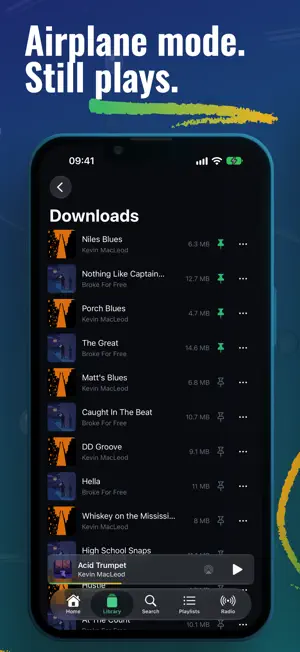
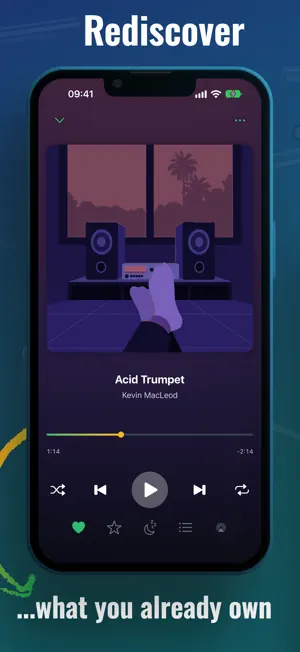
SubSonify is a native iOS client for self-hosted music servers: Navidrome, Airsonic, Ampache, gonic, LMS and anything else that speaks the Subsonic API. Your library, offline, in CarPlay, on Apple Watch, and one "Hey Siri" away. There is no tracking in it, and the only server the app talks to is yours. Free is the whole app at ten songs a day; Pro only removes the cap. WHAT IT DOES • Full offline library. The app keeps a local copy of your library, so browsing and search are instant and work with no signal. It syncs in the background; there is no offline mode to switch on. • Home. Continue Listening, suggestions, For You mixes and Start a Radio from any song, built from your listening, on every server. The server's play history is imported too. • Downloads. Keep albums, playlists or single songs on the device. They survive reboots and keep playing when your server is down. • Auto-download. Point it at your starred songs or any playlist and new additions download on their own. • CarPlay. Browse, search and play from the car screen, with artwork, queue, Up Next, shuffle and repeat. • Apple Watch. Standalone playback: stream over Wi-Fi or LTE, or sync tracks to the watch and leave the phone at home. • Siri. "Hey Siri, play [artist] on SubSonify" plays from your server. Artists, albums, songs, playlists, or "play something" to shuffle the library. Shortcuts too. • Internet radio. Add your own stations in the app; where the server allows it they are saved there, otherwise they stay on the device. Your server's stations appear too. • Crossfade and quality. Adjustable crossfade, plus separate stream quality for Wi-Fi and cellular: FLAC at home, transcoded on mobile data. • Five languages: English, German, Spanish, French, Ukrainian. SERVERS AND LOGIN Tested against Navidrome, LMS, Ampache and gonic. On servers with OpenSubsonic API keys, SubSonify logs in with a key, so your password is never stored on the device. Everywhere else it uses the salted-token authentication every Subsonic server has supported for years. Credentials live in the iOS Keychain and go to your server and nowhere else. WHAT IT COLLECTS Nothing. There is no account to create, and the app ships without an analytics SDK or a crash reporter. Listening history, playlists, downloads and settings stay on your device and your server. The app makes two kinds of connections: to your server, and to Apple for purchases. The one exception is internet radio: stations stream straight from the broadcaster, who can see your IP address. FREE AND PRO Free means ten songs a day with every feature included: downloads, offline playback, CarPlay, the watch app, sync, search and playlists. Pro removes the cap and does nothing else. If ten songs a day is enough, the app costs nothing, ever. Pro is available monthly, yearly, or as a one-time lifetime purchase. The yearly plan starts with a free week. Prices are shown in the app in your local currency. Payment is charged to your Apple Account at confirmation of purchase. Subscriptions renew automatically unless auto-renew is turned off at least 24 hours before the end of the current period; your account is charged for renewal within 24 hours of the end of that period. Manage your subscription and turn off auto-renew in your Apple Account settings after purchase. Privacy policy: https://subsonify.app/privacy Terms of use: https://www.apple.com/legal/internet-services/itunes/dev/stdeula/ Screenshot music: Creative Commons tracks by Kevin MacLeod (incompetech.com) and Broke For Free, CC BY. More at https://subsonify.app
What’s new
Version 1.5.3 · Updated October 9, 2026
• CarPlay Home now has every section your phone's Home has, and you can arrange it in Settings. • A search field on Home, with Playlists, Artists, Albums, Songs and Radio filters for the sections below. • ReplayGain: tracks play at a matched loudness, by track or by album, with a pre-amp. • Remove a song from a playlist from it's menu. • Sync has a Stop button and a Manual mode. Your first sync and Sync Now show progress; automatic syncs are quiet. • Big libraries sync faster and more reliably, and logging in to a slow server answers within 15 seconds.
App privacy
The developer, DoubleFau, reported these privacy practices to Apple.
Data Not Collected
The developer does not collect any data from this app.
Alternatives to Navidrome Player: SubSonify
Looking for apps like Navidrome Player: SubSonify? Here are 6 similar apps on the App Store. The highest rated is AmpSonic: Self-Hosted Music (5.0/5), and all 6 are free to download.
-
 Minidisc - Navidrome & Lidarr
4.0
Minidisc - Navidrome & Lidarr
4.0
-
 TuneBand
-
 AmpSonic: Self-Hosted Music
5.0
AmpSonic: Self-Hosted Music
5.0
-
 Sound Room: Subsonic Client
5.0
Sound Room: Subsonic Client
5.0
-
 Narjo
4.2
Narjo
4.2
-
 NetMusic: Cloud & NAS Player
4.3
NetMusic: Cloud & NAS Player
4.3
| App | Rating | Price | Last updated | Compare |
|---|---|---|---|---|
| Navidrome Player: SubSonify | 3.0 / 5 (2 ratings) | Free | October 9, 2026 | |
| Minidisc - Navidrome & Lidarr | 4.0 / 5 (3) | Free | Sep 15, 2026 | Compare |
| TuneBand | – | Free | Aug 8, 2026 | Compare |
| AmpSonic: Self-Hosted Music | 5.0 / 5 (1) | Free | Oct 16, 2026 | Compare |
| Sound Room: Subsonic Client | 5.0 / 5 (2) | Free | Jun 4, 2026 | Compare |
| Narjo | 4.2 / 5 (35) | Free | Oct 4, 2026 | Compare |
| NetMusic: Cloud & NAS Player | 4.3 / 5 (3) | Free | Oct 16, 2026 | Compare |