

Group Text - Mass SMS Message
Ivan Kaliakin Productivity iPhoneiPadiPod touch
Group Text - Mass SMS Message is a free Productivity app for iPhone and iPad by Ivan Kaliakin. Rated 4.5/5 from 232 ratings. Requires iOS 17.6.
- Rating
- 4.5
- 232 ratings
- Price
- Free
- on the App Store
- Size
- 15 MB
- Age 4+
- Updated
- Jul 9
- 2026 · v1.11
Screenshots

About Group Text - Mass SMS Message
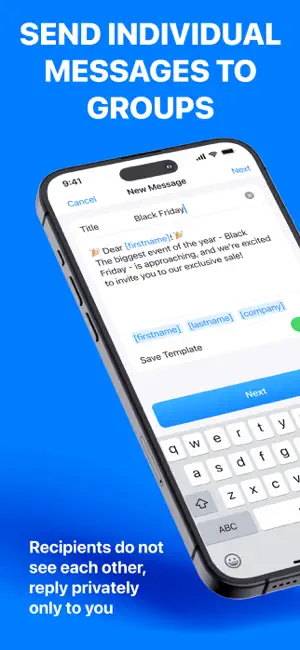
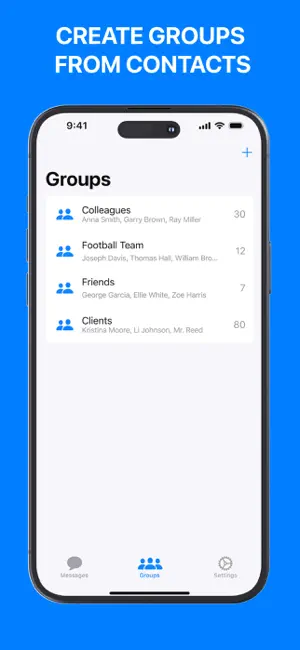
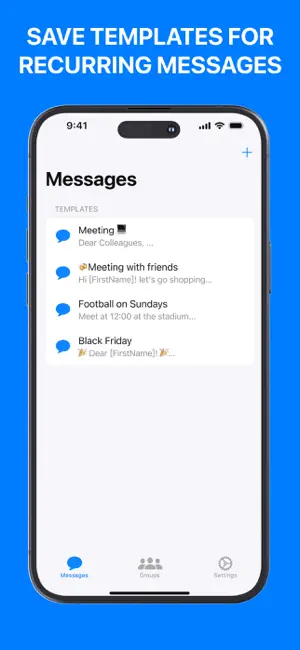
Send personalized mass texts to hundreds of contacts at once — every recipient gets a private message that feels like you wrote it just for them. Or switch to group chat mode when you need everyone in one conversation. Trusted by realtors, coaches, churches, event planners, restaurants, and small business owners across the United States. WHY MASSTEXTER? • Personalized 1-on-1 Bulk SMS Send mass messages that land as individual private texts. Each contact sees only their own message, and every reply comes back to you only. • Group Chat Mode When You Need It Switch to group sending when you want everyone to see the conversation — perfect for coordinating events, family chats, or team updates. • Smart Personalization Use placeholders like [firstname], [lastname], and custom fields. "Hey [firstname]" becomes "Hey Sarah" automatically. Every contact feels personally addressed. • Send From Your Own Phone Number Use your own iPhone number and your regular unlimited texting plan. No business registration required, no separate texting service to sign up for, no per-message charges. • Pacing Between Messages for Larger Lists Built-in delays between sends help you space out messages naturally when reaching out to many contacts at once. • CSV Import & Contact Groups Import contacts from a CSV file or your iCloud address book. Organize them into reusable groups and update them anytime. • Templates That Save Hours Save your most frequently sent messages as templates. Pick one, personalize, send in seconds. • Image Attachments Attach photos to your messages — perfect for property listings, event flyers, menus, and product launches. BUILT FOR YOUR PROFESSION - Realtors & Real Estate Agents — Follow up with leads, announce open houses, share new listings with interested buyers - Coaches, Trainers & Studios — Send class schedules, workout reminders, and check-ins - Event Planners — Coordinate guests, share venue updates, send save-the-dates and last-minute changes - Churches & Nonprofits — Send daily devotions, announce events, run prayer chains and outreach campaigns - Restaurants & Salons — Announce specials, send booking reminders, recover no-shows with friendly follow-ups - Sales Teams — Warm, personal follow-ups at scale that don't sound automated - Service Pros (Plumbers, Electricians, Cleaners, Landscapers) — Booking confirmations, ETA updates, payment reminders, thank-you messages - Teachers & Sports Coaches — Class updates, parent notifications, practice and game reminders - Property Managers — Maintenance notices, rent reminders, community announcements - Small Business Owners — Customer outreach, promotions, holiday greetings, loyalty messages HOW IT WORKS 1. Import your contacts from your phone, iCloud, or a CSV file 2. Choose your sending mode — personalized 1-on-1 or group chat 3. Write your message using personalization tags or pick from your templates 4. Tap send — and you're done COMMON USE CASES → Send daily devotions to your church or prayer group → Announce new property listings to all interested buyers → Send class reminders to parents the night before → Coordinate a birthday party or wedding in one group chat → Send personalized holiday greetings to every client on your list SUBSCRIPTION DETAILS Start free to explore the app. Upgrade to Pro to unlock unlimited messaging, larger group sizes, and advanced features. Payment is charged to your Apple ID account at confirmation of purchase. Subscriptions automatically renew unless canceled at least 24 hours before the end of the current period. You can manage and cancel your subscription anytime in your Apple ID account settings on the App Store. SUPPORT Need help? Email us at [email protected] — we typically reply within 24 hours. Privacy Policy: https://docs.google.com/document/d/1rKJfgpC98Odno_iLiGD16OWgwFsvSGirkyOkD8JSFdk Terms of Use: https://docs.google.com/document/d/1UWX5jFP3IfYSITHUa3Ielg04CSlr4FrtHZWf_ZTKoYM
Ratings & reviews
4.5
232 ratings
What’s new
Version 1.11 · Updated July 9, 2026
- Bug fixes and performance improvements
App privacy
The developer, Ivan Kaliakin, reported these privacy practices to Apple.
Data Used to Track You
The following data may be used to track you across apps and websites owned by other companies:
- Identifiers: Device ID
Data Not Linked to You
The following data, which may be collected but is not linked to your identity, may be used for the following purposes:
- Identifiers: Device ID
- Usage Data: Product Interaction
- Diagnostics: Crash Data
- Contacts: Contacts
Used for: Developer’s Advertising or Marketing, Analytics, App Functionality
Alternatives to Group Text - Mass SMS Message
Looking for apps like Group Text - Mass SMS Message? Here are 6 similar apps on the App Store. The highest rated is Text to Speech – Read Aloud (4.9/5), and all 6 are free to download.
-
 SendHype - Group text
4.6
SendHype - Group text
4.6
-
 Yuna AI - Chatbot & Assistant
4.8
Yuna AI - Chatbot & Assistant
4.8
-
 WSTR: Daily Planner Schedule
4.5
WSTR: Daily Planner Schedule
4.5
-
 Tor Browsing & VPN Security
4.6
Tor Browsing & VPN Security
4.6
-
 Group Text | Mass Message
4.3
Group Text | Mass Message
4.3
-
 Text to Speech – Read Aloud
4.9
Text to Speech – Read Aloud
4.9
| App | Rating | Price | Last updated | Compare |
|---|---|---|---|---|
| Group Text - Mass SMS Message | 4.5 / 5 (232 ratings) | Free | July 9, 2026 | |
| SendHype - Group text | 4.6 / 5 (1,680) | Free | Apr 23, 2026 | Compare |
| Yuna AI - Chatbot & Assistant | 4.8 / 5 (1,233) | Free | Sep 4, 2026 | Compare |
| WSTR: Daily Planner Schedule | 4.5 / 5 (58) | Free | Aug 26, 2024 | Compare |
| Tor Browsing & VPN Security | 4.6 / 5 (526) | Free | Aug 8, 2026 | Compare |
| Group Text | Mass Message | 4.3 / 5 (5,847) | Free | Sep 3, 2026 | Compare |
| Text to Speech – Read Aloud | 4.9 / 5 (141) | Free | Feb 24, 2026 | Compare |