

Hancom Office: Docs & PDF
HANCOM Incorporated Productivity iPhoneiPadiPod touch
Hancom Office: Docs & PDF is a free Productivity app for iPhone and iPad by HANCOM Incorporated. Requires iOS 15.0. Updated July 14, 2026.
- Price
- Free
- on the App Store
- Size
- 583 MB
- Age 4+
- Updated
- Jul 14
- 2026 · v10.48.4
Screenshots



About Hancom Office: Docs & PDF
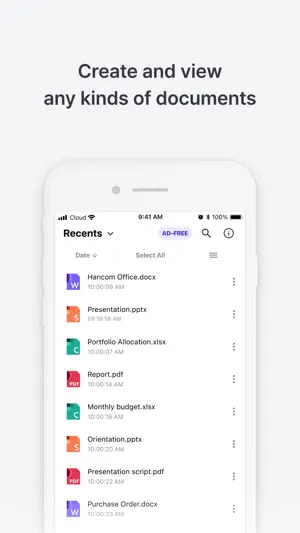
Now on the store: the editor version of Hancom Office Viewer, chosen by 9 million users! Try Hancom Office for free whenever you need to work with documents from writing resumes and essays to creating presentations and analyzing data. [Features] View and edit a variety of document formats, including document, spreadsheet, presentation and PDF, all in a single app. Feel free to work on your documents anytime, anywhere regardless of internet connectivity. Start efficient document creation with the help of desired UI. Seamlessly open and edit Microsoft Office documents within the Hancom Office app. [Word – editing a document] You can move what's in your mind into your document freely in the palm of your hand. Find or replace words, apply rich text or paragraph formats, and make your document neat and tidy using style and numbering. Adding various objects like a shape, an image, or a chart can also make your document more dynamic and visualized. [Cell – managing and analysing data] Cell enables you to manage and analyze data effectively. Gain a powerful tool for calculation, data analysis, and visualization – including advanced features such as conditional formatting, sparklines, and more – all in the palm of your hand. Provided a number of functions, Cell ensures that you can make calculations of massive data quickly and accurately without a single error. [Show – designing a presentation] Show makes it easy to create and design a stunning presentation with just a few clicks. Choose and combine from a wide selection of design themes and animations, predefined objects and effects, then you can visually present your own ideas and grab your audience's attention. [About subscription] With the in-app purchase, you can solely focus on working documents without interruption of ads. - 1-month ad-free: $3.99 ($2.49 for the first subscription) - 6-month ad-free: $19.99 ($14.49 for the first subscription) - 1-year ad-free: $29.99 ($24.99 for the first subscription Payment is processed through your Apple App Store account. Payment history and refunds are available through the Apple customer center. The ad-free product is automatically paid periodically based on the subscription period and automatically renews 24 hours before the current subscription ends. You can manage and cancel your subscription in your account settings. System requirements - Supported operating systems: iOS 15.0 or later - Supported languages: English and Japanese ▶ Required access permissions None ▶ Optional access permissions - Photos Use to add photos to documents - Camera Use to upload images or videos - User activity Use to provide personalized advertising *Optional access permissions are needed when using this feature and if not, there may be restrictions on using the service. [How to withraw your consent] Settings > Permissions > Privacy > Allow or deny access For more information, please see our Privacy Policy and End User License Agreement (EULA). - Privacy Policy : https://www.hancom.com/member/treatInfoAgreement.do - End User License Agreement(EULA) : https://help.hancom.com/hoffice_ios/global/en-US/index.htm#t=license%2Feula.htm
What’s new
Version 10.48.4 · Updated July 14, 2026
Overall service stability enhancements
App privacy
The developer, HANCOM Incorporated, reported these privacy practices to Apple.
Data Used to Track You
The following data may be used to track you across apps and websites owned by other companies:
- Location: Coarse Location
- User Content: Customer Support
- Usage Data: Product Interaction, Advertising Data
Data Linked to You
The following data, which may be collected and linked to your identity, may be used for the following purposes:
- Location: Coarse Location
- Usage Data: Product Interaction, Advertising Data
- User Content: Customer Support
Used for: Third-Party Advertising, Analytics, App Functionality, Other Purposes
Data Not Linked to You
The following data, which may be collected but is not linked to your identity, may be used for the following purposes:
- Identifiers: Device ID
- Purchases: Purchase History
- Diagnostics: Crash Data, Performance Data
- Other Data: Other Data Types
Used for: Third-Party Advertising, Analytics, Product Personalization, App Functionality, Other Purposes
Alternatives to Hancom Office: Docs & PDF
Looking for apps like Hancom Office: Docs & PDF? Here are 6 similar apps on the App Store. The highest rated is daglo: All-in-one AI Notetaker (4.8/5), and all 6 are free to download.
-
 Polaris Viewer - PDF, Document
4.6
-
 daglo: All-in-one AI Notetaker
4.8
-
 Polaris Office - PDF & Docs
4.4
-
 Ultimate Focus - Visual Timer
4.6
-
 Themes for PowerPoint - DesiGN
4.2
-
 Bakey: Install & Use Fonts
4.8
| App | Rating | Price | Last updated | Compare |
|---|---|---|---|---|
| Hancom Office: Docs & PDF | – | Free | July 14, 2026 | |
| Polaris Viewer - PDF, Document | 4.6 / 5 (74) | Free | Apr 28, 2026 | Compare |
| daglo: All-in-one AI Notetaker | 4.8 / 5 (276) | Free | Nov 4, 2026 | Compare |
| Polaris Office - PDF & Docs | 4.4 / 5 (2,476) | Free | Sep 16, 2026 | Compare |
| Ultimate Focus - Visual Timer | 4.6 / 5 (190) | Free | Oct 30, 2026 | Compare |
| Themes for PowerPoint - DesiGN | 4.2 / 5 (51) | Free | Sep 23, 2026 | Compare |
| Bakey: Install & Use Fonts | 4.8 / 5 (279) | Free | Oct 28, 2026 | Compare |