

MagiCam: AI Photo Editor
晶雷 端 Photo & Video iPhoneiPadiPod touch
MagiCam: AI Photo Editor is a free Photo & Video app for iPhone and iPad by 晶雷 端. Requires iOS 17.6. Updated August 30, 2026.
- Price
- Free
- on the App Store
- Size
- 175 MB
- Age 4+
- Updated
- Aug 30
- 2026 · v2.1
Screenshots
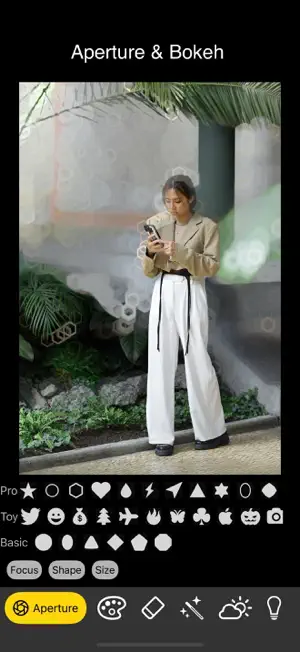

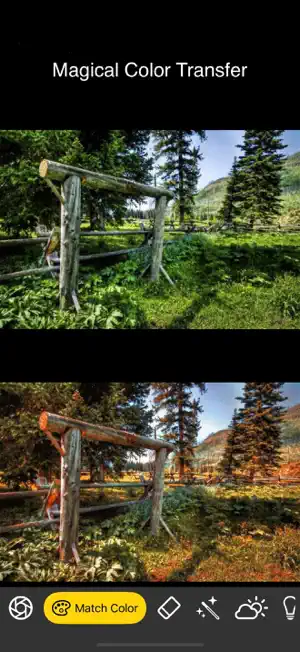

About MagiCam: AI Photo Editor
- Black magic: Take the photo first, then focus. Background blurring and various professional and fun bokeh effects. It can handle the depth of field in Apple's portrait mode photos, and can also generate depth of field using AI models. - You can transfer the colors of one template photo to another photo, and AI will do the job. Carefully choosing the color template photo can achieve amazing and interesting effects. - Remove unwanted objects by brushing over them. - Intelligently enhance the image quality of blurred photos. - A photography tip: Many people always take dark photos with their mobile phones. This is because they always use the default automatic exposure of the mobile phone, which will dim the brighter environment. With our AI HDR, there is no such trouble. You can use this function on existing photos, so that the photos have a wide range of vivid light and dark details. Create HDR effects for a single photo, and adjust the exposure, contrast, highlights and shadows, saturation, brightness, sharpness and other parameters later to make the effect perfect. There are multiple sets of different HDR effects to choose from. You can also adjust the edge darkening effect. The default is 0x edge darkening, and you can also adjust the edge darkening multiple before using HDR. Edge darkening can control the shadow effect. You can choose 2x, 1x, 0x. - Process photos taken at night to make the night scene details clear. You can also adjust multiple parameters later.
What’s new
Version 2.1 · Updated August 30, 2026
- Improved aperture and bokeh. - Revised screenshots as Apple required.
App privacy
The developer, 晶雷 端, reported these privacy practices to Apple.
Data Used to Track You
The following data may be used to track you across apps and websites owned by other companies:
- Identifiers: Device ID
- Usage Data: Advertising Data
Data Not Linked to You
The following data, which may be collected but is not linked to your identity, may be used for the following purposes:
- Identifiers: Device ID
- Usage Data: Advertising Data
Used for: Third-Party Advertising
Alternatives to MagiCam: AI Photo Editor
Looking for apps like MagiCam: AI Photo Editor? Here are 6 similar apps on the App Store. The highest rated is Whimsy Cam: Film & Instant (5.0/5), and all 6 are free to download.
-
 Pixelove - AI Image Generator
-
 Uppik
1.0
-
 Old Photo Repair, Restore &Fix
-
 Whimsy Cam: Film & Instant
5.0
-
 ComparePhotos
-
 projectcamera
| App | Rating | Price | Last updated | Compare |
|---|---|---|---|---|
| MagiCam: AI Photo Editor | – | Free | August 30, 2026 | |
| Pixelove - AI Image Generator | – | Free | May 29, 2025 | Compare |
| Uppik | 1.0 / 5 (1) | Free | Apr 22, 2024 | Compare |
| Old Photo Repair, Restore &Fix | – | Free | Aug 5, 2026 | Compare |
| Whimsy Cam: Film & Instant | 5.0 / 5 (1) | Free | Oct 27, 2026 | Compare |
| ComparePhotos | – | Free | Sep 16, 2026 | Compare |
| projectcamera | – | Free | Feb 27, 2026 | Compare |