

Ari Helper
Blaine Miller Productivity iPhoneiPadiPod touchMacApple Watch
Ari Helper is a paid Productivity app for iPhone and iPad by Blaine Miller. Rated 5.0/5 from 1 ratings. Requires iOS 26.0. Updated September 18, 2026.
- Rating
- 5.0
- 1 ratings
- Price
- 24.99 USD
- on the App Store
- Size
- 88 MB
- Age 17+
- Updated
- Sep 18
- 2026 · v7.0.3
Screenshots


About Ari Helper
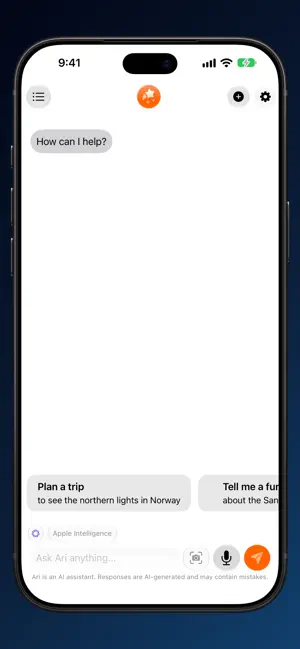
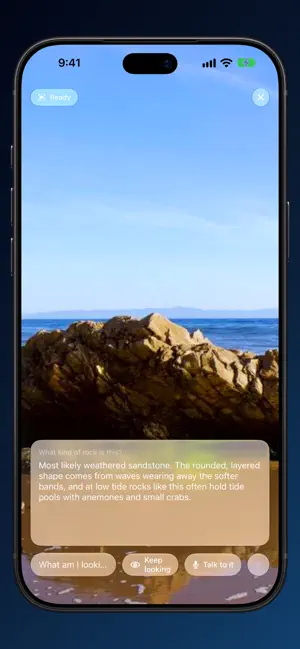
Introducing Ari - Your Easy-to-Use AI Assistant! Meet Ari, your personal AI assistant, right on your device! Ari runs its models on the device itself, so it works entirely offline — no internet connection required. Your privacy is our priority – Ari doesn't collect any of your personal data. Start Ari anywhere with Siri and App Intents — just say "Ask Ari," speak your question, and hear the answer back. Power users get a full Shortcuts catalog: Ask Ari with any model (Apple Intelligence, local, or cloud), start chats, generate and edit images, analyze PDFs, speak replies, change settings, queue Code Session tasks on Mac, and dispatch prompts to other devices — all chainable in Shortcuts. Ari is on your wrist too: the Apple Watch app remote-controls Ari on iPhone. Dictate from the "Ask Ari" complication or Smart Stack, watch answers stream in, hear them spoken, and hand long replies to iPhone. Questions queue when the phone is away; private chats stay off the watch. Conversations show up in Spotlight — including by what's in their images. Ari reads text and objects in chat pictures on-device so you can search for "that screenshot with the receipt". Private media is never indexed. With Sensitive Content Warning on, flagged images blur behind "Show Anyway" (verified adults can opt out). More to love: Text-to-Speech (device voice or Ava); long-press to copy or retry across models; syntax highlighting with one-tap code copy; Previous Chats synced via iCloud. On Apple Intelligence (iOS 26 / macOS 26 and later), Ari uses the on-device foundation model by default — private, no API key, no network. Attach images: on iOS 27 and macOS 27 the model sees them directly; on OS 26 Ari describes them on-device with the Vision framework (text, tables, barcodes, subjects). Prefer full vision models? Pick one from the menu. Download on-device models with a tap. First launch can install Google's Gemma 4 vision model sized to your device. Or paste a model URL. Self-host with Ollama or any OpenAI-compatible server — LM Studio, vLLM, llama.cpp, LiteLLM — by entering its address, or generate images with DrawThings over gRPC. New in Ari 7: Ari makes pictures and films, and repairs the ones you already have. Films is a studio — write a film as a list of shots, render them one at a time, keep the ones that work, and watch the cut come together in a player above the timeline. Pictures get a canvas editor: brush over a crease and heal it, paint a leash or a stranger out of the frame, or treat the whole photograph — repair, denoise, sharpen camera shake, colorize, upscale four times. Every restoration model runs on your device and downloads on first use rather than shipping in the app. Point the camera at something and ask about it. Look at Something sends the frame to whichever model you have selected — on-device, self-hosted or cloud — captions the answer under the picture and speaks it if you like. Talk to it and it listens, answers, then listens again. It sits beside the microphone, and goes on the Lock Screen, Control Center, the Action Button or Siri. Cloud providers with your own keys: OpenAI (GPT-5 family and GPT Image), xAI Grok (4.5 plus Grok Imagine), Anthropic Claude, Google Gemini (plus Imagen and Veo), and AWS Bedrock. Image-capable models accept photos; import text and source files. Cloud use reminds you each provider's privacy policy applies. On Mac, open a Code Session on a project folder with Grok for agentic tools — read, edit, search, git, shell, browser, web, and MCP — so Ari's GUI agent matches a terminal coding agent. Note: For strongest privacy with iCloud sync, enable Advanced Data Protection. Without it, conversations stay limited to your iCloud account but are not fully end-to-end encrypted. Optionally powered by Gemma 4 (HuggingFace) for offline chat and image understanding. Download Ari and keep your AI assistant at your fingertips!
What’s new
Version 7.0.3 · Updated September 18, 2026
Repair damage no longer stops at a crossing. Where two scratches cross, the crossing is thicker than either of them — and Ari finds damage by how thin it is, so it saw picture rather than damage and left a speck behind in the middle of a line it had otherwise taken out. A mark is now followed a little way past the last point Ari is sure of: a spot that only half answers the test counts as damage where it continues damage, and not at all on its own. That carries a scratch through its crossings, and through the stretches where it runs over something as bright as itself. On a scratched photograph it now finds 95% of the damage, against 92% before.
App privacy
The developer, Blaine Miller, reported these privacy practices to Apple.
Data Not Collected
The developer does not collect any data from this app.
Alternatives to Ari Helper
Looking for apps like Ari Helper? Here are 6 similar apps on the App Store. The highest rated is privateSLM: Local AI Chat (5.0/5), and 1 of the 6 are free to download.
-
 Aside: On-Device AI Chat
-
 Offline Ai -NOi
1.0
Offline Ai -NOi
1.0
-
 Good Fuel
-
 privateSLM: Local AI Chat
5.0
privateSLM: Local AI Chat
5.0
-
 Prompt Wizard - AI Assistant
-
 Lynx Private AI
3.0
Lynx Private AI
3.0
| App | Rating | Price | Last updated | Compare |
|---|---|---|---|---|
| Ari Helper | 5.0 / 5 (1 rating) | 24.99 USD | September 18, 2026 | |
| Aside: On-Device AI Chat | – | 9.99 USD | Aug 7, 2026 | Compare |
| Offline Ai -NOi | 1.0 / 5 (1) | 0.99 USD | Mar 30, 2026 | Compare |
| Good Fuel | – | 4.99 USD | Sep 30, 2025 | Compare |
| privateSLM: Local AI Chat | 5.0 / 5 (1) | 7.99 USD | Jul 17, 2026 | Compare |
| Prompt Wizard - AI Assistant | – | 4.99 USD | Nov 15, 2025 | Compare |
| Lynx Private AI | 3.0 / 5 (2) | Free | May 31, 2025 | Compare |
Compare Ari Helper with the top alternatives: ratings, updates, ASO score and keyword gaps →