

REC Voice recording
Sascha Koziellek Productivity iPhoneiPadiPod touch
REC Voice recording is a free Productivity app for iPhone and iPad by Sascha Koziellek. Requires iOS 17.2. Updated April 9, 2026.
- Price
- Free
- on the App Store
- Size
- 17 MB
- Age 4+
- Updated
- Apr 9
- 2026 · v1.0.9
Screenshots
About REC Voice recording
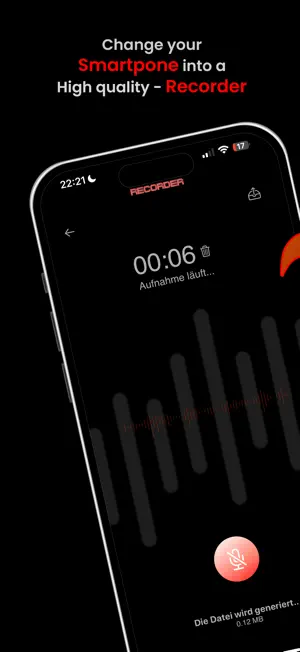
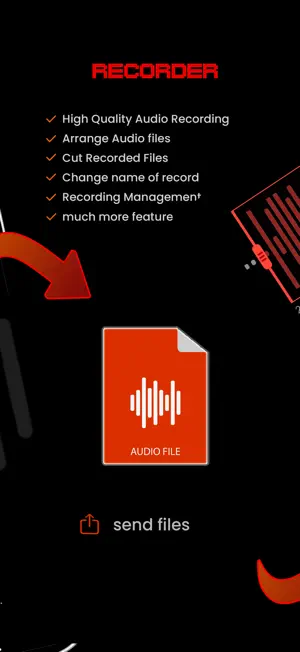
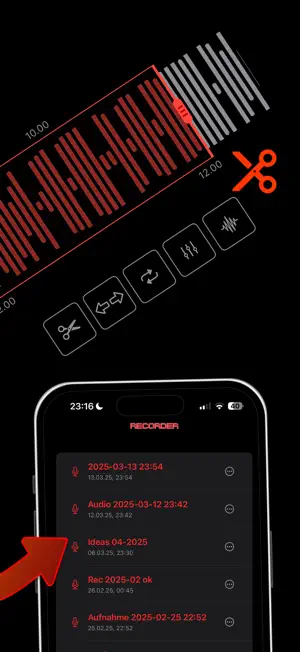
SoundRecorder – Your versatile recording tool for any occasion SoundRecorder is the ultimate app for anyone who wants to make high-quality audio recordings. Whether you need to quickly record sound, use it as a dictaphone for professional purposes, or capture recordings for meetings, lectures, music, or voice memos – SoundRecorder makes it easy and offers powerful tools for every type of audio recording. Key Features: Quick and easy recording: Start recording with just one tap. Thanks to the intuitive user interface, you can record sound whenever you want – be it for quick voice memos, important meetings, or creative music ideas. SoundRecorder is your flexible dictaphone, MP3 recorder, and audio recorder in one. Background recording: Work in other apps or turn off your device’s screen while SoundRecorder continues recording in the background. Perfect for longer sessions where you want to remain flexible. Timed recording: Plan your recordings in advance! With the timer feature, you can schedule when the recording should automatically start – ideal for capturing a meeting or event without needing to be present. Visual editing and audio trimming: SoundRecorder provides a visual editing tool where you can see your audio recordings at a glance and edit them precisely. Cut unwanted sections easily by working directly with the waveform. Trimming audio has never been simpler, allowing you to fine-tune your recordings exactly as needed. Adjustable audio quality: Adjust the recording quality to your needs! Choose between various audio qualities depending on whether you need a quick voice memo or high-quality professional recordings. From compact file sizes for everyday use to crystal-clear studio recordings – you’re in control. Select file format: Decide which format to save your audio files in. SoundRecorder supports popular audio formats like MP3, WAV, and M4A. Whether you want to save space or preserve the highest quality – you can choose the format that suits your needs. SoundRecorder also serves as a reliable MP3 recorder. Rename files: Keep track of all your recordings by renaming them directly in the app. Give each file a unique name so you can easily find the recording you’re looking for. Share recordings: Send your audio files directly from the app to friends, colleagues, or other devices. Whether via email, messages, or other apps – sharing your recordings is as easy as ever. iCloud sync: Never worry about lost files again! SoundRecorder securely saves your recordings in iCloud, so you can access them anytime, from any device. Your data is always safe and synchronized. Why SoundRecorder? Whether you're recording sound for professional use or getting creative in your free time, SoundRecorder provides you with all the tools you need to manage your audio recordings efficiently and professionally. The combination of user-friendly design, extensive editing features (including precise audio trimming), and the ability to record in the background or schedule recordings with a timer makes SoundRecorder the ideal solution for anyone looking for a reliable dictaphone or versatile voice recorder. With adjustable audio quality and file formats, it's also perfect for music recordings, voice memos, and more. Download SoundRecorder now and turn your iPhone or iPad into the ultimate recording device for any situation! Subscription: Unlock all features with a subscription. The subscription renews automatically 24 hours before the end of the current period. Payment is charged to your Apple ID account. You can cancel or manage your subscription at any time in the App Store account settings. http://audio-recorder.eu/dsgvo.html http://audio-recorder.eu/terms.html
What’s new
Version 1.0.9 · Updated April 9, 2026
- The voice recorder can now start immediately - Audio recordings can be organized into folders - General improvements
App privacy
The developer, Sascha Koziellek, reported these privacy practices to Apple.
Data Used to Track You
The following data may be used to track you across apps and websites owned by other companies:
- Location: Coarse Location
- Identifiers: Device ID
- Usage Data: Product Interaction
Data Linked to You
The following data, which may be collected and linked to your identity, may be used for the following purposes:
- Location: Coarse Location
- Identifiers: Device ID
- Usage Data: Product Interaction
Used for: Analytics, App Functionality
Alternatives to REC Voice recording
Looking for apps like REC Voice recording? Here are 6 similar apps on the App Store. The highest rated is Voice Recorder: AI Note Taking (5.0/5), and all 6 are free to download.
-
 Voice Recorder: AI Note Taking
5.0
Voice Recorder: AI Note Taking
5.0
-
 Voice Recordings
4.3
Voice Recordings
4.3
-
 Voicelate
-
 VoiceTrace - Voice Recorder
-
 Voice Recorder Library
5.0
Voice Recorder Library
5.0
-
 autotwin
| App | Rating | Price | Last updated | Compare |
|---|---|---|---|---|
| REC Voice recording | – | Free | April 9, 2026 | |
| Voice Recorder: AI Note Taking | 5.0 / 5 (3) | Free | Oct 23, 2026 | Compare |
| Voice Recordings | 4.3 / 5 (9) | Free | Feb 5, 2024 | Compare |
| Voicelate | – | Free | May 13, 2026 | Compare |
| VoiceTrace - Voice Recorder | – | Free | May 16, 2026 | Compare |
| Voice Recorder Library | 5.0 / 5 (2) | Free | Oct 22, 2026 | Compare |
| autotwin | – | Free | Oct 6, 2026 | Compare |