

EnLingo - AI Vocabulary Drills
Nicher Education iPhoneiPadiPod touch
EnLingo - AI Vocabulary Drills is a free Education app for iPhone and iPad by Nicher. Requires iOS 16.6. Updated September 7, 2026.
- Price
- Free
- on the App Store
- Size
- 113 MB
- Age 12+
- Updated
- Sep 7
- 2026 · v2.1.0
Screenshots


About EnLingo - AI Vocabulary Drills
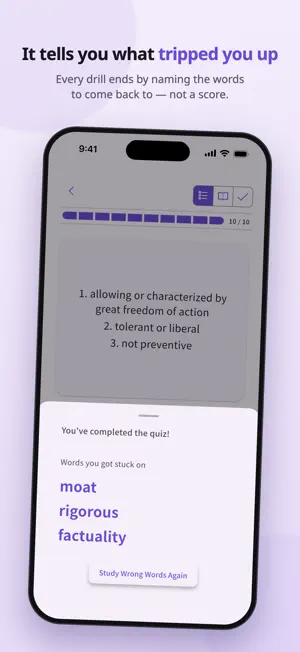
EnLingo - AI Vocabulary Drills | Add the Word, Drill It Until It Sticks Looking a word up is easy. Remembering it is the hard part. EnLingo does both: type just the word and AI writes the meaning, phonetics, and example sentences — then keeps bringing that word back until you own it. WHY ENLINGO? • Type just the word - AI fills in meaning, phonetics, and examples in seconds • Today's drill, ready when you open the app - it decides what you review and what's new • Every word returns in a different format, so you learn it instead of memorizing one card • Study anywhere - fully offline, with server sync across devices ONE TAP TO START • Start drill puts today's review and new words into a single session • Each word cycles through flash, choice, and spelling - seeing it isn't the same as knowing it • Choose 5, 10, 15, or 20 words per drill and fit study into the time you actually have • Filter by group to drill only what you're working on right now SPACED REPETITION THAT SCHEDULES ITSELF • Every answer adjusts when that word comes back - sooner if you struggled, later once it sticks • Daily caps keep new words from burying your reviews • Nothing is forgotten quietly - dormant words resurface on their own • The finish screen names the words you got stuck on, not just a score SEVEN WAYS TO LEARN • Flash Card - classic review at your own pace • Match Word - pair words with meanings • Choice Word - fast multiple-choice quizzes • Spelling - type what you remember • Listen - natural voices with adjustable speed and accent • Speak - say it out loud and let AI check your pronunciation • Dictation - hear the word and type its spelling, with no letters to copy START FROM A WORD PACKAGE • Curated packages from beginner essentials to TOEIC, TOEFL, SAT and GRE • Add a whole package to any group in one tap • Downloaded words join your drills and spaced repetition like every other word BUILD YOUR WORD BOOK • Add a word and pick a group - no forms to fill in • Organize words into groups and focus on what matters now • English-English mode for immersive study • Words grow from Seed to Permanent as your recall improves MADE FOR LONG STUDY SESSIONS • Dark & light themes tuned for study • Works fully offline - study on the subway, sync when you're back • Server backup keeps your word book safe across devices • App UI available in 15 languages GO PREMIUM • Remove ads and unlock all features HOW IT WORKS 1. Add - type the word you met today 2. AI writes - meaning, phonetics, and examples appear in seconds 3. Drill - open the app tomorrow and it's already waiting for you Download EnLingo now - your next 1,000 words start here.
What’s new
Version 2.1.0 · Updated September 7, 2026
The Learn tab has been redesigned around seven practice modes. - A new mode grid with hand-drawn tiles: flash card, match, choice, spelling, listen, speak and dictation. - Flash cards flip on a tap, and you grade yourself — "I knew it" or "Didn't know" decides when the word comes back. - Spelling and dictation now type into letter slots, so you always see how much of the word is left — with hints that reveal a letter when you're stuck. - Listen plays your words as a playlist; Speak drills pronunciation word by word. - You advance at your own pace: a Continue button replaces the one-second auto-advance. - Clearer progress and error states shared across every mode, smoother typing, and many fixes.
App privacy
The developer, Nicher, reported these privacy practices to Apple.
Data Used to Track You
The following data may be used to track you across apps and websites owned by other companies:
- Location: Coarse Location
- Identifiers: User ID, Device ID
- Usage Data: Product Interaction, Advertising Data
- Diagnostics: Crash Data, Performance Data
Data Linked to You
The following data, which may be collected and linked to your identity, may be used for the following purposes:
- Location: Coarse Location
- Identifiers: Device ID, User ID
- Usage Data: Product Interaction, Advertising Data, Other Usage Data
- Diagnostics: Crash Data, Performance Data, Other Diagnostic Data
- Contact Info: Email Address
- User Content: Photos or Videos
Used for: Third-Party Advertising, Analytics, Product Personalization, App Functionality
Alternatives to EnLingo - AI Vocabulary Drills
Looking for apps like EnLingo - AI Vocabulary Drills? Here are 6 similar apps on the App Store.


| App | Rating | Price | Last updated | Compare |
|---|---|---|---|---|
| EnLingo - AI Vocabulary Drills | – | Free | September 7, 2026 | |
| TypeWords: Vocab Typing | – | Free | Oct 18, 2026 | Compare |
| Vernac | – | Free | Oct 15, 2026 | Compare |
| Word Ninja - Practice with AI | – | Free | Jul 16, 2025 | Compare |
| 노리 일본어: 히라가나, JLPT 단어장 | – | Free | May 17, 2025 | Compare |
| O Words | – | Free | Oct 8, 2026 | Compare |
| Engagy | – | Free | Sep 9, 2025 | Compare |