

Fortify: Manage Screen Time
Sapan Kapur Productivity iPhoneiPadiPod touch
Fortify: Manage Screen Time is a free Productivity app for iPhone and iPad by Sapan Kapur. Rated 5.0/5 from 3 ratings. Requires iOS 16.0.
- Rating
- 5.0
- 3 ratings
- Price
- Free
- on the App Store
- Size
- 3 MB
- Age 4+
- Updated
- Sep 23
- 2026 · v4.0
Screenshots


About Fortify: Manage Screen Time
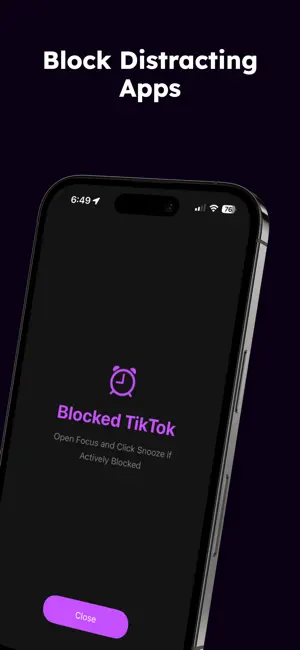
Focus – Block Distractions, Boost Productivity Interrupt the Pattern and stop mindless scrolling with the Hold to Unlock Feature. It hijacks the habit and adds more friction so that you make sure you are spending your own time how you want. Stay on track, achieve your goals, and reclaim your time with Focus! Key Features: 1. Active Blocks Struggling to stay off distracting apps? Set active blocks to instantly block those apps and focus on what matters. If you’re tempted to snooze a block, you’ll need to hold the snooze button for 15 seconds, while being reminded of your ultimate goals and vision. This intentional delay and method helps reduce unnecessary snoozes and keeps you productive. 2. Snooze Accountability Track your daily snoozes and stay motivated to minimize them. Each snooze comes with a reminder of your goals and progress—because every second counts! 3. Scheduled Blocks Take control of your schedule! Set custom blocks to automatically block distracting apps at specific times. For example, block social media every weekday after class so you can focus on your studies. 4. Timer and Stopwatch Blocking Need focus time? Use the timer or stopwatch to block apps for a specific duration. Whether it’s a 25-minute Pomodoro session or a long study stretch, Focus keeps you distraction-free. 5. Motivational Support Customize motivational words for your future self and set personal goals to stay inspired. Focus will remind you of these whenever you snooze a block, keeping you aligned with your long-term vision.Designed to help you manage distractions and build better habits, Focus makes staying productive easier than ever. Whether you’re working, studying, or simply taking a break from social media, Focus is your ultimate productivity companion. Why Choose Focus? • Simple & Intuitive: Designed for ease of use, Focus works seamlessly to block distractions without complicating your life. Take Control of Your Time Today Whether you’re a student, professional, or anyone looking to cut down on distractions, Focus is your essential productivity tool. Terms: https://www.apple.com/legal/internet-services/itunes/dev/stdeula/ Download Focus now and start achieving your goals—one block at a time
What’s new
Version 4.0 · Updated September 23, 2026
Bug Fixes & Improvements
App privacy
The developer, Sapan Kapur, reported these privacy practices to Apple.
Data Not Collected
The developer does not collect any data from this app.
Alternatives to Fortify: Manage Screen Time
Looking for apps like Fortify: Manage Screen Time? Here are 6 similar apps on the App Store. The highest rated is Barrier: Screen Time For Focus (4.7/5), and all 6 are free to download.
-
 Barrier: Screen Time For Focus
4.7
-
 Opal PRO, Social Media Blocker
4.6
-
 focusedOS: Focus & Screen Time
4.4
-
 No Scroll - Limit Screen Time
4.5
-
 Pond - Screen Time & Pomodoro
4.6
-
 Detox: Digital Detox
4.6
| App | Rating | Price | Last updated | Compare |
|---|---|---|---|---|
| Fortify: Manage Screen Time | 5.0 / 5 (3 ratings) | Free | September 23, 2026 | |
| Barrier: Screen Time For Focus | 4.7 / 5 (343) | Free | Jul 1, 2026 | Compare |
| Opal PRO, Social Media Blocker | 4.6 / 5 (53) | Free | Nov 3, 2025 | Compare |
| focusedOS: Focus & Screen Time | 4.4 / 5 (32) | Free | Jul 19, 2026 | Compare |
| No Scroll - Limit Screen Time | 4.5 / 5 (699) | Free | Oct 24, 2026 | Compare |
| Pond - Screen Time & Pomodoro | 4.6 / 5 (848) | Free | Jun 15, 2026 | Compare |
| Detox: Digital Detox | 4.6 / 5 (453) | Free | Sep 2, 2026 | Compare |