

Octoclip: Universal Clipboard
磊 陈 Utilities iPhoneiPadiPod touchMac
Octoclip: Universal Clipboard is a free Utilities app for iPhone and iPad by 磊 陈. Rated 4.2/5 from 13 ratings. Requires iOS 15.0. Updated November 3, 2026.
- Rating
- 4.2
- 13 ratings
- Price
- Free
- on the App Store
- Size
- 230 MB
- Age 4+
- Updated
- Nov 3
- 2026 · v2.0.0
Screenshots
Save to Pinterest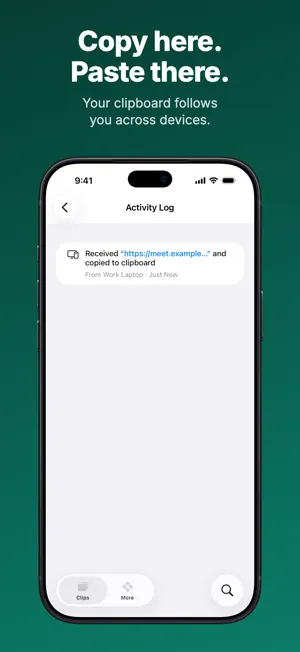


About Octoclip: Universal Clipboard
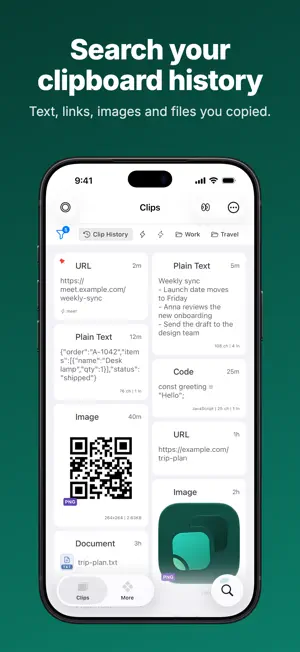
Copy on your iPhone, paste on your computer. Octoclip keeps a searchable history of what you copy and syncs it between your devices: no more sending links to yourself, and no more losing a clip the moment you copy the next one. YOUR CLIPBOARD HISTORY Text, links, images, files and code, saved and searchable. Type Pinyin or Romaji to find Chinese or Japanese clips ("beijing" finds 北京), match your own aliases, or filter by type. Keep the clips you reuse in collections, in the order you want. PASTE FROM THE KEYBOARD The Octoclip keyboard brings your clipboard history into any app. Set an alias and frequent text expands itself: type "email" and get your address. SAVE WHAT YOU COPY IN OTHER APPS Start background monitoring and Octoclip saves what you copy in other apps while the Monitoring Window stays open. Start or stop it from Shortcuts or Control Center. PLUGINS FOR WHAT YOU COPY Add official plugins to read QR codes, pull the text out of an image, translate with your own provider, and more. Run them from your history, a clip's details or the keyboard (plugins in the keyboard need Allow Full Access). Split Words picks out just the words you need. Free lets you use one plugin; Pro unlocks all plugins. WORKS WITH SHORTCUTS With App Integrations, Shortcuts and links can copy a clip, send it to another device, open your history, or clean it up by rule. SYNC YOUR WAY • Nearby Sync: devices on the same network find each other. No account needed. • Cloud Sync: across networks, through your own WebDAV or S3 storage. YOUR CLIPBOARD STAYS YOURS Local-first: your clips live on your devices. Cloud Sync goes through storage you own, and with a master password set, clips are encrypted on your device before upload. Your clipboard holds passwords and personal text; it shouldn't sit on someone else's server.
Ratings & reviews
4.2
13 ratings
What’s new
Version 2.0.0 · Updated November 3, 2026
Octoclip 2.0 brings plugins to your clipboard. PLUGINS • Add official plugins to read QR codes, pull the text out of an image, translate and more. Run them from Clip History, a clip's details or the Quick Input keyboard. • Set up text recognition, and your own AI or translation provider, in More > Services. • Free lets you use one plugin; Pro unlocks all plugins. Plugins in the keyboard need Allow Full Access. ALSO NEW • Split Words: pick just the words you need from a text clip or the text in an image. • App Integrations: Shortcuts and octoclip:// links can copy or send a clip, open Clip History, and clean up history by rule, with a preview first. • Start or stop background monitoring from Shortcuts (iOS 16 or later) or Control Center (iOS 18 or later). • Save images and videos to Photos or Files, and files and folders to Files. Create text clips, edit text or link clips, and rename clips. • Preview text files, switch Markdown between source and formatted views, and reorder clips in a collection. • Layouts and controls adapted for iPhone Duo. IMPROVEMENTS AND FIXES • Shorter Auto Cleanup options and clearer transfer errors. • Instant Cloud Sync now connects on networks that only allow regular web traffic. • Fixes for Clip History not refreshing, and for missing the latest copy after the device locks.
App privacy
The developer, 磊 陈, reported these privacy practices to Apple.
Data Linked to You
The following data, which may be collected and linked to your identity, may be used for the following purposes:
- Contact Info: Email Address
Used for: App Functionality
Alternatives to Octoclip: Universal Clipboard
Looking for apps like Octoclip: Universal Clipboard? Here are 6 similar apps on the App Store. The highest rated is Clipsync (5.0/5), and all 6 are free to download.
-
 CrossPaste: Clipboard Manager
-
 Clipsync
5.0
-
 clipboard advanced
1.0
-
 Linkboard - Cross-Device P2P
5.0
-
 OmniClip - Universal Clipboard
5.0
-
 CleanClip - Clipboard Manager
3.3
| App | Rating | Price | Last updated | Compare |
|---|---|---|---|---|
| Octoclip: Universal Clipboard | 4.2 / 5 (13 ratings) | Free | November 3, 2026 | |
| CrossPaste: Clipboard Manager | – | Free | Nov 10, 2026 | Compare |
| Clipsync | 5.0 / 5 (2) | Free | Nov 4, 2026 | Compare |
| clipboard advanced | 1.0 / 5 (1) | Free | Dec 5, 2023 | Compare |
| Linkboard - Cross-Device P2P | 5.0 / 5 (3) | Free | Nov 12, 2026 | Compare |
| OmniClip - Universal Clipboard | 5.0 / 5 (1) | Free | Sep 28, 2026 | Compare |
| CleanClip - Clipboard Manager | 3.3 / 5 (7) | Free | May 29, 2026 | Compare |