

Video Editor Tools
RAYO INNOVATIONS PRIVATE LIMITED Photo & Video iPhoneiPadiPod touch
Video Editor Tools is a free Photo & Video app for iPhone and iPad by RAYO INNOVATIONS PRIVATE LIMITED. Rated 1.0/5 from 1 ratings. Requires iOS 16.0.
- Rating
- 1.0
- 1 ratings
- Price
- Free
- on the App Store
- Size
- 70 MB
- Age 4+
- Updated
- Oct 21
- 2026 · v1.4
Screenshots
About Video Editor Tools
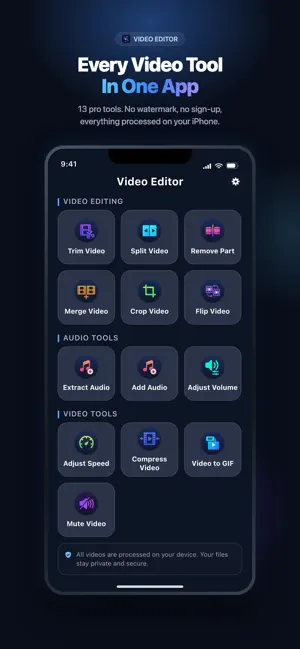
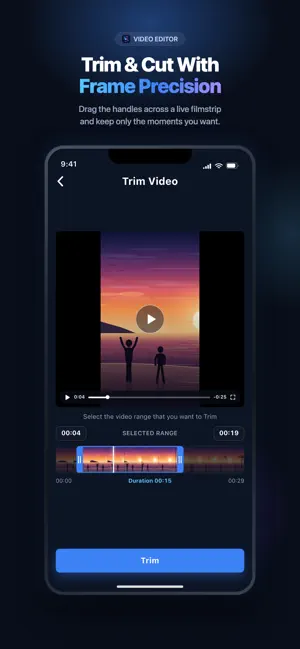
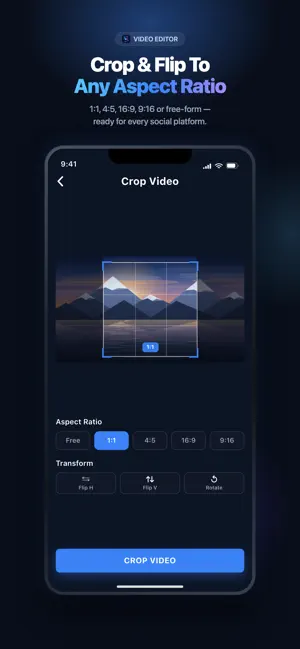
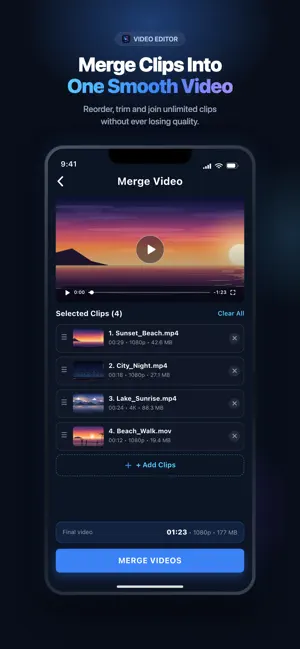
Video Editor Pro Free is an easy-to-use and free app that offers multiple features, including: 1. Trim Video 2. Split Video 3. Remove Part of Video 4. Merge Videos 5. Crop Video 6. Flip Video 7. Extract Audio 8. Add Audio 9. Adjust Volume 10. Adjust Video Speed 11. Compress Video 12. Convert Video to GIF 13. Mute Video Features Trim Video: - Drag the handles across a live filmstrip to select exactly the range you want to keep. - Frame-accurate start and end times so you never lose the moment that matters. Split Video: Two ways to break a long video into shareable pieces: i) WhatsApp Split: automatically divides lengthy videos into 30-second clips, ideal for sharing on WhatsApp Status. ii) Duration Split: splits long videos into segments of any duration you choose, giving you full flexibility. - Save every resulting clip at once with Download All. Remove Part of Video: - Select any unwanted section in the middle of a video and cut it out. - The remaining parts are joined back together automatically. Merge Videos: - Combine multiple clips into a single video. - Reorder clips by dragging, remove any clip, or clear the whole list and start over. - For best results use videos with the same format, resolution and aspect ratio. Crop Video: - Crop to Free, 1:1, 4:5, 16:9 or 9:16 with a rule-of-thirds guide. - Get the exact frame for Instagram, TikTok, YouTube Shorts or Facebook in one tap. Flip Video: - Mirror your video horizontally - perfect for un-mirroring selfie and front-camera recordings. Extract Audio: - Effortlessly separate the audio track from any video. - Saves as a high-quality AAC (.m4a) file you can keep or share. Add Audio: - Add music, voice-overs or any soundtrack to your video. - Supports MP3, M4A, WAV, AAC and more. - Trim the audio clip and drag it along the timeline to set exactly when it plays. - Loop the clip a set number of times or repeat it for the entire video. - Mix levels independently: set the added audio volume and automatically duck the original audio underneath it. Adjust Volume: - Raise or lower the volume of your video from 0% to 200%. - Mute it completely, restore it to the original level, or boost quiet recordings. Adjust Video Speed: - Speed up or slow down any video, from 0.25x slow motion to 2x fast forward. - Audio is adjusted along with the video so it still sounds natural. Compress Video: - Shrink large videos so they are easy to send and store. - Choose High, Medium or Low quality and see the estimated output size before you start. Convert Video to GIF: - Turn any video or selected range into a shareable GIF. - Speed the GIF up to 1x, 1.5x, 2x, 2.5x or 4x. - Optimised palette and frame rate keep the file small without a blocky look. Mute Video: - Remove the audio from an entire video, or mute only a selected part. SAVE AND SHARE: - Save any result straight to your Photos library. - Share to WhatsApp, Instagram, Facebook, YouTube, Messages, Mail and more without leaving the app. FREE TO USE Video Editor Pro Free is free and supported by ads. Prefer an ad-free experience? A single one-time in-app purchase removes ads permanently, and Restore Purchase brings it back on your other devices. Questions or feedback? Get in touch from the Settings screen. we read every message.
What’s new
Version 1.4 · Updated October 21, 2026
Performance improvements and bug fixes for a smoother app experience.
App privacy
The developer, RAYO INNOVATIONS PRIVATE LIMITED, reported these privacy practices to Apple.
Data Used to Track You
The following data may be used to track you across apps and websites owned by other companies:
- Identifiers: Device ID
Data Linked to You
The following data, which may be collected and linked to your identity, may be used for the following purposes:
- Identifiers: Device ID
Used for: Third-Party Advertising
Data Not Linked to You
The following data, which may be collected but is not linked to your identity, may be used for the following purposes:
- Usage Data: Product Interaction, Other Usage Data
- Diagnostics: Crash Data
Used for: App Functionality
Alternatives to Video Editor Tools
Looking for apps like Video Editor Tools? Here are 6 similar apps on the App Store. The highest rated is Pix - Photos for Watch (4.7/5), and 5 of the 6 are free to download.
-
 MovieFrame - Video Editor
-
 Watermarker - Watermark Videos
-
 Matte Viewer
3.0
Matte Viewer
3.0
-
 Cleanify: Duplicate Photo
4.0
Cleanify: Duplicate Photo
4.0
-
 Change Video Background Editor
2.3
Change Video Background Editor
2.3
-
 Pix - Photos for Watch
4.7
Pix - Photos for Watch
4.7
| App | Rating | Price | Last updated | Compare |
|---|---|---|---|---|
| Video Editor Tools | 1.0 / 5 (1 rating) | Free | October 21, 2026 | |
| MovieFrame - Video Editor | – | Free | Sep 24, 2024 | Compare |
| Watermarker - Watermark Videos | – | Free | Oct 19, 2026 | Compare |
| Matte Viewer | 3.0 / 5 (2) | Free | Nov 11, 2025 | Compare |
| Cleanify: Duplicate Photo | 4.0 / 5 (1) | Free | Apr 12, 2024 | Compare |
| Change Video Background Editor | 2.3 / 5 (3) | Free | May 30, 2024 | Compare |
| Pix - Photos for Watch | 4.7 / 5 (3) | 2.99 USD | Oct 9, 2026 | Compare |
Compare Video Editor Tools with the top alternatives: ratings, updates, ASO score and keyword gaps →