

AD Boy: All-in-One-Emulator
Furkan Yuce Games iPhoneiPadiPod touch
AD Boy: All-in-One-Emulator is a free Games app for iPhone and iPad by Furkan Yuce. Rated 3.6/5 from 314 ratings. Requires iOS 15.0. Updated August 10, 2026.
- Rating
- 3.6
- 314 ratings
- Price
- Free
- on the App Store
- Size
- 35 MB
- Age 4+
- Updated
- Aug 10
- 2026 · v2.4
Screenshots

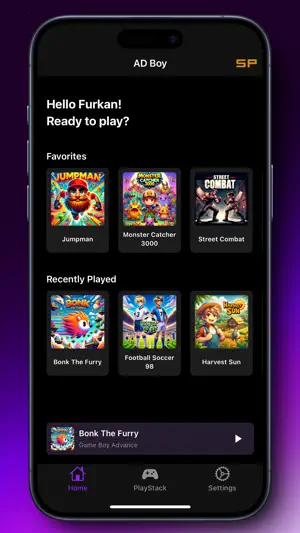

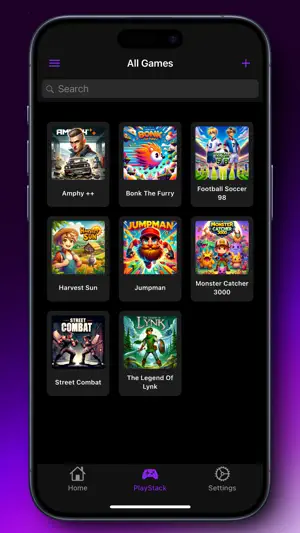
About AD Boy: All-in-One-Emulator
AD Boy - Your all-in-one emulator to relive the golden era of gaming! With support for NDS, GBA, GBC, GB, NES, SNES, SMS, SG and SGG AD Boy opens the doors to a treasure trove of classic titles right on your device. Systems: - Nintendo Entertainment System - Super Nintendo Entertainment System - Game Boy (Color) - Game Boy Advance - Nintendo DS - Sega Master System - Sega Genesis/Mega Drive - Sega Game Gear Features: PlayStack: Organize your game collection in a sleek library and launch them with the Game Launcher! Emulator Settings: Change the appearance or set a different fast forward speed! Quick Save and Quick Load: Save your game progress wherever you want and load it whenever you want! Fast Forward: Play your game at a faster speed to reach your goal more quickly! Save file Export/Import: Export your game progress to play on another device or emulator, and import it back to continue playing on AD Boy! Skins: Choose from a variety of skins to customize the appearance of AD Boy to your liking! Cheats Codes: Enhance your gaming experience by using cheats with cheat codes! And much more! ***It's important to note that AD Boy should only be used with legally acquired game files. We do not endorse or support any form of piracy. Rest assured, AD Boy operates independently and has no affiliation with console manufacturers.***
Ratings & reviews
3.6
314 ratings
What’s new
Version 2.4 · Updated August 10, 2026
General - Introduced a refreshed app design - Updated various icons - Removed the "Back" text from navigation buttons - Bottom navigation bar is now hidden on selected screens - Fixed the position of the "Next" button during onboarding Home - Redesigned the "Continue" button - Long-press actions on game cards now also work on the Home screen PlayStack - Updated UI of the Filter panel - Updated UI of the Add Game and Edit Game sheets - Improved the game grid layout Settings - Updated UI of the Save Data Manager Game Launcher - Updated the game header - Redesigned Save State cards Save States - Save States now display the correct screenshot - Empty Save States can no longer be loaded Cheats - Cheat codes can now be edited while a game is running Emulation - Fixed an issue in the NDS engine that prevented some games from running - Fixed an issue where emulation could resume after returning to the app while the emulator menu was still open Bug Fixes & Performance - Improved handling of large game files - Improved image loading performance - Minor stability improvements - Minor performance improvements - Minor bug fixes
Play today's Inkspill puzzle
Spread your ink until the whole board is one color, within the move limit. A free daily puzzle from Fiplay, same board for everyone. It plays right here, no download.
App privacy
The developer, Furkan Yuce, reported these privacy practices to Apple.
Data Not Collected
The developer does not collect any data from this app.
Alternatives to AD Boy: All-in-One-Emulator
Looking for apps like AD Boy: All-in-One-Emulator? Here are 6 similar apps on the App Store. The highest rated is Gamma - PS 1 Game Emulator (4.8/5), and all 6 are free to download.
-
 Gamma - PS 1 Game Emulator
4.8
Gamma - PS 1 Game Emulator
4.8
-
 Lume Emulator
3.8
Lume Emulator
3.8
-
 Dolphin Emulator - Basic
2.0
Dolphin Emulator - Basic
2.0
-
 PPSSPP - PSP emulator
4.5
PPSSPP - PSP emulator
4.5
-
 Emu64 XL
2.2
Emu64 XL
2.2
-
 Super16Bit
4.5
Super16Bit
4.5
| App | Rating | Price | Last updated | Compare |
|---|---|---|---|---|
| AD Boy: All-in-One-Emulator | 3.6 / 5 (314 ratings) | Free | August 10, 2026 | |
| Gamma - PS 1 Game Emulator | 4.8 / 5 (11,069) | Free | Sep 4, 2026 | Compare |
| Lume Emulator | 3.8 / 5 (52) | Free | Aug 19, 2024 | Compare |
| Dolphin Emulator - Basic | 2.0 / 5 (196) | Free | Feb 26, 2025 | Compare |
| PPSSPP - PSP emulator | 4.5 / 5 (2,814) | Free | May 19, 2026 | Compare |
| Emu64 XL | 2.2 / 5 (29) | Free | Jun 20, 2024 | Compare |
| Super16Bit | 4.5 / 5 (26) | Free | May 31, 2026 | Compare |