

LineAlert
Kupaku Incorporated Utilities iPhoneiPadiPod touch
LineAlert is a free Utilities app for iPhone and iPad by Kupaku Incorporated. Rated 5.0/5 from 6 ratings. Requires iOS 15.1. Updated October 13, 2026.
- Rating
- 5.0
- 6 ratings
- Price
- Free
- on the App Store
- Size
- 27 MB
- Age 17+
- Updated
- Oct 13
- 2026 · v2.0
Screenshots


About LineAlert
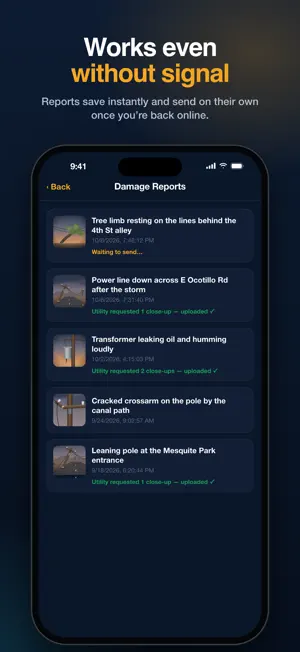
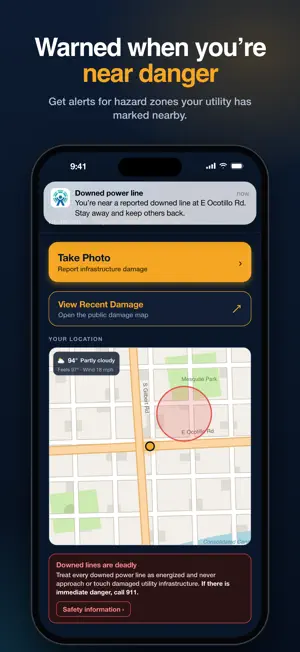
When a storm brings down electric infrastructure, your utility needs to know where the damage is. LineAlert lets you report it in seconds. Take a photo, and the app sends it straight to your utility's crews with the exact location attached. Every report helps crews find the problem, decide what to fix first, and get the power back on sooner. REPORT DAMAGE IN SECONDS • Tap Take Photo, capture the damage, add a short description, and submit. • GPS coordinates are attached automatically, so crews know exactly where to go. • Your report goes directly to your local utility. ZOOM IN FROM A SAFE DISTANCE • The built-in camera uses your iPhone's lenses to zoom in on damaged poles, wires, and equipment. • Get a clear, detailed photo without ever getting close to the hazard. WORKS EVEN WITHOUT SIGNAL • Cell networks are often overloaded or down after a storm. LineAlert saves your report on your phone right away and sends it on its own as soon as you have a connection. • Uploads are sized to your connection, so reports get through even on a weak signal. • Track every report under Damage Reports, including any close-up photos your utility asked for. HAZARD ALERTS • Get a notification when you come near a hazard zone your utility has marked, such as an area with a downed power line. • See nearby hazard zones on the map on your home screen. SAFETY FIRST • Quick safety tips for downed lines, vehicles, water, and metal. • Links to your utility's own safety resources. • Local weather at a glance. HOW IT WORKS 1. Download LineAlert and create an account with your utility. 2. When you see damaged electrical equipment, stay back and tap Take Photo. 3. Add a description and submit. Your photo and location go to your utility. 4. Your utility reviews the report and sends crews where they're needed most. Together, residents and utilities can find damage faster and help communities recover sooner. IMPORTANT: LineAlert does not replace emergency services. Treat every downed line as energized. Never approach or touch damaged utility equipment. If anyone is in immediate danger, call 911. Hazard alerts use your location in the background, but only if you turn them on. Support and feedback: [email protected]
Ratings & reviews
5.0
6 ratings
What’s new
Version 2.0 · Updated October 13, 2026
Update UI and utility-based user assignment.
App privacy
The developer, Kupaku Incorporated, reported these privacy practices to Apple.
Data Linked to You
The following data, which may be collected and linked to your identity, may be used for the following purposes:
- Location: Precise Location
Used for: App Functionality
Data Not Linked to You
The following data, which may be collected but is not linked to your identity, may be used for the following purposes:
- Diagnostics: Crash Data
Used for: Analytics
Alternatives to LineAlert
Looking for apps like LineAlert? Here are 6 similar apps on the App Store. The highest rated is The Garage Sale App (4.8/5), and all 6 are free to download.
-
 OthelloGo
-
 VMDAEC Outage Map
-
 My-NCC
3.0
My-NCC
3.0
-
 Carify : AI Car Identifier
3.7
Carify : AI Car Identifier
3.7
-
 The Garage Sale App
4.8
The Garage Sale App
4.8
-
 Decatur County Sheriffs Office
3.0
Decatur County Sheriffs Office
3.0
| App | Rating | Price | Last updated | Compare |
|---|---|---|---|---|
| LineAlert | 5.0 / 5 (6 ratings) | Free | October 13, 2026 | |
| OthelloGo | – | Free | Jul 17, 2026 | Compare |
| VMDAEC Outage Map | – | Free | Mar 18, 2026 | Compare |
| My-NCC | 3.0 / 5 (4) | Free | Mar 14, 2026 | Compare |
| Carify : AI Car Identifier | 3.7 / 5 (3) | Free | Nov 26, 2025 | Compare |
| The Garage Sale App | 4.8 / 5 (5) | Free | Sep 8, 2026 | Compare |
| Decatur County Sheriffs Office | 3.0 / 5 (2) | Free | May 6, 2025 | Compare |
Compare LineAlert with the top alternatives: ratings, updates, ASO score and keyword gaps →