

Click Cast: TV Remote Control
玉婉 祝 Utilities iPhoneiPadiPod touchApple Watch
Click Cast: TV Remote Control is a free Utilities app for iPhone and iPad by 玉婉 祝. Rated 5.0/5 from 1 ratings. Requires iOS 15.0. Updated October 10, 2026.
- Rating
- 5.0
- 1 ratings
- Price
- Free
- on the App Store
- Size
- 20 MB
- Age 4+
- Updated
- Oct 10
- 2026 · v1.3.2
Screenshots


About Click Cast: TV Remote Control
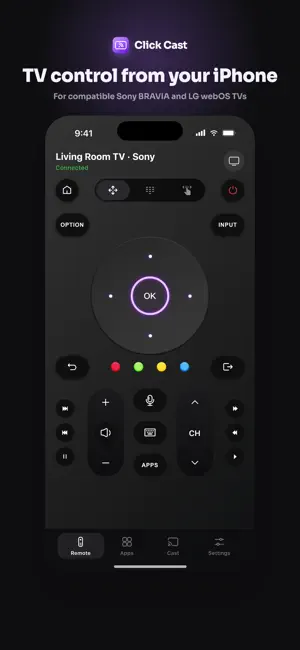
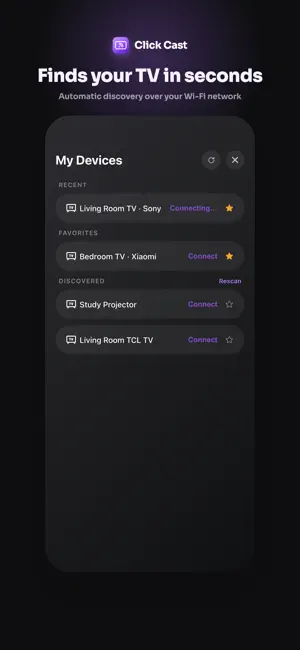
Control compatible Sony BRAVIA and LG webOS TVs from your iPhone on the same Wi-Fi network. Click Cast helps you discover, pair, and control supported TVs with a familiar remote experience. KEY FEATURES • Discover compatible Sony BRAVIA and LG webOS TVs on your local network • Control power, volume, navigation, menus, and number keys; available controls vary by TV • On compatible Sony BRAVIA and LG webOS TVs, launch apps, enter text, and switch HDMI inputs • Cast photos and videos to compatible TVs over DLNA — not screen mirroring • Use Apple Watch for basic remote controls while your iPhone remains nearby • Optional Premium removes ads REQUIREMENTS • Your iPhone and TV must be connected to the same Wi-Fi network • Local Network permission is required for device discovery and control • Photos permission is required only when selecting media to cast • Remote control support is limited to Sony BRAVIA and LG webOS TVs; feature availability varies by model and brand • Photo and video casting uses DLNA and requires a TV with media rendering. On Sony TVs, allow Click-Cast in the renderer access settings LEGAL Terms of Use (EULA): https://www.apple.com/legal/internet-services/itunes/dev/stdeula/ Privacy Policy: https://jinshuihupro.github.io/click-cast-privacy.html?lang=en Additional Terms: https://jinshuihupro.github.io/click-cast-terms.html?lang=en
What’s new
Version 1.3.2 · Updated October 10, 2026
What’s New in 1.3.2 • Share Click Cast with friends directly from Settings. • Improved diagnostics to help us investigate TV discovery and connection issues. Thank you for using Click Cast!
App privacy
The developer, 玉婉 祝, reported these privacy practices to Apple.
Data Used to Track You
The following data may be used to track you across apps and websites owned by other companies:
- Location: Coarse Location
- Identifiers: Device ID
- Usage Data: Advertising Data
Data Not Linked to You
The following data, which may be collected but is not linked to your identity, may be used for the following purposes:
- Location: Coarse Location
- Identifiers: Device ID
- Usage Data: Advertising Data, Product Interaction
- Purchases: Purchase History
- Diagnostics: Crash Data, Performance Data, Other Diagnostic Data
Used for: Third-Party Advertising, Analytics, App Functionality
Alternatives to Click Cast: TV Remote Control
Looking for apps like Click Cast: TV Remote Control? Here are 6 similar apps on the App Store.
-
 Zybra Remote Control
-
 PodRadar: Find Your Headphones
-
 TV Remote · Stay Connected
-
 TV Remote: Samsung, LG, Roku
-
 Voice Remote for Samsung TV
-
 Smart Remote: Universal TV App
| App | Rating | Price | Last updated | Compare |
|---|---|---|---|---|
| Click Cast: TV Remote Control | 5.0 / 5 (1 rating) | Free | October 10, 2026 | |
| Zybra Remote Control | – | Free | May 15, 2026 | Compare |
| PodRadar: Find Your Headphones | – | Free | Sep 17, 2026 | Compare |
| TV Remote · Stay Connected | – | Free | Apr 20, 2026 | Compare |
| TV Remote: Samsung, LG, Roku | – | Free | Oct 12, 2026 | Compare |
| Voice Remote for Samsung TV | – | Free | Oct 13, 2026 | Compare |
| Smart Remote: Universal TV App | – | Free | Aug 9, 2026 | Compare |