

Yuko Scan for Food Safety
Burak Guner Health & Fitness iPhoneiPadiPod touch
Yuko Scan for Food Safety is a free Health & Fitness app for iPhone and iPad by Burak Guner. Rated 4.5/5 from 374 ratings. Requires iOS 17.0.
- Rating
- 4.5
- 374 ratings
- Price
- Free
- on the App Store
- Size
- 51 MB
- Age 4+
- Updated
- Oct 21
- 2026 · v5.0.3
Screenshots
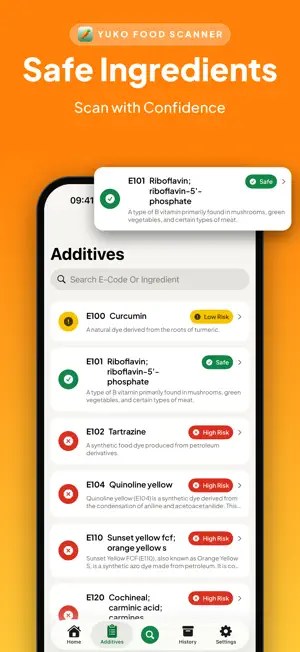


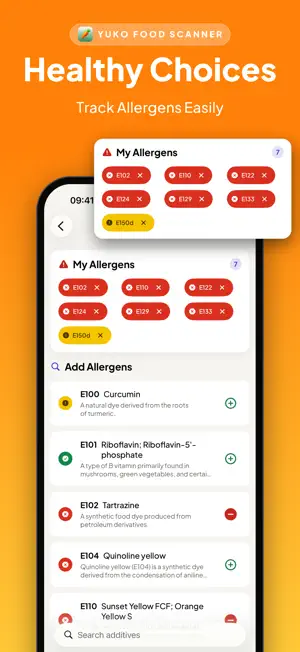
About Yuko Scan for Food Safety
Scan a barcode or the ingredients label and see what is really inside the food you are about to buy. WHAT YOU GET FROM ONE SCAN ● PLAIN-LANGUAGE VERDICT Yuko reads the ingredients and tells you what stands out: higher-risk additives, allergens listed on the pack, and nutrient levels that are high. When there is not enough information to judge, Yuko says that instead of pretending. ● ADDITIVE ENCYCLOPAEDIA 340+ E-numbers and other additives, each with a risk level and a plain explanation of what it is and what it does. Risk levels are based on EFSA, WHO, FAO and Turkish Food Codex assessments, and every screen links to the sources. ● THE FULL PRODUCT RECORD Nutri-Score, NOVA processing group and Green-Score, each with the breakdown that produced it. Full nutrition table per 100 g or per serving, with high/medium/low levels for fat, saturated fat, sugars and salt. Ingredients with allergens highlighted. Labels and certifications. Packaging and recycling. Origins, countries and stores. Product photos. ● PERSONAL AND FAMILY PROFILES Tell Yuko about allergies and health conditions, for yourself and for the people you shop for, and scans are checked against every profile. ● SCAN HISTORY Your scans are saved, so you can compare products later, offline. ● WORKS ON THE LABEL, NOT JUST THE BARCODE If a product is not in the database, point the camera at the ingredients list and Yuko reads it directly. WHO IT IS FOR Parents reading labels for their children, people managing allergies or a specific diet, anyone who wants to know what an unpronounceable ingredient actually is. HOW IT WORKS 1. Scan the barcode, or the ingredients list 2. Read the verdict and the detail behind it 3. Tap any additive to learn what it is IMPORTANT Yuko is an information tool, not medical advice. Ingredient and allergen data comes from a community database and can be incomplete or out of date, so always check the pack itself, especially for allergies. SUBSCRIPTION INFORMATION The first 3 scans are free. Yuko Pro unlocks unlimited scanning; every other feature is included at no extra cost. • Weekly: billed every week, with a 3-day free trial • Yearly: billed every year • Lifetime: one-time purchase Prices are shown in your local currency in the app before you buy. Payment is charged to your Apple Account at confirmation of purchase. A subscription renews automatically unless auto-renew is turned off at least 24 hours before the end of the current period. Your account is charged for renewal within 24 hours before the end of the current period. You can manage and cancel subscriptions in your Apple Account settings. Barcode product data, photos and scores are provided by Open Food Facts contributors and are available under the Open Database License (ODbL). openfoodfacts.org Support: https://bgmobiledev.com/support Privacy Policy: https://rightfoods9.wordpress.com/privacy-policy-for-right-food/ Terms of Use (EULA): https://www.apple.com/legal/internet-services/itunes/dev/stdeula/
Ratings & reviews
4.5
374 ratings
What’s new
Version 5.0.3 · Updated October 21, 2026
Fewer surprises for subscribers. • Payment problem? If Apple can't renew your subscription, Yuko now tells you on the Home screen and in Settings, with a one-tap link to update your payment method so you don't lose access. • Your allergen list now works on label scans too. When you scan an ingredients label, additives on your list are marked in the result. "Mark for Allergy" on an additive's page now adds it to the same list. • App Store search updates and small fixes. Thanks for scanning with Yuko!
App privacy
The developer, Burak Guner, reported these privacy practices to Apple.
Data Used to Track You
The following data may be used to track you across apps and websites owned by other companies:
- Identifiers: Device ID
Data Not Linked to You
The following data, which may be collected but is not linked to your identity, may be used for the following purposes:
- Identifiers: Device ID
- Usage Data: Product Interaction
Used for: Developer’s Advertising or Marketing, Analytics
Alternatives to Yuko Scan for Food Safety
Looking for apps like Yuko Scan for Food Safety? Here are 6 similar apps on the App Store. The highest rated is Plyometric Training - Springy (5.0/5), and all 6 are free to download.
-
 Yuqa - Food & Cosmetic Scanner
4.6
Yuqa - Food & Cosmetic Scanner
4.6
-
 AI - Food & Cosmetic Scanner
4.5
AI - Food & Cosmetic Scanner
4.5
-
 Labeled Food Scanner & Checker
4.8
Labeled Food Scanner & Checker
4.8
-
 Plyometric Training - Springy
5.0
Plyometric Training - Springy
5.0
-
 GAINS: Gym Progress Tracker
4.9
GAINS: Gym Progress Tracker
4.9
-
 Calorie Counter: Zorest AI
4.6
Calorie Counter: Zorest AI
4.6
| App | Rating | Price | Last updated | Compare |
|---|---|---|---|---|
| Yuko Scan for Food Safety | 4.5 / 5 (374 ratings) | Free | October 21, 2026 | |
| Yuqa - Food & Cosmetic Scanner | 4.6 / 5 (63) | Free | Oct 22, 2026 | Compare |
| AI - Food & Cosmetic Scanner | 4.5 / 5 (23) | Free | Sep 3, 2026 | Compare |
| Labeled Food Scanner & Checker | 4.8 / 5 (544) | Free | Oct 26, 2026 | Compare |
| Plyometric Training - Springy | 5.0 / 5 (71) | Free | May 12, 2026 | Compare |
| GAINS: Gym Progress Tracker | 4.9 / 5 (21) | Free | Mar 10, 2026 | Compare |
| Calorie Counter: Zorest AI | 4.6 / 5 (498) | Free | Oct 21, 2026 | Compare |