

TV Remote Control “Universo”
Nemo Apps LLC Utilities iPhoneiPadiPod touch
TV Remote Control “Universo” is a free Utilities app for iPhone and iPad by Nemo Apps LLC. Rated 4.7/5 from 1,965 ratings. Requires iOS 18.0.
- Rating
- 4.7
- 1.9K ratings
- Price
- Free
- on the App Store
- Size
- 113 MB
- Age 4+
- Updated
- Sep 25
- 2026 · v3.7.0
Screenshots

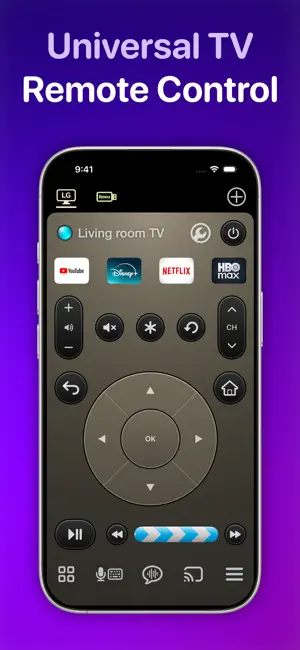
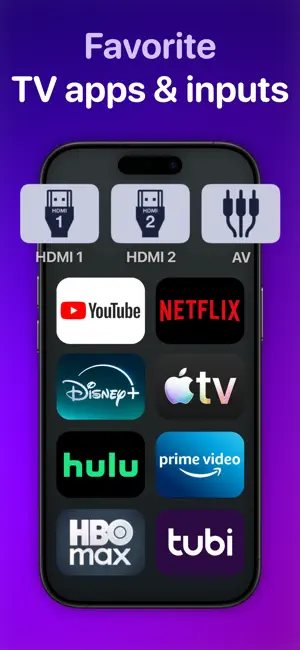

About TV Remote Control “Universo”
Turn your iPhone and iPad into a universal remote control and companion for smart televisions and streaming devices. Simplify Entertainment • Tired of digging through sofa cushions for a lost remote? With this app, a fully functional remote control is always a tap away. • Set up your TV in 30 seconds or less. Universally Compatible • All major brands of TVs and streaming devices supported. See our full list below. Multi-Device Support • Control all your TVs and devices in one place. One tap switches between them. • You can even make a "combo" remote that controls your TV and streaming stick together - no juggling. Captions and Subtitles, on the side • Instead of covering the movie action with text, display captions and subtitles on your second screen: an iPhone or iPad. Easy navigation control • With an integrated d-pad / touchpad, you can tap or use swipe gestures to navigate TV menus. • Designed so your eyes stay on the TV screen, not your phone. • One long swipe skips multiple steps at once. Time Jumper for YouTube • Get to the good parts of a YouTube video like a pro. • Slide slowly for precision control over the current play position. • Flick fast to leap across to different scenes. Photo and Video Casting • Throw your photos and home movies onto the big screen in seconds. Keyboard Input and Voice Search • Type on your TV with the iOS keyboard under your fingertips — or just speak. Design Your Perfect Remote • Make quick access buttons for your favorite TV apps and inputs. • Launch apps like YouTube, Netflix, HBO Max, and Disney with one tap. • Direct switch to TV inputs/sources like HDMI1, HDMI2, or Antenna (“Live TV”). • Go minimal or load it up with all the buttons. • Style your remote in finishes like Space Gray, Silver, Gold, Rose Gold, and Obsidian. All the Regulars • Power on/off. This app uses Wake-on-LAN (WoL) to power on TVs that support it. • Standard media buttons like play, pause, rewind and fast-forward. • Change channels with channel up/down buttons and numpad. • Audio buttons for volume control and mute. On remote controls for streaming devices, these buttons can control the companion TV. How Does This App Work? • It connects with your TV securely on your home wireless network. It doesn’t use IR (Infrared) like a traditional remote control. • It uses Apple Bonjour (zeroconf) and UPnP discovery to find devices on your home network automatically. • Some surprise benefits of Wi-Fi control: + You don’t need to point your phone at the TV for it to work. + There is no cross-interference between two TVs. + If your roommate is playing the TV too loud, turn it down from the other room. Compatibility Supported platforms • Roku • Google TV • Fire TV OS • Samsung Tizen • LG WebOS Supported devices • Amazon Fire TV Stick • Roku Streaming Stick • Google Chromecast • Nvidia Shield • Xiaomi Mi TV Stick Supported TV sets • Samsung (2016+) • LG • Sony • Vizio (2016+) • TCL • Hisense • Sharp • Toshiba Also: Philips, Insignia, Panasonic, JVC, RCA, Onn, Element, Magnavox, Grundig, Onida, OnePlus, Realme, Xiaomi, Skyworth, Blaupunkt, Metz, XGIMI, Haier, Pioneer, Westinghouse This app is not affiliated with the TV brands mentioned here. All trademarks are property of their respective owners. We try to make the most out of the functionality offered by the TV platform for control by apps. But the capabilities offered vary by manufacturer and model. So some of the remote control features listed here may not be available for your TV. Terms of use: https://www.apple.com/legal/internet-services/itunes/dev/stdeula
Ratings & reviews
4.7
1.9K ratings
What’s new
Version 3.7.0 · Updated September 25, 2026
Built and tested for iOS27. Full support for iPad multitasking and iPhone mirroring.
App privacy
The developer, Nemo Apps LLC, reported these privacy practices to Apple.
Data Used to Track You
The following data may be used to track you across apps and websites owned by other companies:
- Identifiers: Device ID
Data Not Linked to You
The following data, which may be collected but is not linked to your identity, may be used for the following purposes:
- Identifiers: Device ID
- Usage Data: Product Interaction
- Diagnostics: Crash Data, Other Diagnostic Data
Used for: Third-Party Advertising, Developer’s Advertising or Marketing, Analytics, Product Personalization, App Functionality
Alternatives to TV Remote Control “Universo”
Looking for apps like TV Remote Control “Universo”? Here are 6 similar apps on the App Store. The highest rated is TV Remote | Smart TV Control (4.8/5), and all 6 are free to download.
-
 TV Remote | Universal Control
4.6
TV Remote | Universal Control
4.6
-
 TV Remote | Smart TV Control
4.8
TV Remote | Smart TV Control
4.8
-
 Remote Control Smart LG TV
4.2
Remote Control Smart LG TV
4.2
-
 Remote Control for Samsung TV・
4.8
Remote Control for Samsung TV・
4.8
-
 Universal TV Remote Control
3.6
Universal TV Remote Control
3.6
-
 TV Remote & Universal Control+
4.6
TV Remote & Universal Control+
4.6
| App | Rating | Price | Last updated | Compare |
|---|---|---|---|---|
| TV Remote Control “Universo” | 4.7 / 5 (1,965 ratings) | Free | September 25, 2026 | |
| TV Remote | Universal Control | 4.6 / 5 (85) | Free | Aug 12, 2026 | Compare |
| TV Remote | Smart TV Control | 4.8 / 5 (13) | Free | Sep 21, 2026 | Compare |
| Remote Control Smart LG TV | 4.2 / 5 (3,777) | Free | Oct 5, 2025 | Compare |
| Remote Control for Samsung TV・ | 4.8 / 5 (646) | Free | Sep 1, 2026 | Compare |
| Universal TV Remote Control | 3.6 / 5 (4,127) | Free | Sep 11, 2026 | Compare |
| TV Remote & Universal Control+ | 4.6 / 5 (718) | Free | Sep 15, 2026 | Compare |